Learn to DJ With Your Own Music: A Beginner’s Path
Every DJ course starts the same way. You download its practice tracks, follow its fixed lessons, and get good at mixing songs you'll never play. Then you open your own library and start again. There's a better way to learn: practise on your own tracks, in the order you'll actually play them.
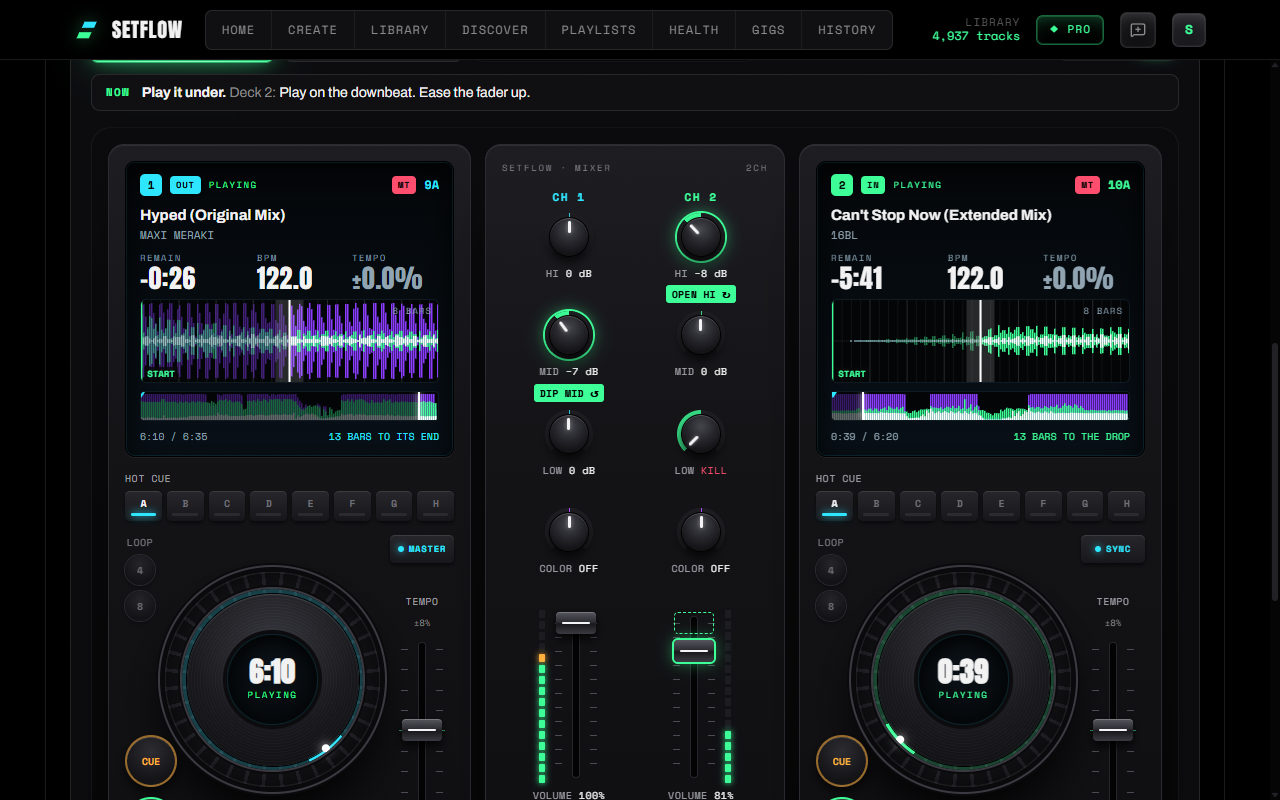
This page is a learning path. It covers what you need, the skills to learn in the order that makes sense, and how to practise each one on music you already own. Each step links to a deeper guide.
What you need to start DJing
Less than you think. Three things:
- A two-channel controller. Two decks, a mixer with three EQ knobs per channel, and faders. The Pioneer DDJ-400 and its successor, the DDJ-FLX4, are the usual first picks. Our DDJ-400 beginner guide takes you from unboxing to your first mix.
- DJ software. Most controllers come with Rekordbox or Serato. Both are fine to learn on. If you're stuck choosing, read Rekordbox vs Serato.
- Headphones. Closed-back, so you can hear the next track over the speakers. They don't need to be expensive.
And music you love. You'll hear each track hundreds of times while you practise, so start with what you'd happily play at a party.
The core skills, in order
Learn these one at a time. Each one builds on the last, and trying to learn them all at once is why so many beginners give up.
1. Matching the tempo
Two tracks only blend if they play at the same speed, beat for beat. Press SYNC to start with, but learn what it's doing: the tempo fader speeds one track up or slows it down to meet the other. Our guide to mixing songs with different BPM covers how far you can push it before it sounds wrong.
2. Phrasing
Dance music is built in blocks of 8, 16 and 32 bars. Changes land at the start of a block: the drop, the breakdown, the vocal. Count along until you can feel where the next block starts. Our guide to mixing on the phrase shows you how to hear it.
Here's how the blocks stack. Press play to count along at club tempo:
Beats make bars, bars make phrases
3. Starting a transition
Most beginner blends sound wrong because they start at the wrong moment. Start too late and you rush the mix. Start too early and two full tracks fight for too long. Read when to start a DJ transition to learn where to press play.
4. EQ and the bass swap
Two basslines at once turn to mud. So you bring the new track in with its bass turned down, then swap the basses over in one move on a bar line. This single move is what makes a blend sound clean. Start with how to do a bass swap, then how to EQ a DJ transition for the highs and mids.
5. Effects
Echo outs and filter sweeps get you out of tracks that won't blend: a clashing key, a big tempo jump, an awkward outro. Learn them after the bass swap, not instead of it. Our guide to echo outs and filter sweeps covers when each one works.
6. Set energy
A great set is more than good transitions. It's the order: where it builds, where it breathes, and which tracks sit well next to each other in key. Read DJ set energy flow, harmonic mixing with the Camelot wheel and how to plan a DJ set.
For an overview of every kind of transition, from cuts to long blends, see DJ transitions explained. If you're on a Pioneer controller, your first transition on the FLX4 and DDJ-400 tips and tricks put it all on the hardware.
Why practise on your own tracks
Practice tracks are chosen to be easy. Long intros, clean outros, the same tempo, keys that never clash. Your library isn't like that. Some tracks have no bass until the drop. Some end abruptly. Some are a few BPM apart. Those are the transitions you'll actually face, so those are the ones worth practising.
There are three more reasons:
- You know the music. When you know where a track's breakdown comes, you can focus on the mix instead of being surprised by it.
- Every blend you learn is one you'll use. Nail a transition between two of your tracks and it's ready for your next set.
- You learn the order, not just the pair. A set is a run of transitions. Practising them in sequence teaches you to think a track ahead, which no single lesson does.
How to practise your own set in SetFlow
SetFlow builds a DJ set from your library, then shows you how to mix every transition in it. Here's the routine:
- Import your library. Export it from Rekordbox, Serato, Traktor or TribeXR and import it into SetFlow. Only the track details come across, not the music.
- Build a set. On Create, pick a length and an energy shape. SetFlow orders your tracks by key, tempo and energy.
- Open the Mix view. From the set, open its Mix view and connect your music folder. Each transition shows its two tracks lined up, with the moment to start, the bass swap and the drop marked.
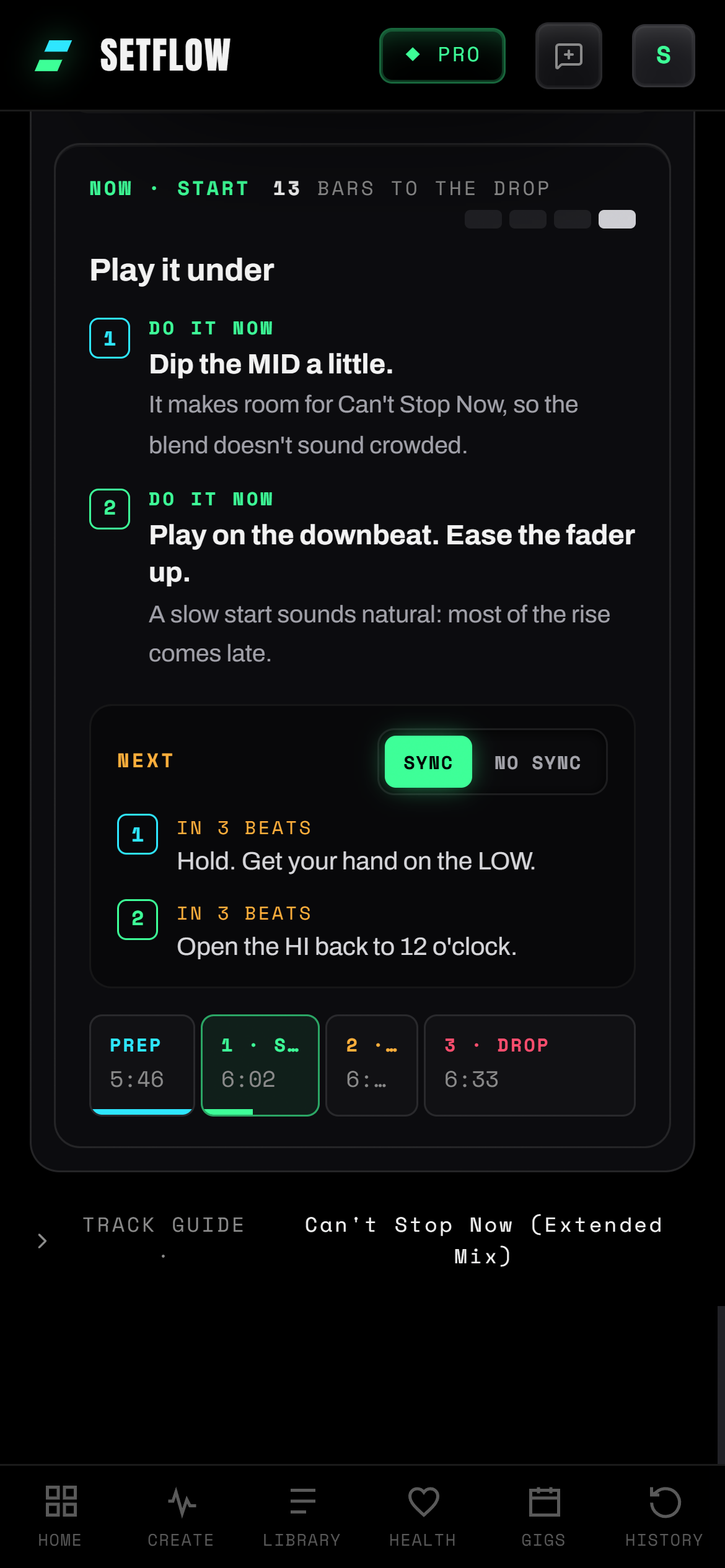
- Switch to DJ Tutor. Each transition plays on an on-screen controller. The knobs and faders move as the blend plays, a badge lights the next control to touch, and a guide under each deck says what to do and why.
- Slow it down. Play the transition at half or quarter speed to follow every move. The steps along the bottom are clickable, so you can jump straight to the bass swap.
- Hear the blend. Back at full speed, press Hear the blend and SetFlow plays the two tracks from your music folder, beat-matched, with the same moves. Then try it yourself on your controller.
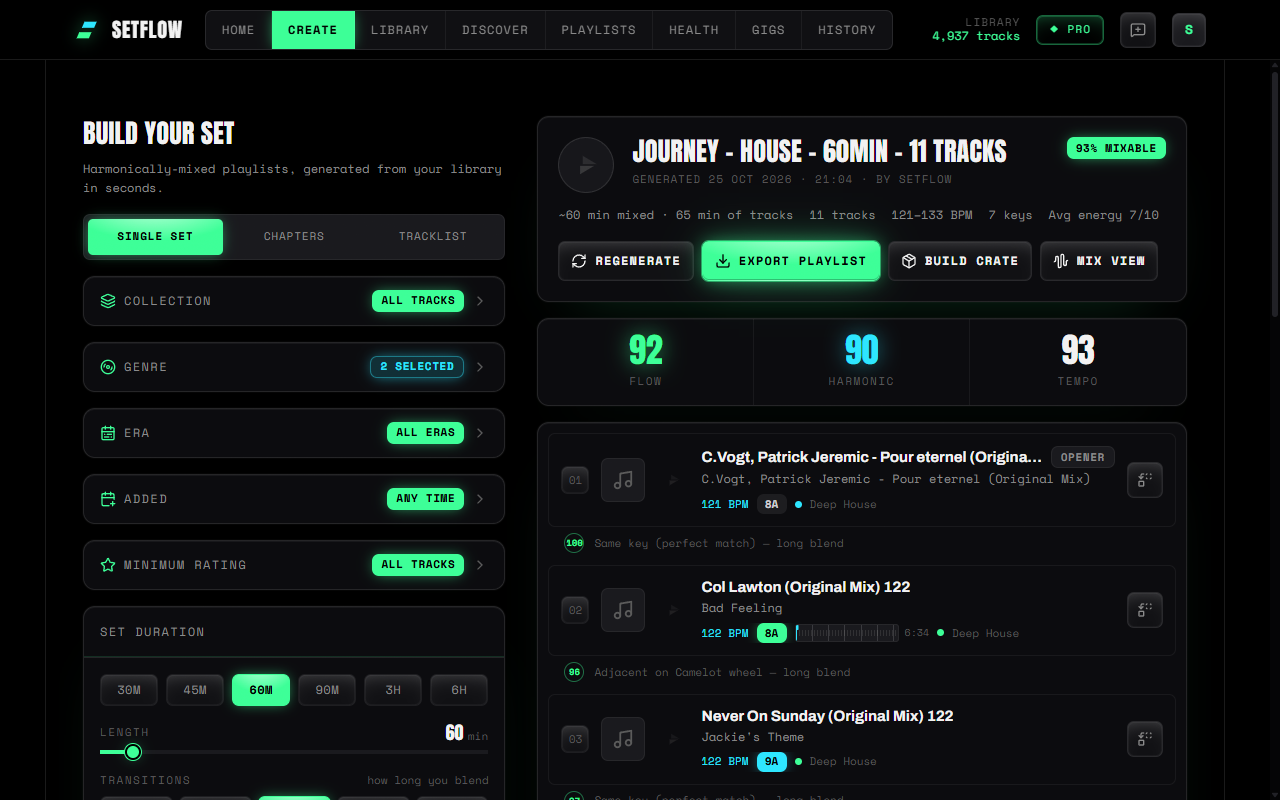
Our guide to learning DJ transitions move by move goes through the DJ Tutor in more detail.
What you need to know first
- The DJ Tutor is Pro. Building sets has a free trial; the Mix view's DJ Tutor is part of Pro. A Weekend Pass unlocks it for 72 hours for £2.99, which is plenty for a weekend of practice. See pricing for the rest.
- Hearing blends needs a computer. Chrome and Edge remember your music folder. Safari and Firefox let you pick it each visit.
- Phones walk through without sound. A phone can't play the files in your music folder, so it shows the moves silently.
- Your music stays put. Blends play straight from your own folder. Your music never leaves your computer.
Ready to start? Build a set from your library and practise the first transition tonight.
Frequently asked questions
How do I start DJing as a complete beginner?
Get a two-channel controller, the free software that comes with it (Rekordbox or Serato) and a pair of closed-back headphones. Then learn the skills in order: matching tempo, counting phrases, starting a transition, the bass swap, effects, and set energy. Practise one skill at a time on tracks you already know well.
Can I learn to DJ with my own music?
Yes, and it’s the best way. Your own tracks are the ones you’ll play out, so every blend you practise is one you can use. SetFlow builds a set from your library and its DJ Tutor shows every transition in that set, move by move, then plays the blend from your own files.
How long does it take to learn to DJ?
Most people get a basic blend working in a few hours. Clean, consistent transitions take a few weeks of regular practice. Choosing what to play next, and keeping a room moving, takes longer, which is why it pays to practise whole sets rather than random pairs of tracks.
Do I need a controller to learn to DJ online?
Not to learn the moves. SetFlow’s DJ Tutor plays each transition on an on-screen controller, so you can learn which knob moves when before your hands are on the decks. To actually mix, you’ll want a controller: even a cheap one teaches you far more than a keyboard and mouse.
Is SetFlow free?
Building sets from your library has a free trial. The DJ Tutor is part of Smart Mix Points in Pro. If you only want it for a weekend of practice, a Weekend Pass unlocks it for 72 hours for £2.99.
Does it work on my phone?
Partly. Phones can’t play the music files in your folder, so on a phone the DJ Tutor walks through each transition without sound. To hear the blends, use a computer: Chrome or Edge remember your music folder, and Safari or Firefox let you pick it each visit.
Do my music files get uploaded?
No. SetFlow reads your library export to build sets, and plays blends straight from the music folder on your computer. Your music never leaves your computer.
DJ Phrasing: How to Count Bars and Mix on the Phrase
Ready to build better sets?
Import your Rekordbox, Traktor, or Serato library and generate perfectly mixed DJ sets in seconds.
Try SetFlow Free