Echo Out, Filter Sweep or Wash? When to Use DJ Effects in a Transition
A bass swap is the right answer for most transitions. But some pairs of tracks just won't blend: the keys clash, the tempos are too far apart, or both have vocals over the same bars. That's when DJs reach for the effects. Here's when to use an echo out, a filter sweep, a reverb wash or a vinyl brake, and how SetFlow now plans them for every transition in your set.
Four effects, four problems
Every effect transition solves a problem a straight blend can't. Pick the effect by the problem:
- The keys clash: echo out. Two tracks in clashing keys sound wrong the moment they overlap. Throw a 1-beat echo on the outgoing track and cut its fader on the downbeat: the repeats ring on and fade while the new track starts, and the two never play together.
- The tempos are far apart: echo out or vinyl brake. Beat-matched more than about 8% apart, a track sounds out of key. An echo out skips the blend. For a really big jump, a vinyl brake stops the old track like a turntable, and you start the new one from silence.
- Both tracks have vocals: filter sweep. Two vocals at once are hard to listen to. Bring the new track in with its filter turned up (no bass, just hats), then over the last 8 bars use both hands: turn the outgoing filter up as you turn the incoming one back down. The two cross in the middle, and the bass hands over smoothly instead of all at once.
- The energy drops: reverb wash. Going from a peak-time track to a softer one can feel like the floor fell away. Wash the outgoing track into reverb before you cut it, taking its LOW out with your other hand, and the drop sounds like a choice.
For the full set of transition types, from cuts to breakdowns, see DJ transitions explained.
Where the effect goes
The most common mistake is putting the effect too late. A track's last bars are usually its quietest, so an echo there has almost nothing to repeat. Put the effect where the outgoing track starts to wind down, while it still has its energy, and land the incoming drop on the cut.
On the mixer, an echo out is three moves: pick ECHO, 1 beat, on the outgoing channel. Switch it on in the bar before the change and raise its level. Then cut the fader on the downbeat and switch the echo off once the tail has gone. A wash is the same, using the SPACE Sound Color FX and turning the channel's COLOR knob instead.
The bass swap: kill, then slam
The bass swap itself has a feel to it too. Turning one LOW down as you turn the other up sounds safe, but for a beat the two basslines blur. Most DJs kill the outgoing bass a little early instead, a bar before the drop, so the room hears a moment with no bass, then slam the new LOW in on the downbeat in one fast twist. The gap is what makes the drop hit.
An effect on the end of a blend
You don't have to choose between a blend and an effect. When two tracks mix well but the outgoing one has a long, empty outro, blend as usual and swap the bass, then throw the echo or the wash on the outgoing track at the swap and cut it there. You keep the blend and lose the long fade. Our guide to EQing a DJ transition covers the bass swap itself.
Effects in SetFlow
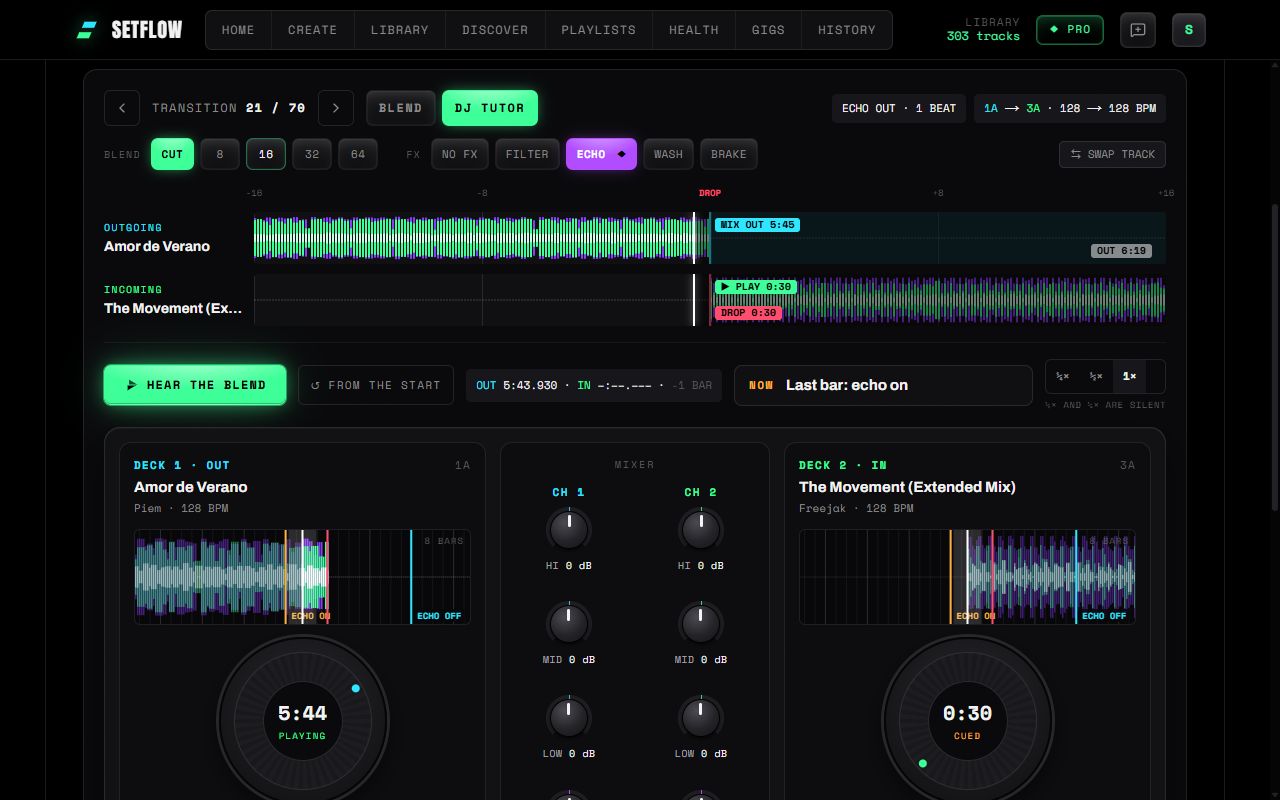
Open a set in the Mix view and each transition has two rows of buttons: BLEND for its length (or Cut) and FX for its effect. The bass swap is the default. When the two tracks clash, SetFlow marks the effect that suits the transition with a ◆ and says why. Click it to try it, or ignore it.
- Hear the blend plays the transition from your own files with the effect, so you can judge it by ear. Your music never leaves your computer.
- The DJ Tutor shows it on a mixer: the effect unit lit, a badge on the button to press next, and a guide that says when to switch it on, when to cut, and which hand does what. Slow it down to half or quarter speed to follow every move. New to the DJ Tutor? Start with learning transitions move by move.
- Your picks are saved with the set, transition by transition, and Play the mix plays the whole set with them.
See everything in this release in the changelog, or build a set and open its Mix view.
Frequently asked questions
What is an echo out in DJing?
An echo out puts a beat-synced echo on the outgoing track and then cuts its fader, so the repeats carry on and fade while the next track comes in. The two tracks never play together, which is why it is the go-to exit when their keys or tempos clash.
When should I use a filter sweep instead of a bass swap?
When both tracks have vocals or busy mids over the blend. Sweeping a high-pass filter up the outgoing track thins it out from the bottom, so it gets out of the way of the incoming track instead of fighting it. It is still a blend, so the tracks need to be in compatible keys.
What is a reverb wash?
A wash turns the outgoing track into a cloud of reverb before you cut it, using the SPACE (or REVERB) Sound Color FX on most mixers. It softens a change, so it suits the moment the energy drops from one track to the next.
How long should a DJ effect transition be?
Short. Switch the echo or the wash on for the bar before the change, raise its level, then cut the fader on the downbeat. A filter sweep takes a few bars. Leave an effect on any longer and it muddies the incoming track.
Which echo setting should I use?
One beat is the safe choice for house and techno: the repeats stay on the grid with the incoming track. Use half a beat for a tighter, busier tail, or two beats for a slower, more spacious one.
Can I practise effect transitions without a mixer?
Yes. SetFlow’s DJ Tutor plays each transition in your set on an on-screen mixer, with the effect unit lit up: which effect to pick, when to switch it on and when to cut. You can also hear the result from your own files in Chrome or Edge on a computer. It is part of Pro.
Get the Camelot cheat sheet
A one-page printable of all 24 keys, compatible moves, and energy jumps — handy next to the decks.
One email with your download. No newsletter, no spam.
Ready to build better sets?
Import your Rekordbox, Traktor, or Serato library and generate perfectly mixed DJ sets in seconds.
Try SetFlow Free