// Changelog

What's
new

Every release, fix and feature that ships to SetFlow. Follow along as the smart DJ set generator evolves.

v2.37.0
New

Discover: New Tracks That Fit Your Sets

SetFlow now finds music as well as mixing it. Discover looks at the artists you actually play, finds new releases from artists close to them, and checks every one against your library — including the keys your library is missing.

New

  • •Discover (Pro) — new releases grouped by the artist that led there (“Because you play Dosem”), plus new releases from artists you already play. Every pick shows its BPM and key, two tracks from your own sets it mixes with, a 30-second preview, and Beatport, Traxsource and Bandcamp links. Save picks to a wishlist, or tap × and they never come back.
  • •Fill the gaps — SetFlow spots the holes in your Camelot wheel: keys where you have a handful of tracks between two keys you have plenty of. Those are dead ends for key changes, and Discover shows the new picks that land right in them.
  • •New for your sets on Home — your top picks, playable straight from the dashboard. On phones it's how you get to Discover.
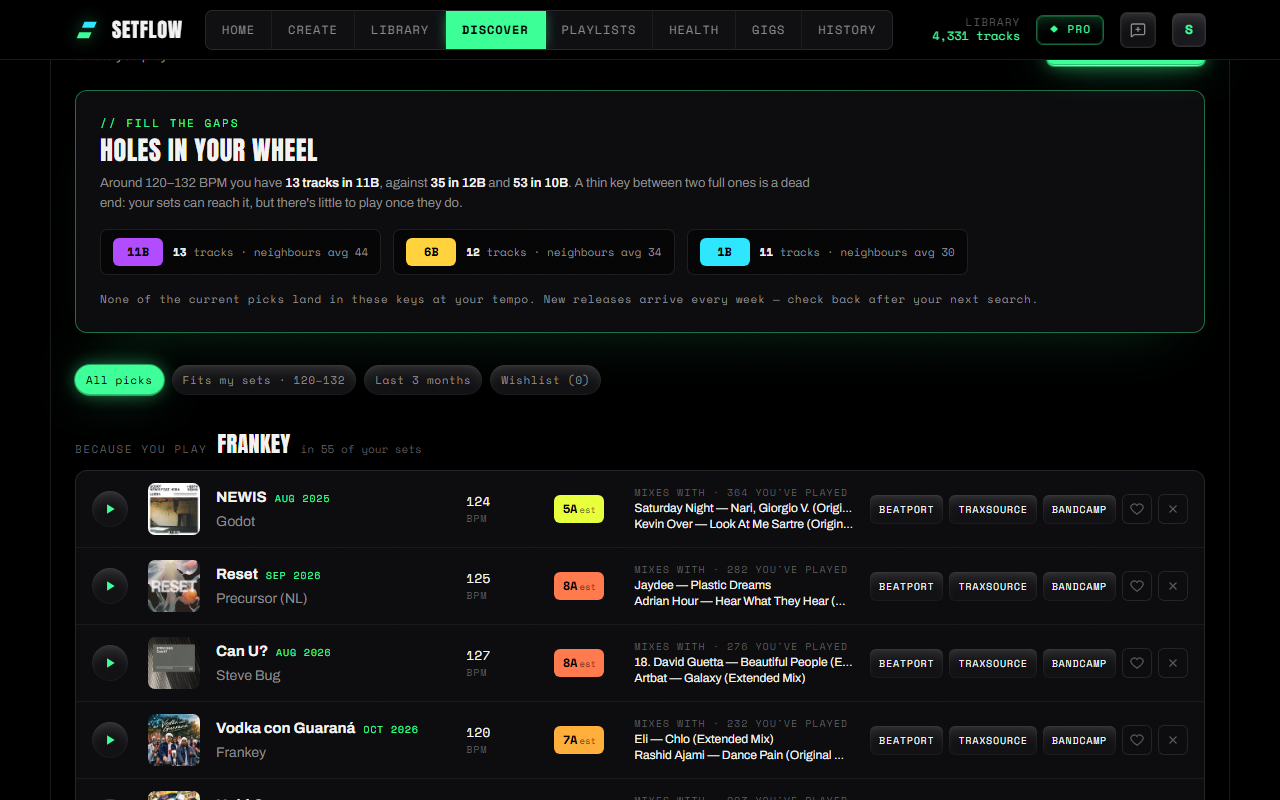
SetFlow's Discover page: a Fill the gaps panel showing three thin Camelot keys in the library, then new releases grouped under 'Because you play', each with BPM, key, tracks it mixes with, and Beatport, Traxsource and Bandcamp links
Discover: the gaps in your wheel first, then new releases grouped by who you play.

BPM and key are estimated from each preview, so check them after you buy. How it works: Discover new tracks that fit your sets.
v2.36.0
NewImproved

Set Chapters: Plan the Whole Night

Plan the whole night, not just a set. Set Chapters chains set types into one long set — Warm-up → Build → Peak → Reset → Build → Peak → Closing — with every chapter ending on the track the next one starts with. And three new set types make those joins possible.

New

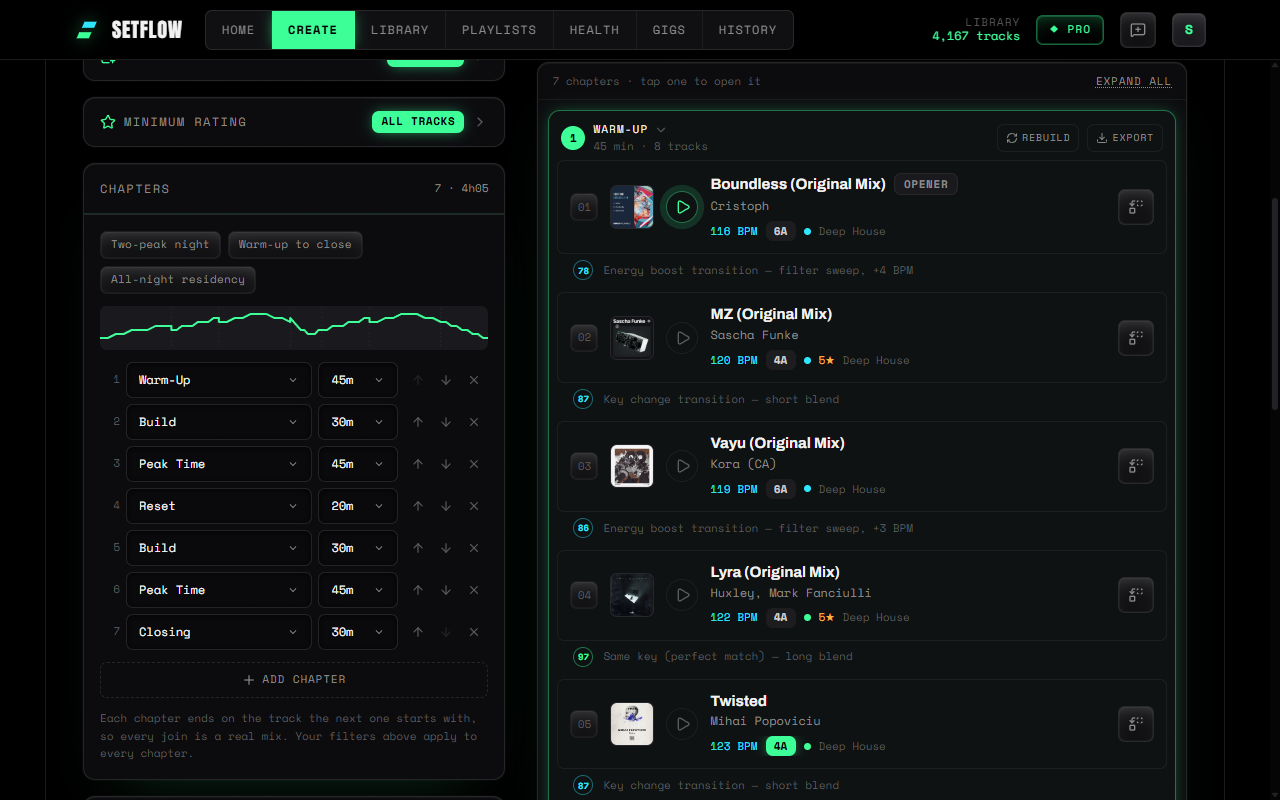
  • •Set Chapters (Pro) — switch Create to Chapters, line up two to eight chapters with a type and a length each (or start from a preset like Two-peak night), and generate. Your filters apply to every chapter, no track repeats, and each join is a real mix. Chapters open one at a time, with a preview of the rest, so a four-hour night stays readable.
  • •Rebuild one chapter — not feeling the second peak? Rebuild just that chapter. Its first and last tracks stay put, so the rest of the night doesn't move and any rebuild is a drop-in alternative.
  • •Export a chapter on its own — every chapter exports in all six formats, so you can take each phase into the booth as its own playlist — or export the whole night as one.
  • •Build, Maintain and Reset — three new set types for every plan. Build rises without peaking; Maintain holds the floor without escalating; Reset drops after a peak so a long set can peak again.
SetFlow's Create page in Chapters mode: a seven-chapter plan with an energy-arc preview on the left, and the generated set with its open first chapter outlined in green, with Rebuild and Export on the chapter header
Chapters mode on Create: plan the night on the left, rebuild or export any chapter on the right.

Improved

  • •Chapter sets show their chapters in History, and History, Gigs and Playlists filters plus your Mixing defaults all know the new set types.

How it works: plan a long DJ set in chapters. The thinking behind the new set types: how to structure a long set with more than one peak.

v2.35.0
NewImprovedFixed

Filter Sets and Crates by When You Added the Tracks

Build a set from what you bought this month — or from the records you haven't touched in years. SetFlow now keeps the date each track was added in Rekordbox, Traktor or Serato, and the set builder can filter on it. And if you've built a crate, you can now start a set straight from it — or from any playlist you imported.

New

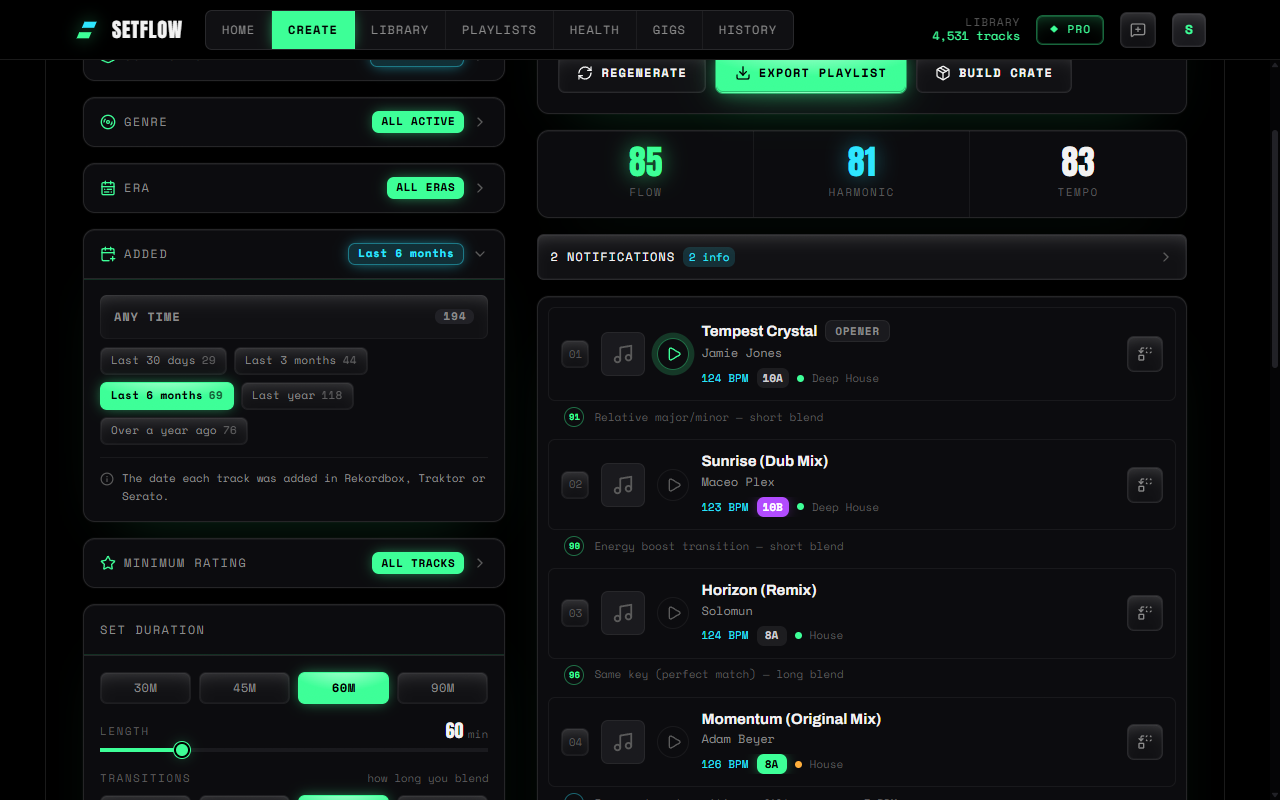
  • •Added filter — on Create, pick Last 30 days, Last 3 months, Last 6 months, Last year, or Over a year ago. Each option shows how many tracks it leaves you with, counted inside your other filters.
  • •Era and Added in the Library — a new Filters panel with the same options as Create, sort by date added (phones too), then select everything that matches and add it to a crate — or a brand-new one — in one go.
  • •Smart crates that keep up — on Pro, add an “Added to your collection” condition. It's counted back from today, so a “new this month” crate updates itself. Decade shortcuts make era crates one click.
  • •Build a set from a crate or playlist — hit the lightning icon on any crate, or any playlist you imported from Rekordbox, Traktor or Serato, and you land on Create with just those tracks as your source.
SetFlow's set builder with the new Added filter open: Any time, Last 30 days, Last 3 months, Last 6 months, Last year and Over a year ago, each with a track count
The Added filter sits under Era on Create — every option shows its track count.

Improved

  • •A calmer Library toolbar — search, Filters and Sort in one row; active filters show as chips you can tap away; and when you select tracks, the actions stay pinned above the list instead of sitting at the top of the page.
  • •Tidier Collection picker — on Create, SetFlow Crates now folds away like your imported playlists, and any group with something selected opens so you can always see what's narrowing your set.

Fixed

  • •Your add dates were being replaced — every track was stamped with the day it came into SetFlow instead of the date in your DJ software. Re-import your collection once and the real dates come back; nothing else about your library changes. Until you do, the Added panel tells you your dates still look like import days.

How to use it: build a DJ set from your newest tracks (or your forgotten ones).

v2.34.0
NewImproved

Export Any Crate — and Build One From Any Set

Crates now leave SetFlow. Any crate — manual, smart, or one built around a set — exports to your DJ software in the same six formats as a set. And you no longer need a gig to build one: every set has a Build crate button that wraps it in 2–5× compatible tracks, so you have room to change direction mid-set.

New

  • •Export any crate — hit the download icon on a crate in Library and pick Rekordbox (.m3u8 or XML), Traktor (.m3u), Serato (a native .crate), TribeXR, or a printable PDF. Tracks export in crate order.
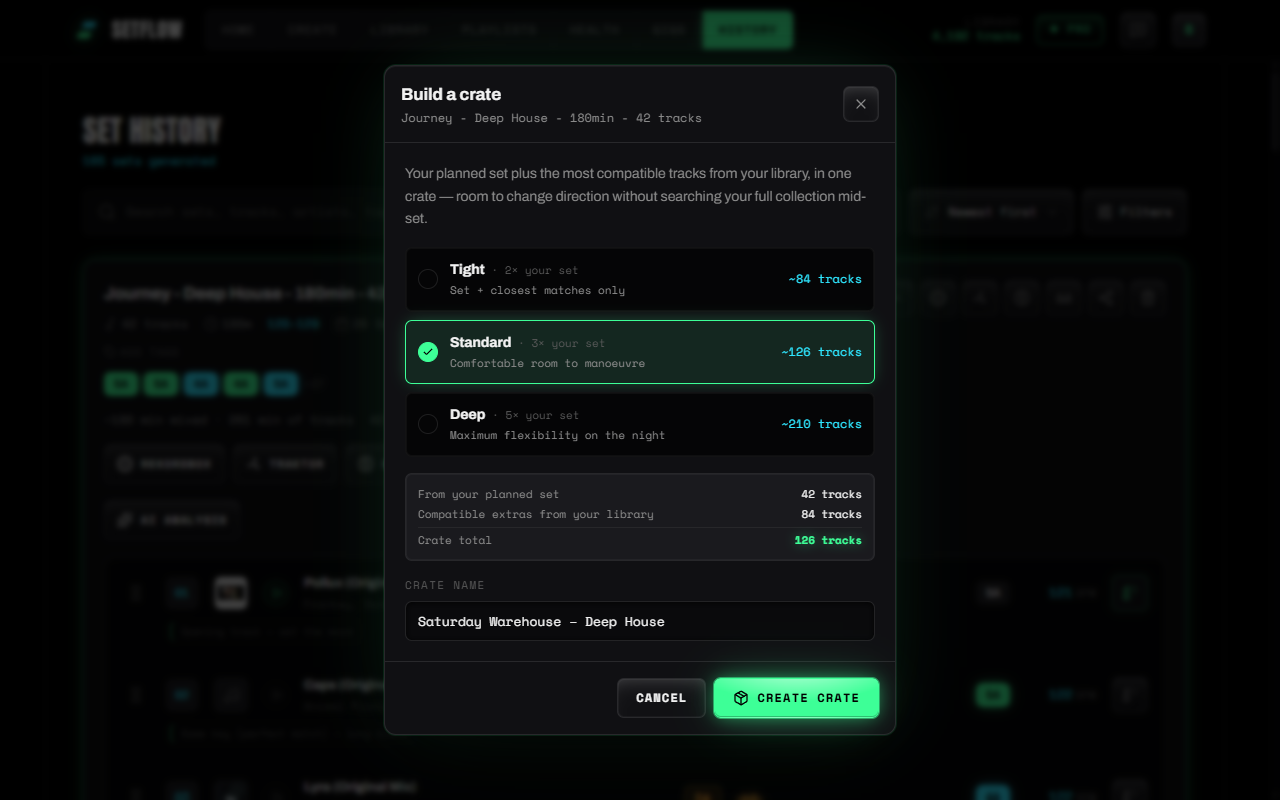
  • •Build a crate from any set — on Create and in History, Build crate takes the set as its backbone and adds the most compatible tracks from your library (harmonic fit, BPM, energy, genre). Pick Tight (~2×), Standard (~3×) or Deep (~5×) and see the counts first.
  • •Straight to your decks — once a crate is built, Export now takes you to the formats in one step. It's also saved under Library → Crates for later.
SetFlow's Build a crate dialog for a three-hour set: Tight 2x at about 84 tracks, Standard 3x at about 126 tracks, Deep 5x at about 210 tracks, a breakdown of 42 set tracks plus 84 compatible extras, and an editable crate name
Build crate on any set: pick a size, name it, create — then export it in one step.

Improved

  • •Gig crates use the same flow — build one from a gig's linked sets on Gigs, then export it right away.
  • •Crate sizes follow your set length — a 30-minute set now gets three genuinely different sizes, and a three-hour set keeps the full 5× (crates now go up to 300 tracks, from 150). If your library runs out of tracks that mix with the set, the builder tells you.
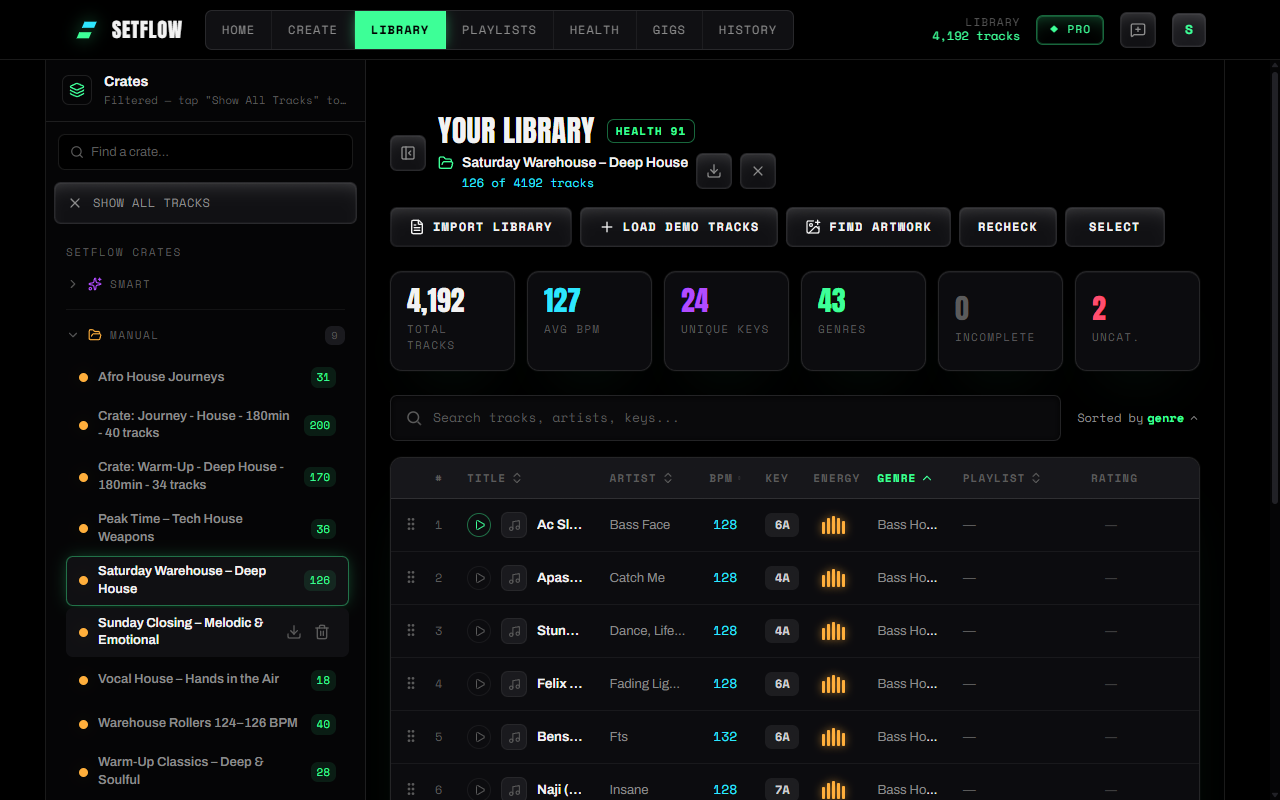
  • •Crates you can actually read — a wider crates panel where long names wrap instead of cutting off, a search box once you have more than a handful, and the Library now names the crate you're viewing, with Export right beside it.
  • •Name your crate — the builder suggests a name you can change, and crate names are now unique so two crates never look the same.
SetFlow's Library with the Crates panel open: crate names wrap onto two lines, and the selected crate is named at the top of the Library with 126 of 4,192 tracks and an export button
Your crates in the Library — full names, the crate you're viewing named up top, and export one click away.

Step-by-step walkthrough: how to build a DJ crate from your set and export it. The thinking behind it: backup tracks and gig crates.

v2.33.0
NewImproved

Sets Planned for the Mix, Not the Tracklist

Ask for a 90-minute set and you used to get 90 minutes of tracks — played end to end. But nobody plays them end to end. Every blend overlaps two tracks, so a 14-track, 90-minute set with two-minute blends mixes down to about 65 minutes. SetFlow now plans for the mix you'll actually play. Ask for 90 minutes, get a 90-minute mix.

New

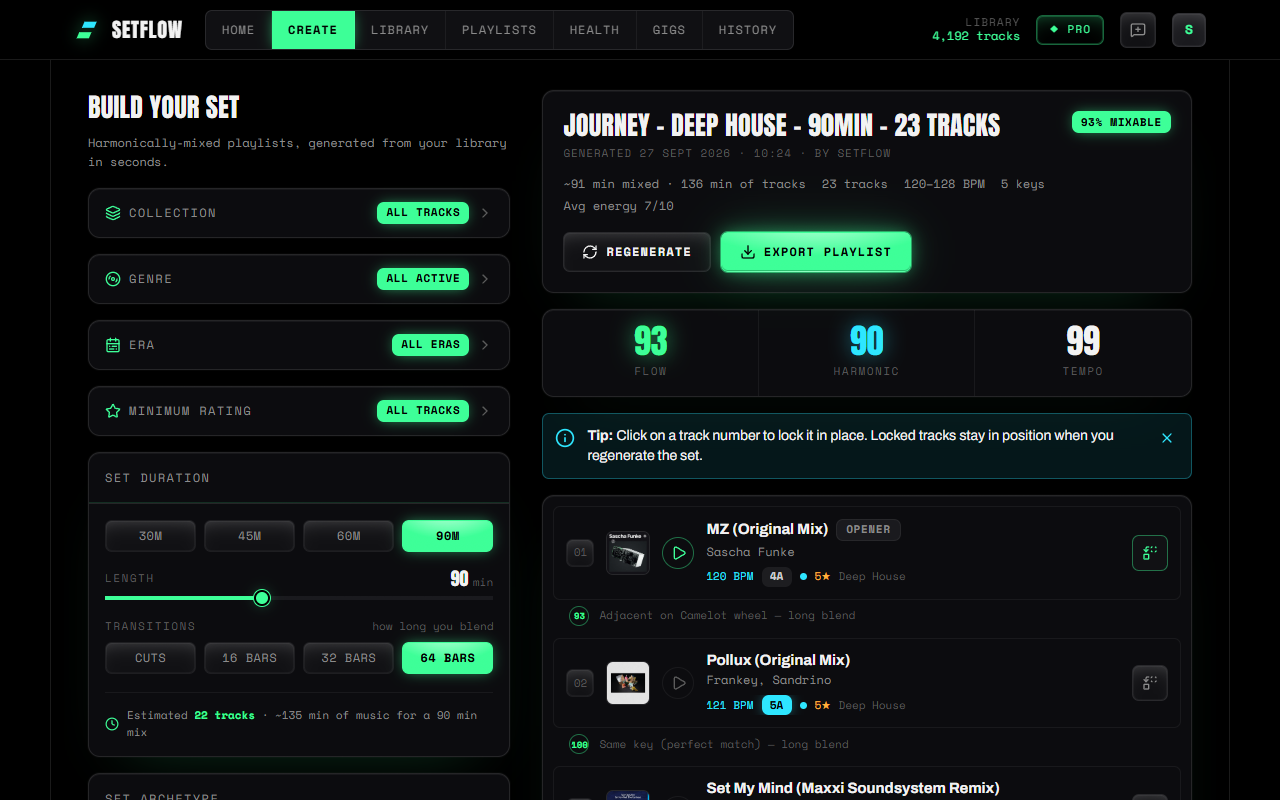
  • •Choose how long you blend — under Set duration, pick Cuts, 16, 32 or 64 bars. SetFlow works out each blend from the track's own BPM (32 bars at 124 BPM is just over a minute), takes it off the set's length, and adds tracks to fill the gap. 32 bars is the default.
The Create page. Under Set duration, 90 minutes is selected and the Transitions control is set to 64 bars, with the estimate reading 22 tracks and about 135 minutes of music for a 90-minute mix. The generated set's header reads ~91 min mixed, 136 min of tracks, 23 tracks
A 90-minute set with 64-bar blends: 23 tracks and 136 minutes of music, mixed down to ~91.

Improved

  • •Both lengths, side by side — generated sets now show how long they'll run as mixed and how much music is in them, for example “~91 min mixed · 136 min of tracks”. The estimate under the length slider counts the blends too.
  • •An estimate that follows your filters — the track estimate now works from the tracks you've actually selected. Pick a crate of radio edits and it expects more tracks; pick extended mixes and it expects fewer.
  • •Short sets land closer to time — in a 30-minute set one track can be a fifth of the whole thing, so the last pick could run minutes over. SetFlow now closes the set with whichever of its best-matching tracks lands nearest your length.
  • •Goodbye, Mix style slider — the old “percentage of each track” control is replaced by the blend length. If you'd set it to a quick mix, you start on 64 bars; otherwise 32.

Why bars, not a percentage? A blend takes about the same time whether you're mixing a four-minute edit or an eight-minute extended mix, so taking a fixed share of every track overstates the long ones and understates the short ones. Bars are also how you already think about a mix. Sets you generated before this update keep the length they were saved with.

v2.32.0
NewImproved

Your Cue Points, Beside Every Track

You already marked up your tracks — the intro, the drop, the point where you always mix out. Rekordbox and Traktor put those cues in every export, and SetFlow was throwing them away at import. Now it keeps them, and draws them right next to the key on every track in your sets. Your mix points, beside our transition plan.

Start here: re-import your collection. Cue points only arrive when you import, so tracks already in SetFlow won't show any until you do. Head to Library → Import and bring your Rekordbox XML or Traktor NML in again. Your existing tracks are updated in place, not duplicated — and sets you've already saved pick the cues up too.

New

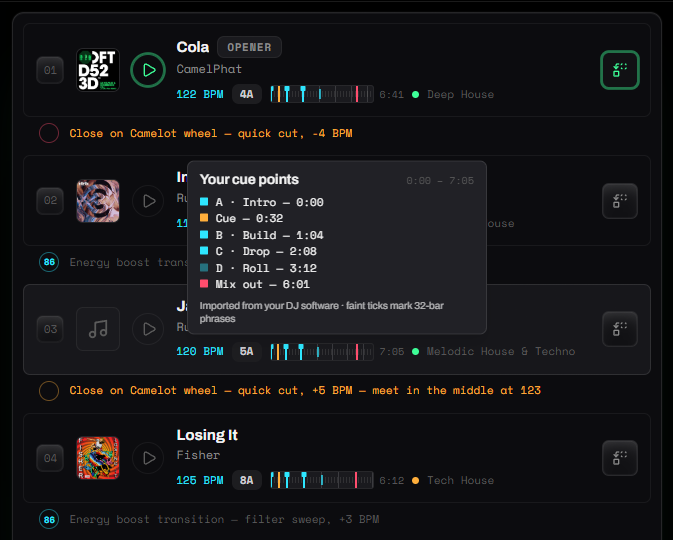
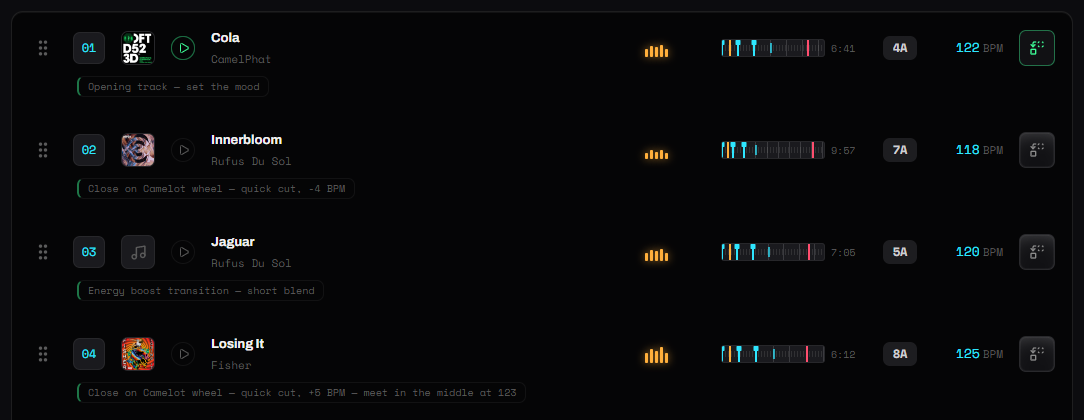
  • •A cue strip on every track — a small timeline sits beside the key on the Create page and in Set History. The left edge is the start of the track, the right edge the end, with its length printed alongside, and your cues marked along it: hot cues in cyan, memory cues in amber, your fade-in and fade-out points in green and red, and loops as shaded spans.
  • •Hover for the detail — point at a strip (or tap it on your phone) for the full list: pad letter, name and time for every cue, colour-keyed to the markers.
  • •Phrase markers — when a track has a steady beatgrid, faint ticks mark every 32 bars, so you can see at a glance whether your cues land on the phrase.
A generated set on the Create page. Each track shows a small cue strip beside its key, marked with coloured cue points, and a hover panel lists one track's cues: Intro at 0:00, Build at 1:04, Drop at 2:08, a loop at 3:12 and Mix out at 6:01
Your cues beside the key on the Create page — hover a strip for the full list.

Improved

  • •Set History shows your cues too — the same strip on every track, in its own column beside the key on a wide screen and tucked under the artist on a smaller one. Sets without any cued tracks keep the layout they always had.
  • •See every cue on a track — open a track in your Library to edit it and its cue points are listed underneath, with their pad letters and times.
  • •The import tells you what it found — the import summary now counts the cue points in your file, so you know they came across before you commit.
An expanded set in Set History, with a cue strip column between each track's energy and key showing its cue points and length
In Set History the strip gets its own column, right beside the key.

What the strip is, and isn't. SetFlow never sees your audio, so this is a timeline of your cues, not a waveform — we'd rather show you nothing than an invented shape. SetFlow only reads your cues: it never changes them, and nothing is written back to your DJ software. Rekordbox and Traktor both export cue points; Serato keeps them inside the audio files themselves, so they can't come across from a Serato import.

v2.31.0
ImprovedFixed

A Brighter SetFlow

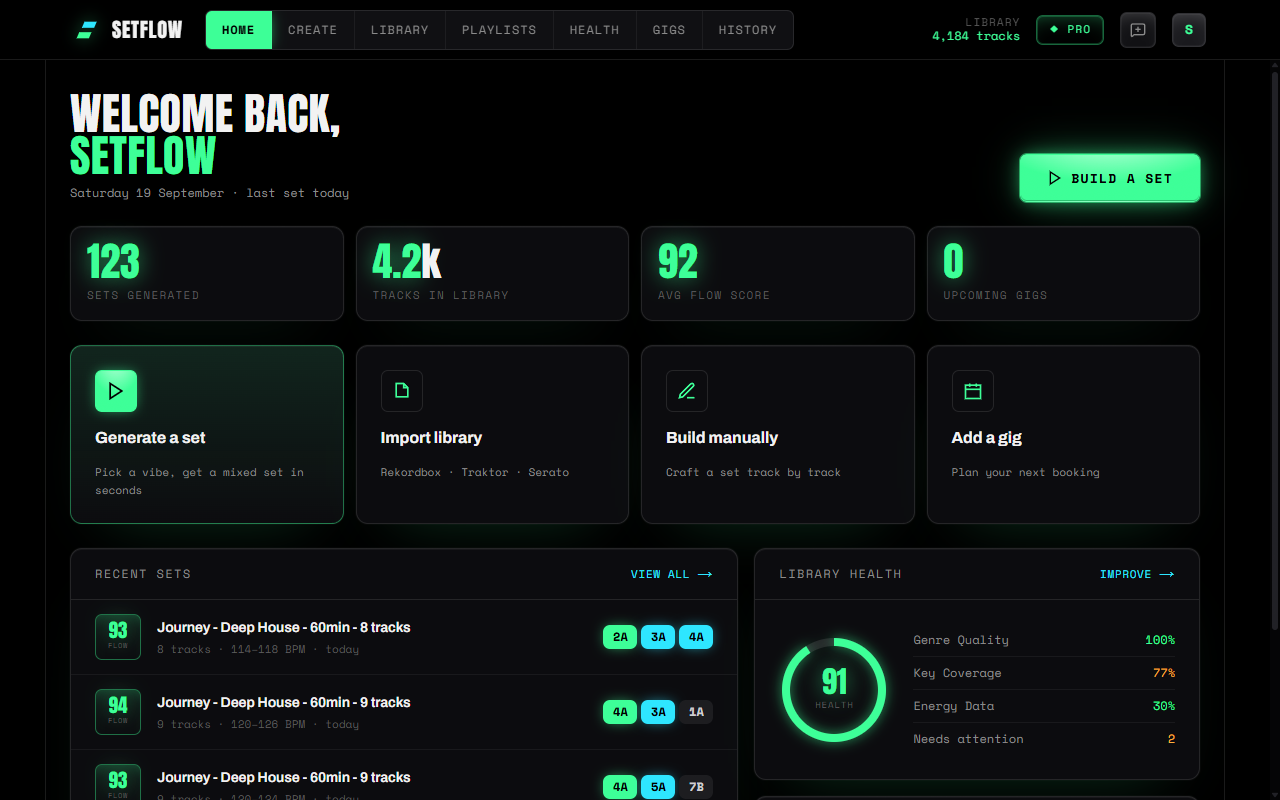
SetFlow now looks the way a booth feels: dark, matte hardware where the only light comes from the things that matter — the action you're about to take, a key that mixes, the score you're chasing. Nothing moved. Every button, filter and export is exactly where you left it.

The SetFlow dashboard with matte black cards floating on a faint green haze, a glowing Build a Set button, glowing lime stat numbers and a lit library-health dial
One lit action per screen. Everything else stays quiet until you need it.

Improved

  • •Light that means something — the main action on each screen glows, buttons catch the light like a hardware face, search boxes and sliders sit recessed, and panels float. Colour only lights up where it carries information, so the eye goes straight to what matters.
  • •One key colour language — on the Create page, each key in a generated set is now coloured by how it mixes with the track before it, the same as Set History: lime for the same key, cyan for a step round the wheel, violet for an energy swing. The opener stays neutral — there's nothing before it to mix from.
  • •Every screen, every pop-up — Library, Library Health, Playlists, Gigs, Set History, Settings and every modal they open share the same finish, down to the gig review, crate builder and export panels.
  • •Shared sets look like SetFlow — the public page your crowd sees when you share a set now matches the app, with the SetFlow mark up top. The free tools and the interactive guides on the blog were brought in line too.
  • •Easier on every display — glow is never the only signal: every lit state also changes colour or border, so it reads on a washed-out screen in daylight. Turn on your system's increased-contrast setting and most of the glow switches off, leaving borders and colour to do the work. Keyboard focus gets a clear outline.
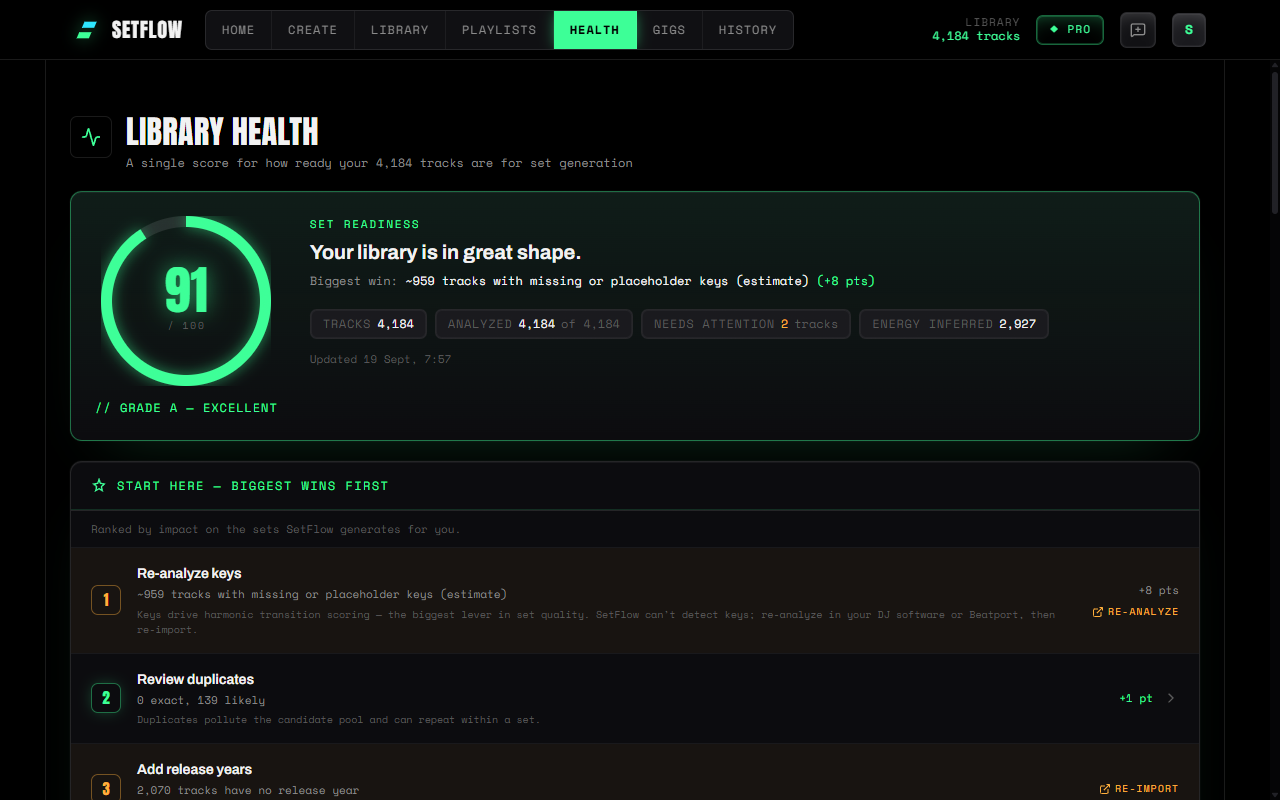
Library Health with a glowing score ring reading 91, a Grade A label, and a ranked Start Here list of the biggest fixes
Library Health's score ring now glows in its grade colour.

Fixed

  • •Export formats you can tell apart — on wide screens the export panel cut names short, so “Rekordbox XML” read as “Rekordbox…”, identical to the playlist option beside it. All six formats now show in full.
  • •Full-size search on your phone — the search boxes on Set History and My Playlists were squashed to half height on mobile.
  • •Gig names in full — on a phone, a gig's five action buttons squeezed its name down to a few letters. They now sit on their own row underneath.
  • •Cleaner numbers and logos — the big totals on your Library page no longer clip their commas, and the Rekordbox, Traktor and Serato logos on export buttons render crisply instead of looking smudged.

Only the look changed. How sets are built, scored and exported is exactly as it was — same filters, same archetypes, same six export formats, same results from the same library.

v2.29.0
NewImproved

Build a Set From a Decade

Your DJ software has always known when a record came out. SetFlow was throwing that away at import. Now it keeps it — so you can build a set from a decade. 90s house. 00s R&B. Pre-70s soul.

Start here: re-import your collection. Release years only arrive when you import, so every track already in SetFlow has a blank one until you do. Head to Library → Import and bring your collection in again. Your existing tracks are updated in place, not duplicated.

New

  • •Build a set from an era — a new Era panel sits under Genre on the Create page, with a chip per decade. Each count is measured inside your other filters, so picking a genre re-counts the decades and you can see what you'd actually get before you commit. Pick one decade, pick several, or leave it alone.
  • •Save a decade as a smart crate — set a year range alongside genre, BPM and energy, and “90s House” becomes a crate you can feed straight into the builder.
  • •Release years survive a round trip — export back to Rekordbox and the year goes with the track. It used to come out blank, which quietly stripped it from your collection.

Improved

  • •Library Health tells you what's missing — a new entry shows how many tracks have no release year and links straight to them. It doesn't affect your Set Readiness score: this is a field nobody could supply until today, so it would be unfair to mark you down for it.
  • •The builder is honest about what it dropped — a track with no year can't belong to a decade, so era filters skip it. The panel tells you how many that is before you generate, and warns you up front when your filters have narrowed things too far, rather than leaving you wondering why a two-hour request came back short.

Where the years come from. Rekordbox stores a year against each track and Traktor stores a full release date; SetFlow reads either. Serato may not export one at all, so if you import from Serato the Era panel will tell you instead of sending you off to re-import for nothing. Years come from the tags on your files, so a remaster or a compilation rip sometimes reports its reissue year rather than the original.

v2.30.0
Improved

A Tidier Set Builder

The Create page had quietly grown. Every filter we added claimed another block of the column, and the two controls you actually touch on every set — length and archetype — ended up below the ones you rarely change. The filters now fold away.

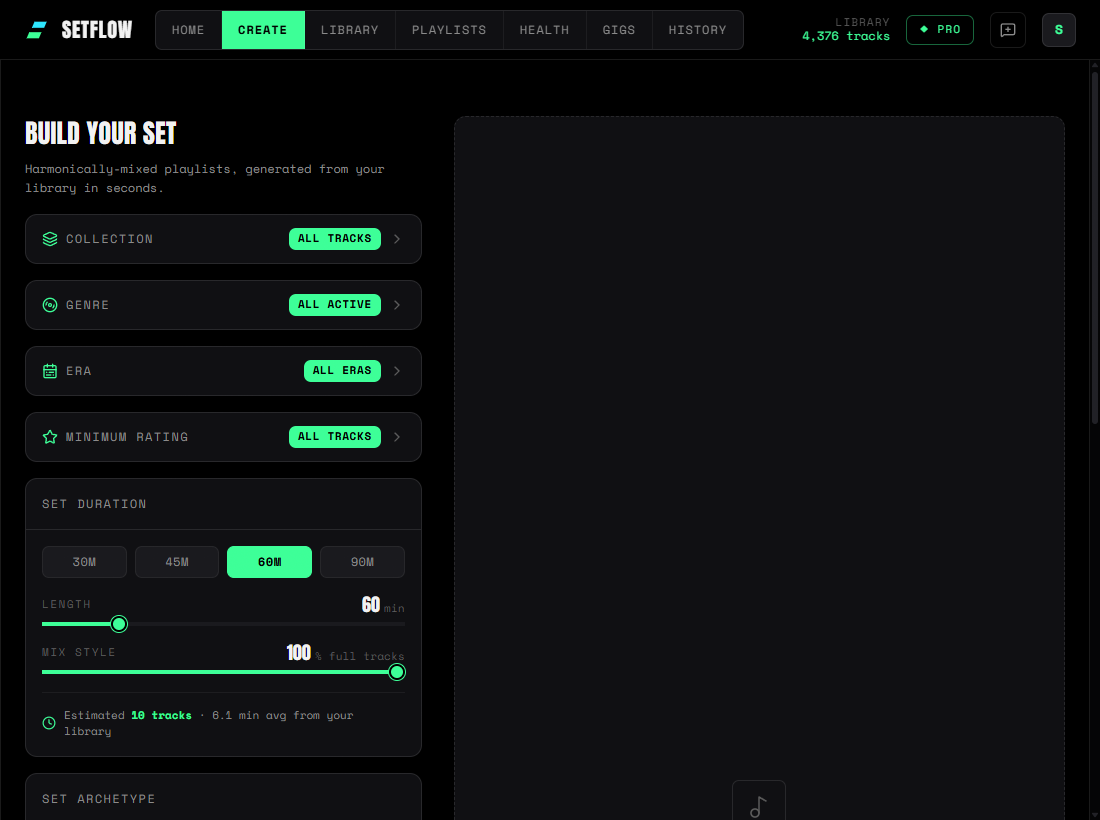
The SetFlow Create page with Collection, Genre, Era and Minimum rating collapsed into single rows, each showing its current setting, above an open Set duration panel
Four filters, four rows — and set duration visible without scrolling.

Improved

  • •Collection, Genre, Era and Minimum rating collapse — each becomes a single row you can open when you need it. Set duration and Set archetype stay open, because those get set every time.
  • •Every row tells you what it's set to — “All tracks”, “4 selected”, “1990s”. A filter can't quietly narrow your library while looking untouched, so folding them away costs you nothing.
  • •Filter counts now account for each other — pick a few genres and the era counts update to match, and the other way round. Previously each counted your whole library, so two filters could look healthy and still have almost nothing in common.
  • •“Filter by crate” is now “Collection” — it has always filtered playlists as well as crates, and the old name undersold it.

Nothing has moved and nothing has been taken away — the same controls are in the same order, just folded. Open any row and it works exactly as it did.

v2.28.0
FixedImproved

Every Playlist a Track Belongs To

A good record rarely lives in one playlist. It's in your peak-time crate, your best-of-the-year list and that one wedding set — but SetFlow was only ever keeping one of those, and quietly dropping the rest. Not any more.

Fixed

  • •A track now appears in every playlist it belongs to — filter by any one of them and it's there. Previously a track could only be remembered against a single playlist, so whichever one imported last won and every other playlist showed it missing.
  • •Re-importing updates your playlists instead of duplicating them — import the same collection twice and you get one set of playlists, not two. If you'd imported a few times you may have collected copies; the next import tidies onto a single one rather than adding another.
  • •Playlist track counts are honest — the number next to a playlist is now exactly what's in it. Some counts will have gone down, which is the number correcting itself rather than anything being lost.

Improved

  • •Changes you make in Rekordbox come across — take a track out of a playlist, export again, and it disappears here too. Re-importing now mirrors your library rather than piling on top of it.
  • •Your playlist order is kept — tracks come in the order you arranged them, instead of arriving in whatever order they happened to be read.

Playlists showing 0, or a count that looks too low? Re-import your collection from Library → Import and it'll fill back in. Those playlists lost their tracks to the old one-playlist-per-track limit, and a fresh import now restores every one of them. Your existing tracks are updated, not duplicated. Traktor and Serato collections get all of this too.

v2.27.0
Fixed

All Your Rekordbox Playlists, Not Just the Top Level

If you keep your Rekordbox playlists in folders — and most DJs with a real library do — SetFlow was only ever showing you the handful sitting loose at the top of the tree. Everything filed inside a folder was invisible at import. Now the whole tree comes across.

Fixed

  • •Every playlist, at every depth — folders, sub-folders, sub-sub-folders. Import your collection and you'll see the full list, each one labelled with the folder path it came from.
  • •Same name, different folder — if you have a “Warmup” in both your Gigs and Weddings folders, they now come in as Gigs/Warmup and Weddings/Warmup instead of two playlists you can't tell apart.
  • •Honest counts — the import summary now reports how many playlists were actually created, and tells you if any were missed.

Already imported your collection? Re-run the import from Library → Import to pick up the playlists that were previously skipped. Your existing tracks are updated, not duplicated. Traktor and Serato hierarchies were never affected.

v2.26.0
Fixed

The Bottom of Every Page Is Back on iPhone

If you use SetFlow on an iPhone, the last stretch of every screen has been sitting behind the bottom tab bar — the final export formats, the end of your library, the bottom of a generated set — with no way to scroll to it. That's fixed.

Fixed

  • •Every page scrolls all the way down again — the app was laying itself out about 200px taller than your screen, so the bottom of each page ended up below the fold where nothing could reach it. Create, Library, History, Gigs: all of them, all fixed by the same change.
  • •A genuinely sneaky one — two rules in two different files were each setting the app's height, one in vh and one in svh. Those units are identical on desktop and in the installed app, and differ only in mobile Safari, where the address bar can slide away. So it looked perfect everywhere except a real iPhone.
  • •The feature suggestion card fits a phone — the prompt that appears after you generate a set was squeezing its text into a thin column beside the button. It now stacks properly on narrow screens.

Nothing to update — just reload SetFlow on your phone. Desktop, Android and the installed home-screen app were never affected.

v2.25.0
New

Hear Your Tracks — Audio Preview in Create, Library and History

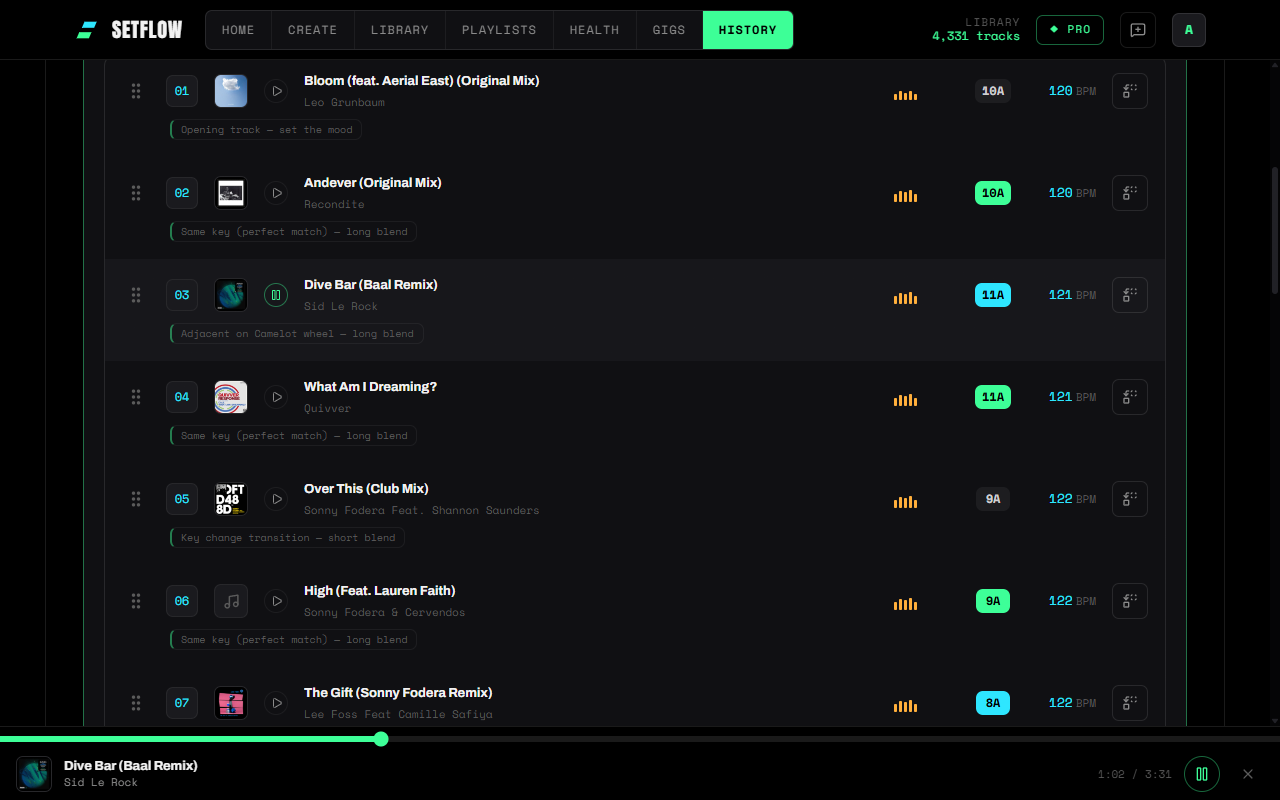
You can now hear a track without leaving SetFlow. Connect your music folder once and every track row — in Create, Library, History and the playlist builder — gets a play button that plays your own file, full length, straight from your disk.

New

  • •Play buttons everywhere you see a track — the generated set in Create, your Library table and cards, saved sets in History, the playlist builder and its library browser, and both swap modals. Planning an order and hearing that order are finally the same screen.
  • •A player that follows you — a small bar along the bottom with a scrubber, so a track you started in Library keeps playing while you walk over to Create and compare it against what you're building.
  • •Audition before you commit — the swap and alternatives lists play too, so you can pick the track that sounds right rather than the one that scores best.
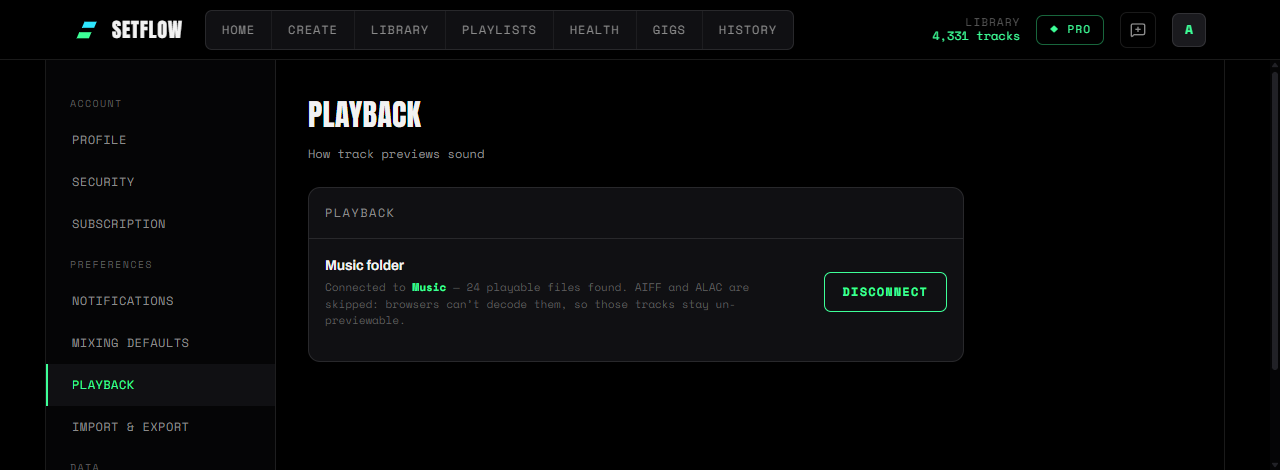
  • •Settings → Playback — choose your music folder once. SetFlow reads a file only when you press play on it, nothing is uploaded, nothing is modified, and you can disconnect whenever you like.
A generated set in SetFlow with a play button on every track row and the preview player bar along the bottom showing the playing track, a scrubber and elapsed time
One player for the whole app — start a track anywhere, it follows you between pages.

Worth knowing

  • •Chrome or Edge on desktop — only Chromium browsers can open a folder for a web app. On Safari, Firefox and phones the play buttons stay inactive and everything else works as before.
  • •Your files, or nothing — we deliberately don't fall back to a 30-second clip from a music shop. For a remix, an edit or a white label that clip is the original release, which is not the track you're about to play.
  • •MP3, M4A, WAV, FLAC and Ogg play — AIFF and ALAC can't be decoded by browsers, so those tracks stay un-previewable even once your folder is connected.
  • •Your browser will ask again — folder access is dropped when you close the last SetFlow tab. That's one click to restore, not a re-pick, and you can do it straight from any play button.
The Playback section of SetFlow settings showing a connected music folder with the number of playable files found, and a button to disconnect it
Settings → Playback — one folder, read-only, disconnect any time.

More on why a browser can't normally touch your music, and what changed: Why web DJ tools can't play your tracks.

v2.24.0
NewImproved

Generated Sets, Redesigned — Cards, Colour, One Swap

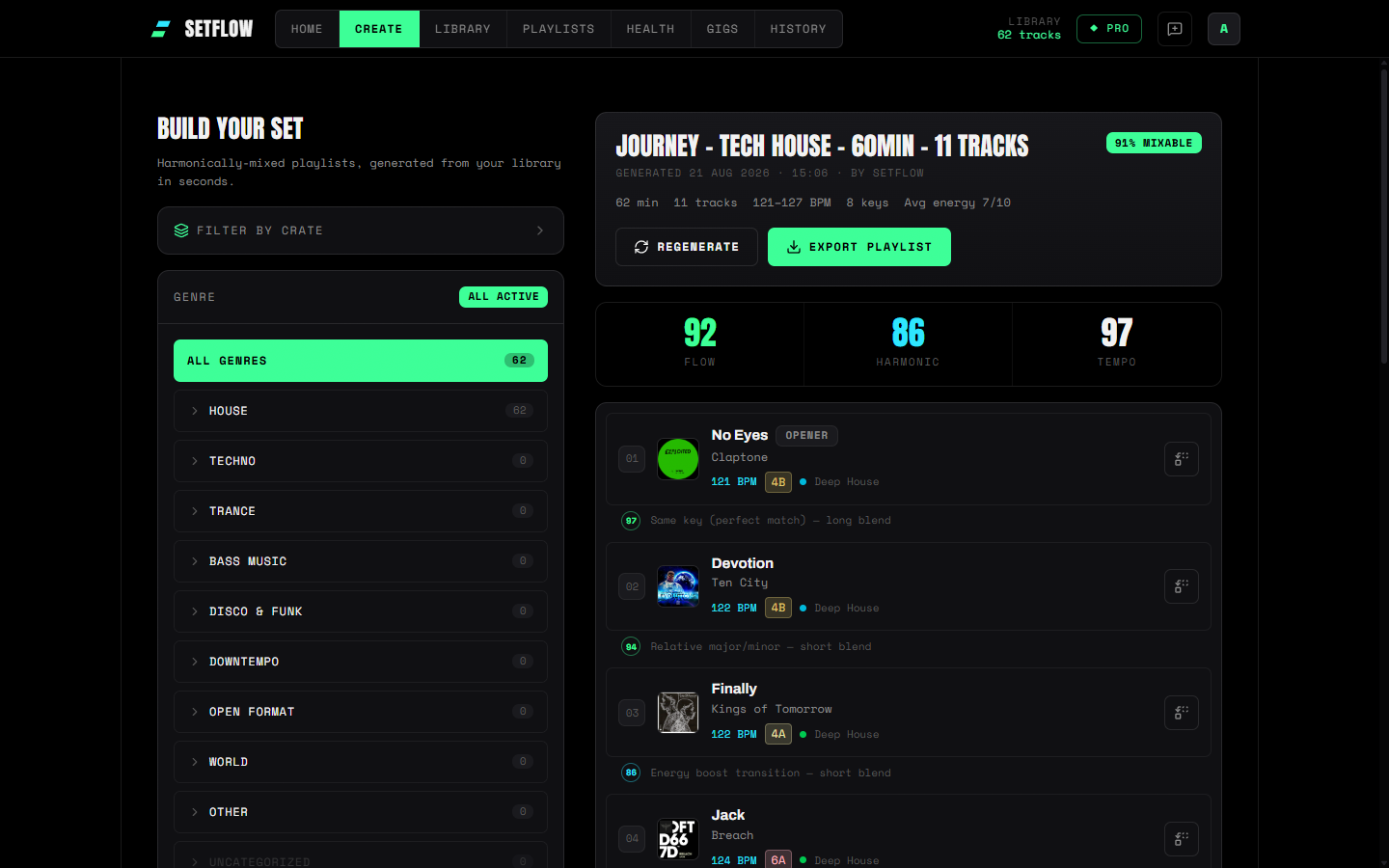
The set Create builds for you used to pack nine things onto every track row. It's now cover art, a title, an artist — and one quiet line underneath for the rest, with the transition between two tracks told once instead of twice.

New

  • •Track cards, not columns — cover art leads every row, with BPM, key, energy and genre folded into a single caption line instead of five separate chips fighting for space.
  • •Colour that means something — BPM in cyan, energy on a blue-to-orange dot, and key on a Mixed In Key-style colour per Camelot value — the same palette the public share page has used all along, now consistent everywhere you look at a set.
  • •One transition, one line — a small scored connector sits between each pair of cards, replacing a warning badge on one row and a separate annotation on the row above that (a genuine bug) didn't actually describe the same transition.
  • •The opener, marked — the first track in a set gets a small “Opener” badge next to its title.
A generated set on the Create page showing the redesigned track cards: cover art, title and artist, a caption line with coloured BPM, key and energy, and a scored connector between tracks
Every track's BPM, key, energy and genre now live on one line under the artist.

Improved

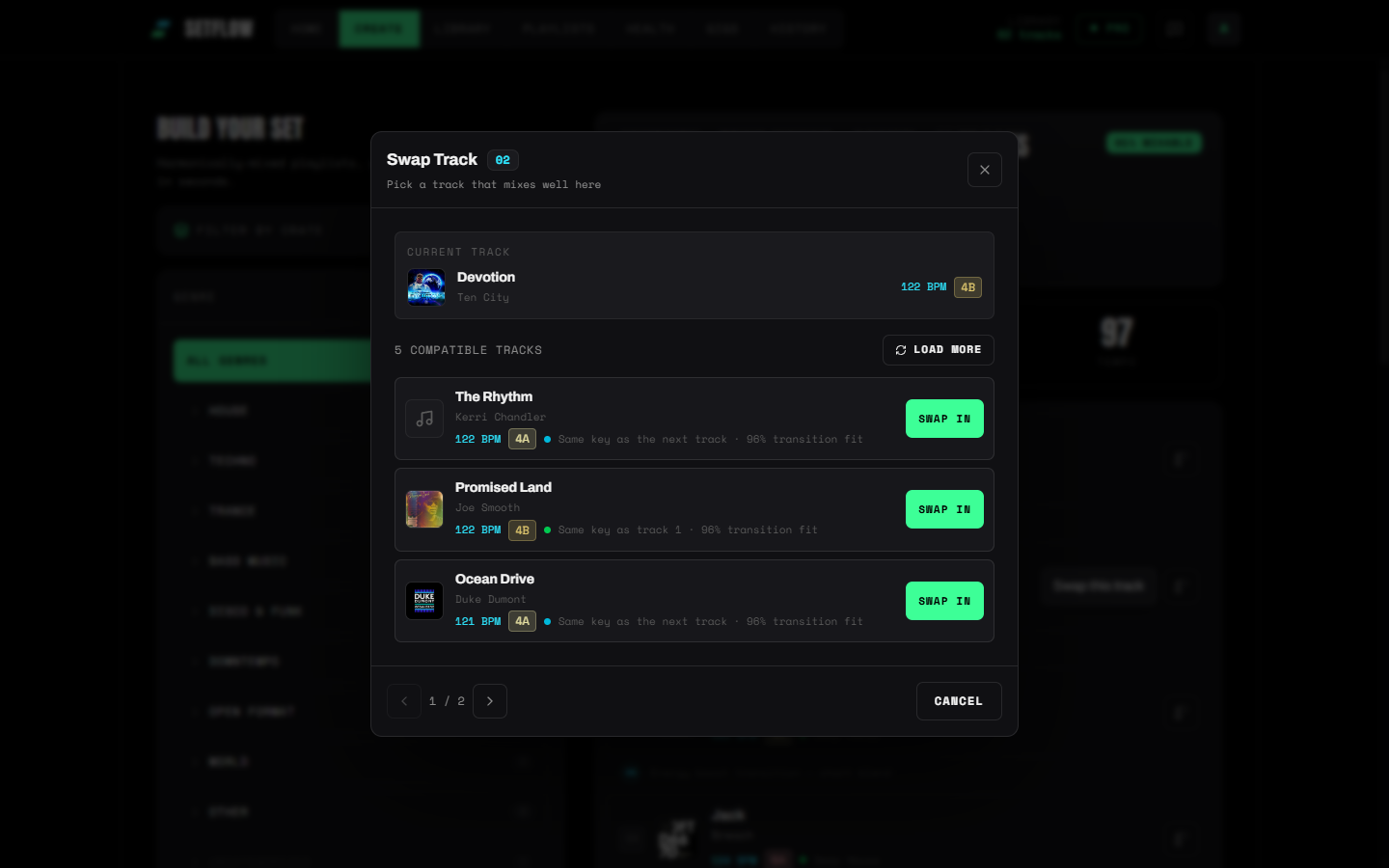
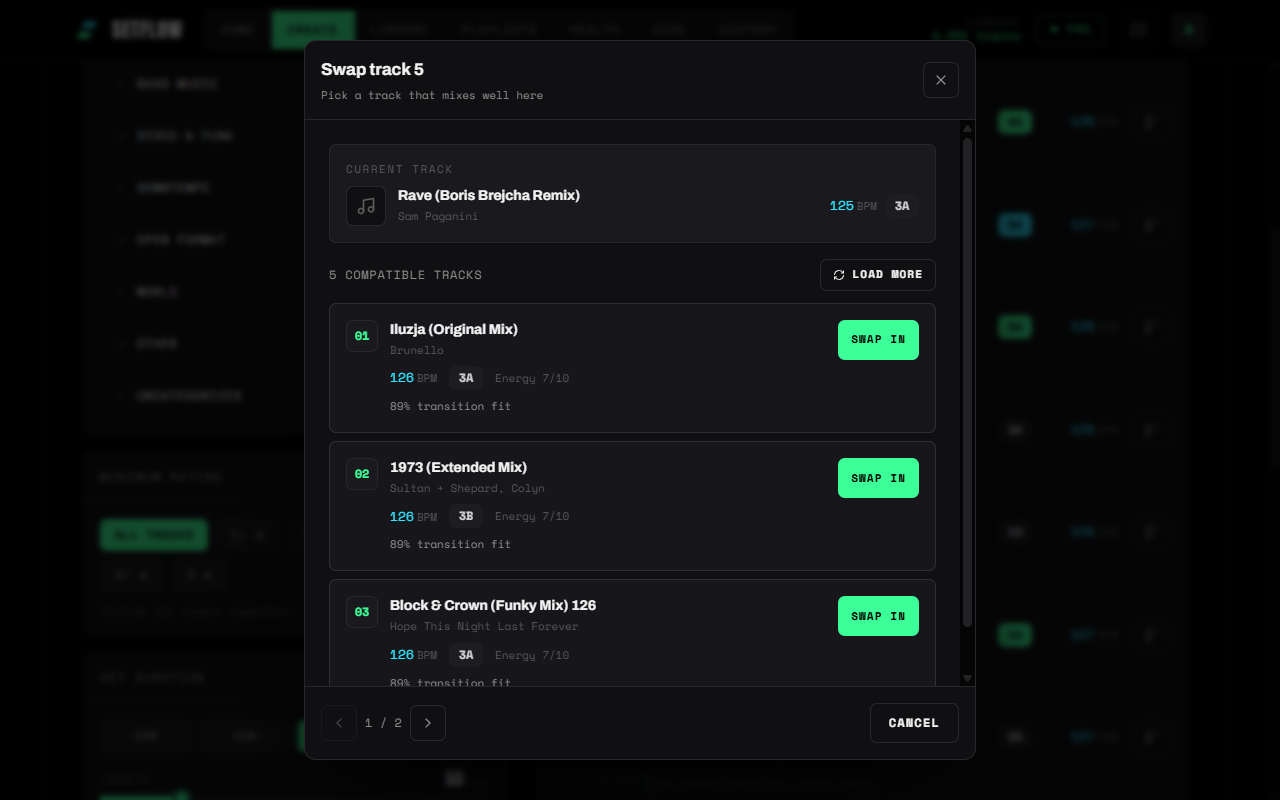
  • •Swap, simplified — the per-track Swap button and the “alternatives for this slot” list used to offer the same thing two different ways with no explanation. There's now one Swap modal, backed by a live search across your whole library.
  • •Cover art in the Swap modal too — the current track and every suggestion now show real artwork instead of a placeholder icon, and each row is roughly half the height it was.
  • •A tidier heading — “Swap Track” with the slot number in a small badge, instead of a plain number stuck on the end.
The Swap Track modal showing the current track with cover art, and three compact library suggestions each with artwork, BPM, key, and a transition-fit reason
One search, real cover art, no more guessing which of two lists to use.

Visual only — locking, swapping, alternatives and every export format work exactly as before. Mobile gets the same cards, just narrower.

v2.23.0
NewImproved

Set Tags — Label Your Sets, Find Them Later

Set History used to greet you with thirteen buttons before you'd found a single set. It now opens with three — search, sort, filters — and you can tag your sets however you actually think about them. “Best for Pacha”. “Sunset”. “Tested live”. Your words, not ours.

New

  • •Tags on sets — add up to twelve labels to any set from its card in History. A venue, a slot, a crowd, a note to self. Tags are private to you and never appear on a set you share with a promoter.
  • •Filter by tag — tap a tag on any card to narrow History to it, or pick several in the Filters panel to find the set that was both “Pacha” and “Tested live”. Search matches tags too.
  • •Suggestions as you type — the tag editor offers the tags you've already used, so a season's work doesn't end up split across “Pacha”, “pacha” and “Pacha ”.

Improved

  • •Sorting says what it does — one menu with plain options (“Newest first”, “Highest rated”, “Longest”) replaces the old dropdown-plus-arrow pairing, where you had to read two controls to work out which way round you were looking. Sorting by name is new while we were in there.
  • •Filters fold away — energy, source and tags now live behind a single Filters button that tells you how many are switched on. The eleven filter chips that used to sit on screen permanently are one tap away when you want them and out of sight when you don't.
  • •You can see what you filtered — whatever is active shows as a row of pills with the result count, each one removable on its own. No more closing a panel and forgetting why half your sets vanished.
  • •Better on a phone — the controls stack instead of squeezing, which matters when you're checking a tracklist in a taxi on the way to the club.

Existing sets keep every filter and sort you had before — nothing was removed, it just stopped shouting. Tags start empty; add the first one from any set card in History.

v2.22.0
New

Cover Art — Your Library, With Album Covers

Your library has always been a wall of text. Now it has covers. SetFlow can find the artwork for your tracks and show it everywhere you look at music — the library, the set you just generated, your history, and the pages you share with promoters.

New

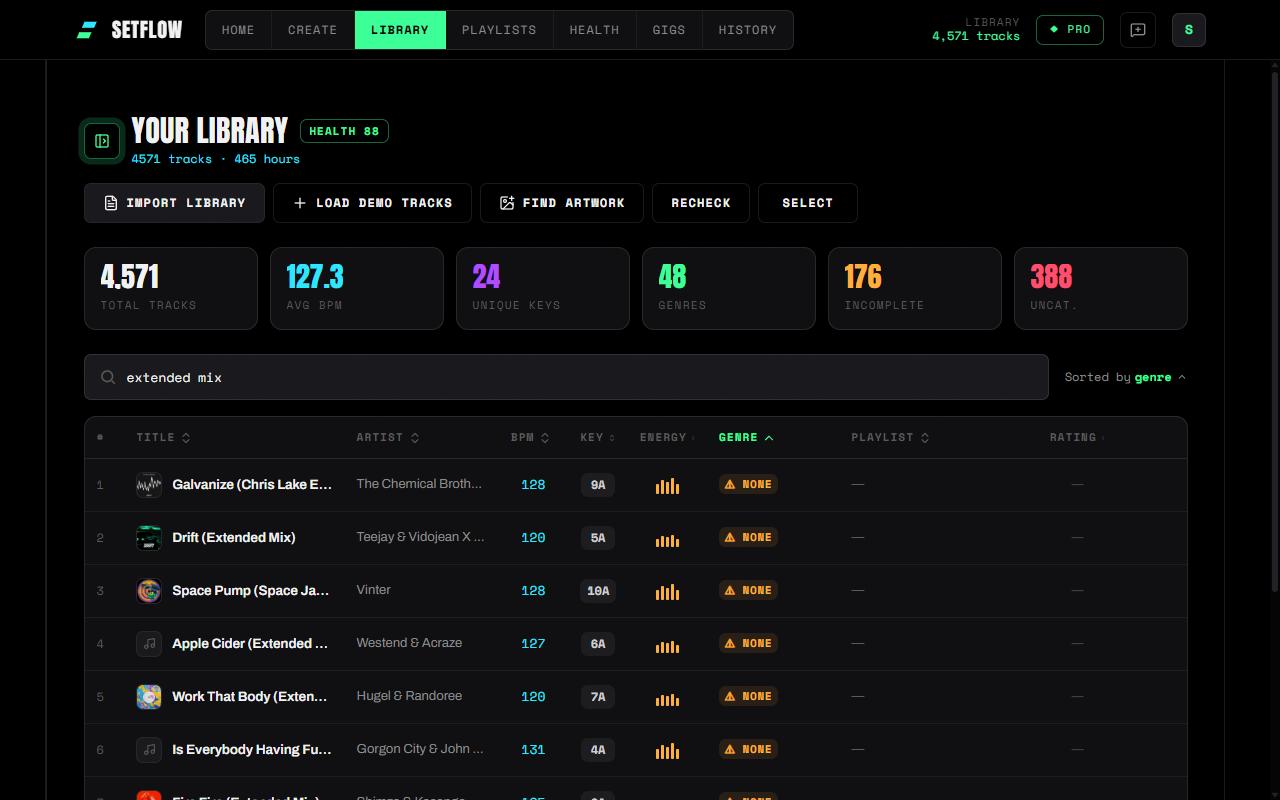
  • •Find Artwork — one button in your Library looks up cover art for every track that doesn't have it, matching on title and artist. Your DJ software never exports artwork (Rekordbox XML has no field for it at all), so this fills a gap the export simply can't.
  • •Covers everywhere that matters — library rows, the generated set on Create, expanded sets in History, and public share links. Click any cover in the app to see it full size.
  • •Runs while you work — a progress bar shows how far along the scan is and how many covers it has found. Reload the page or come back later and it picks up where it left off; hit Stop whenever you like.
  • •Careful about what it matches — both the artist and the title have to agree before a cover is accepted, and tracks credited to “Unknown Artist” or “Various” are skipped entirely. An empty square beats the wrong album.
  • •Recheck — tracks that came back empty can be tried again later. Music catalogues are busy places, and a track that missed today might match next week.
A SetFlow library with cover art beside each track title, and the Find Artwork button in the toolbar
Covers in the library — found from your existing title and artist data, no re-tagging required.

On a real 4,500-track collection this found covers for roughly 86% of tracks with proper artist metadata. Bootlegs, white labels and unreleased edits won't match — they're not in any catalogue to be found.

The full story of why your DJ software loses artwork in the first place is in the companion blog post.

v2.21.0
Improved

Sets Planned to the Minute — With Your Real Track Lengths

Set generation used to assume every track runs six minutes. Now it plans with your real track lengths — so a 90-minute request comes out as 90 planned minutes, whether your library is 3-minute radio edits or 8-minute extended mixes. Energy detection got smarter across the board too.

Improved

  • •Sets planned to the minute — the generator builds against the actual playing time of the tracks it picks and stops when the set lands closest to your requested length, instead of counting to a fixed number of six-minute slots.
  • •Estimates from your library — the Set Builder's track-count estimate now uses your library's real average track length (you'll see it in the estimate line), and Quick Mix percentages scale it correctly.
  • •Honest set durations — a saved set now shows its actual planned playing time. If your library genuinely can't get close to the requested length, SetFlow tells you instead of pretending.
  • •Locks and pins are respected — the new stop rule never drops a locked track, and a pinned outro's playing time is reserved so the closer still fits inside your slot.
  • •Smarter energy for all 55 genres — the genre-based energy detection now covers the full genre list. Drum & Bass, Bass House, Minimal / Deep Tech, Amapiano, Mainstage and more previously fell back to generic guesses. Applies to newly imported (or re-imported) tracks; existing tracks keep their stored energy.
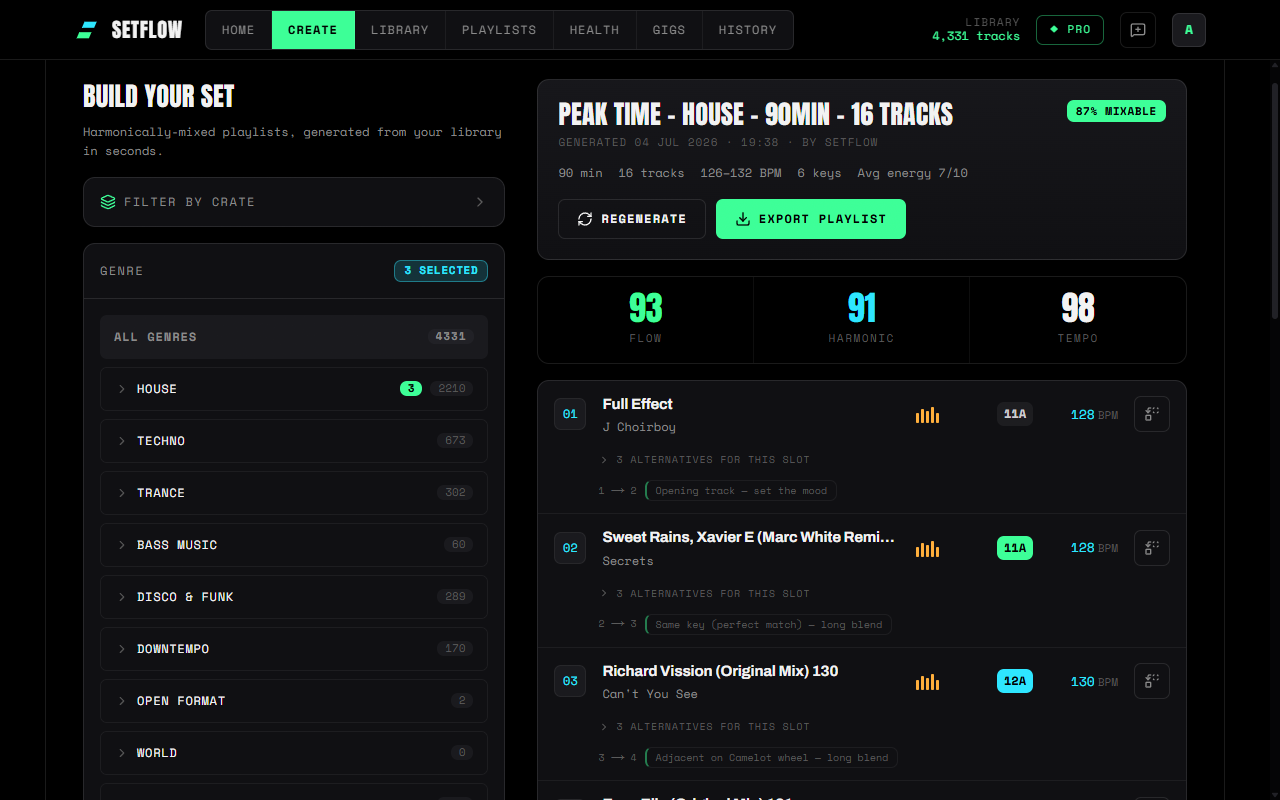
A generated 90-minute house set in SetFlow showing exactly 90 planned minutes across 16 tracks, with flow, harmonic, and tempo scores
A 90-minute request, planned as 90 minutes across 16 real tracks — not sixteen guesses.

Full walkthrough in the companion blog post.

v2.20.0
New

Slot Alternatives & Gig Crates — A Plan B for Every Set

Two features for the gap between the set you planned and the night you actually play. Every generated set now carries ranked backup tracks for each slot, and any gig with a linked set can build a gig crate in one click — your set plus the most compatible tracks from your library, so you never search your full collection mid-set.

New

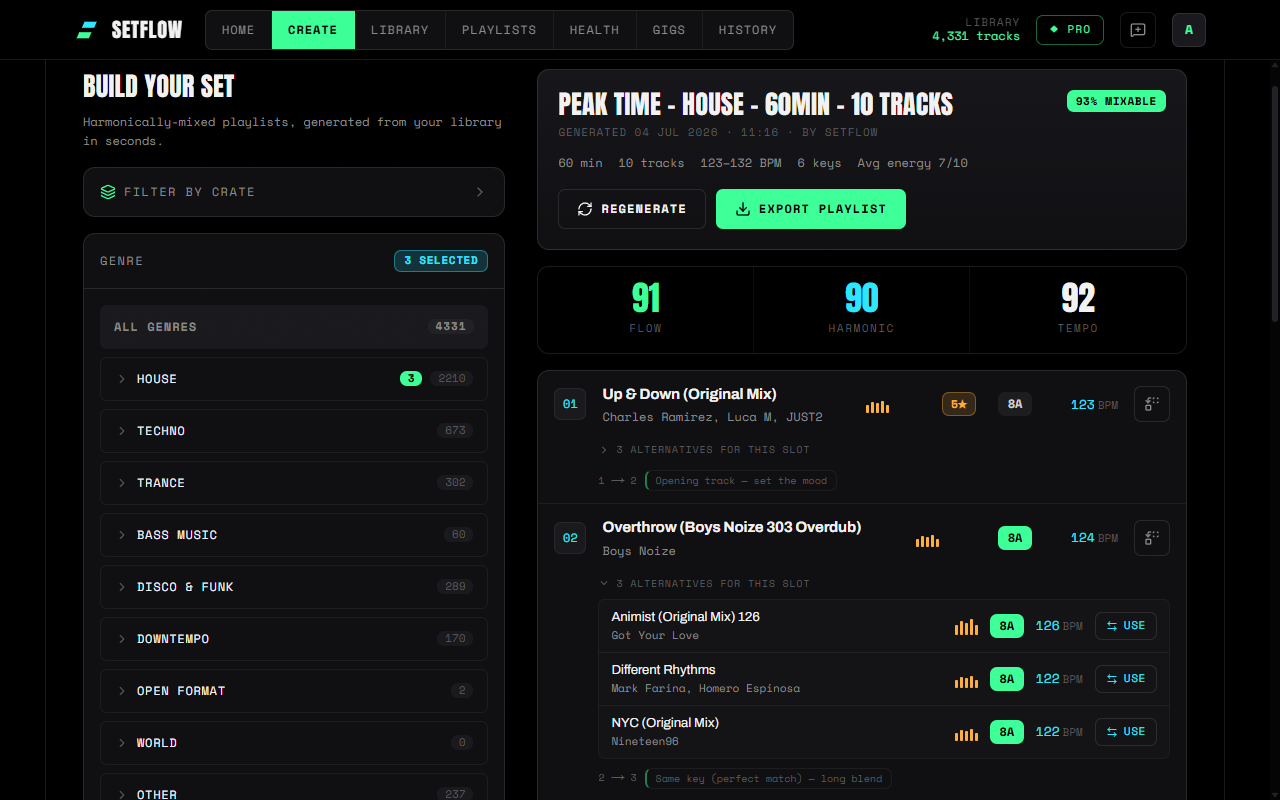
  • •Alternatives for every slot — the generator keeps the top three runner-up tracks it scored for each position. Expand any track row to see them, each with key, BPM, and energy, ranked for that exact slot — a skeleton you can flex on the night, not a locked script.
  • •One-tap, reversible swaps — hit Use on an alternative and it drops into the slot; the outgoing track joins the alternatives so you can flip back. Transition notes recalculate and the change saves itself. Works on fresh sets and in History, on every plan.
  • •Gig crates — on any gig with a linked set, one click builds a crate: your set in order, padded with the most compatible tracks from your library (scored on harmonic fit, BPM — half-time aware — energy, and genre).
  • •Three sizes with live counts — Tight (~2× your set), Standard (~3×), or Deep (~5×), with exact track counts shown before you commit. The crate is named after the gig and date.
  • •It's a normal crate — use it as a generation source on Create, export it to your DJ software, or edit it like any other crate. Counts as one of your manual crates.
A generated set in SetFlow with one track's alternatives expanded — three ranked backup tracks with key, BPM, energy, and a Use button each
Every slot carries up to three ranked alternatives — one tap to swap, one tap to swap back.

Full walkthrough in the companion blog post.

v2.19.0
New

Weekend Pass — Full Pro for 72 Hours, No Subscription

Not every DJ wants a subscription. If you only gig now and then, paying every month for a tool you touch twice doesn't add up. The Weekend Pass fixes that: full Pro for 72 hours, one-time, £2.99 — no subscription, nothing to cancel. Prep your set, play the gig, done.

New

  • •Full Pro for 72 hours — unlimited tracks and sets, 3-hour mixes, smart crates, and every export format (Rekordbox, Traktor, Serato, PDF, TribeXR) for one flat £2.99.
  • •One-time, no auto-renew — it's a purchase, not a plan. Nothing renews, nothing to cancel, no surprise charge next month.
  • •Instant activation with a live countdown — Pro unlocks the moment you pay, and a 72-hour timer ticks down in the app so you always know how long you've got.
  • •Your library stays put — when the pass ends, your tracks and saved sets are exactly where you left them. Grab another pass or subscribe whenever your next gig comes around.
  • •AI included — every pass comes with 3 AI library fixes (genres + artists) and 5 AI set analyses, enough to clean a whole library before a gig.
  • •It's a pass, not a plan — your saved plan is untouched, so you can still start a proper subscription any time without being double-charged. Settings shows the pass on top of your plan, with the countdown.
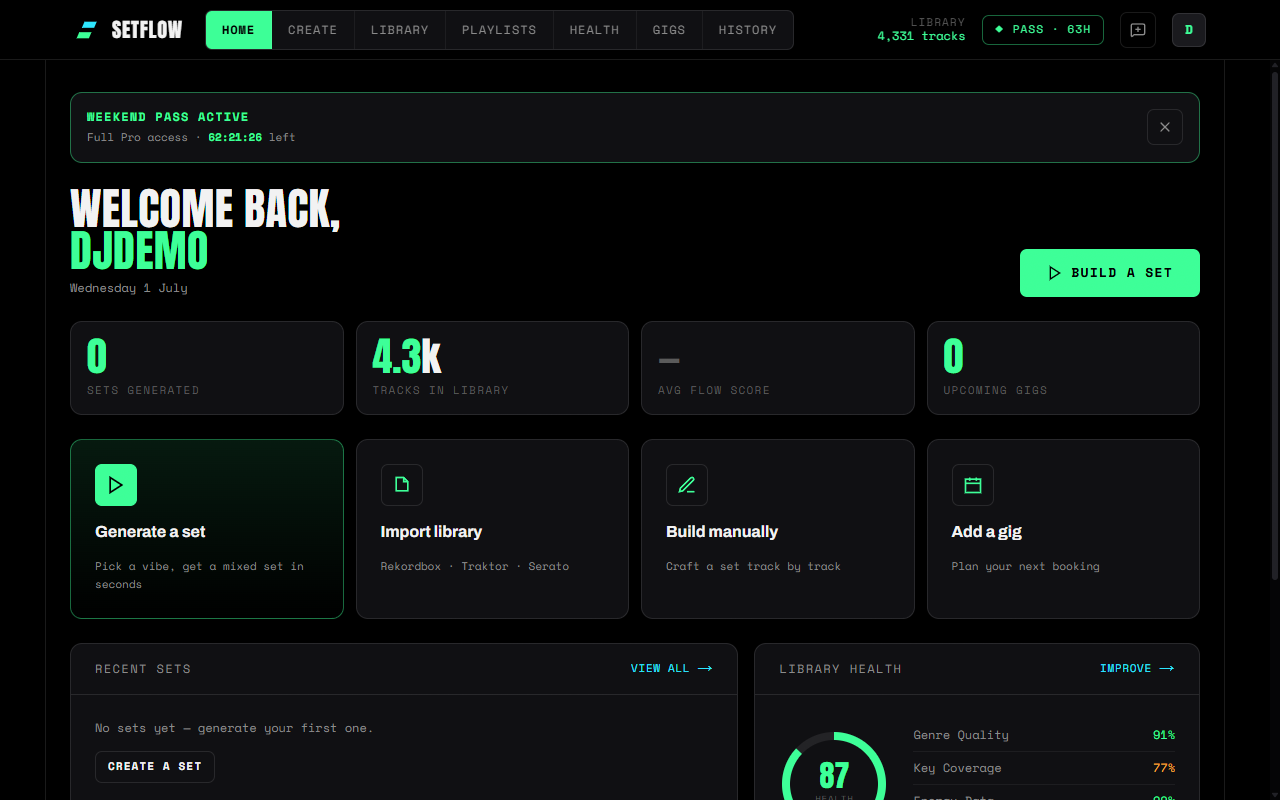
SetFlow dashboard with an active Weekend Pass — a lime PASS chip in the top bar and a Weekend Pass Active banner showing full Pro access with a live 72-hour countdown
An active Weekend Pass — full Pro access with a live countdown to expiry.

Full walkthrough in the companion blog post.

v2.18.0
New

Swap Any Track — One Tap to a Better Fit

Love a set but not one track in it? Every track now has a Swap button that hands you the best-fitting alternatives from your library — scored for the exact slot, so you can change one track without unpicking the mix around it.

New

  • •Swap on every track — on generated sets and on saved sets in History. Tap Swap and pick from a ranked shortlist of compatible tracks, each with its key, BPM, energy, and a transition-fit score.
  • •Scored on both sides of the mix — every suggestion is graded on how it mixes out of the previous track and into the next one, so a replacement tightens the set instead of fixing one transition and breaking another.
  • •Tuned to the gap you're filling — suggestions bridge the tracks around the one you're removing, so even if that track was a tempo outlier you still get candidates that close the gap cleanly.
  • •Tidy, in-place edit — transition notes recalculate around the new track, the rest of your order stays put, and swaps on saved sets are written straight back to your history.
  • •On every plan — the scoring is pure harmonic maths, so there's nothing to pay and nothing to wait for. Works the same on desktop and mobile.
The Swap panel showing the current track and a ranked list of compatible library tracks, each with BPM, Camelot key, energy, a transition-fit percentage, and a Swap in button
Tap Swap on any track and SetFlow ranks the tracks that mix in cleanest for that slot.

Full walkthrough in the companion blog post.

v2.17.0
ImprovedNew

Set Workbench — A Rebuilt Playlist Builder

We rebuilt the manual playlist builder into a single live workspace. Your library and the set you're building now sit side by side, a new Set Timeline shows your energy arc and mix quality in one strip that updates as you work, and your in-progress set autosaves so a stray refresh never loses it.

Improved

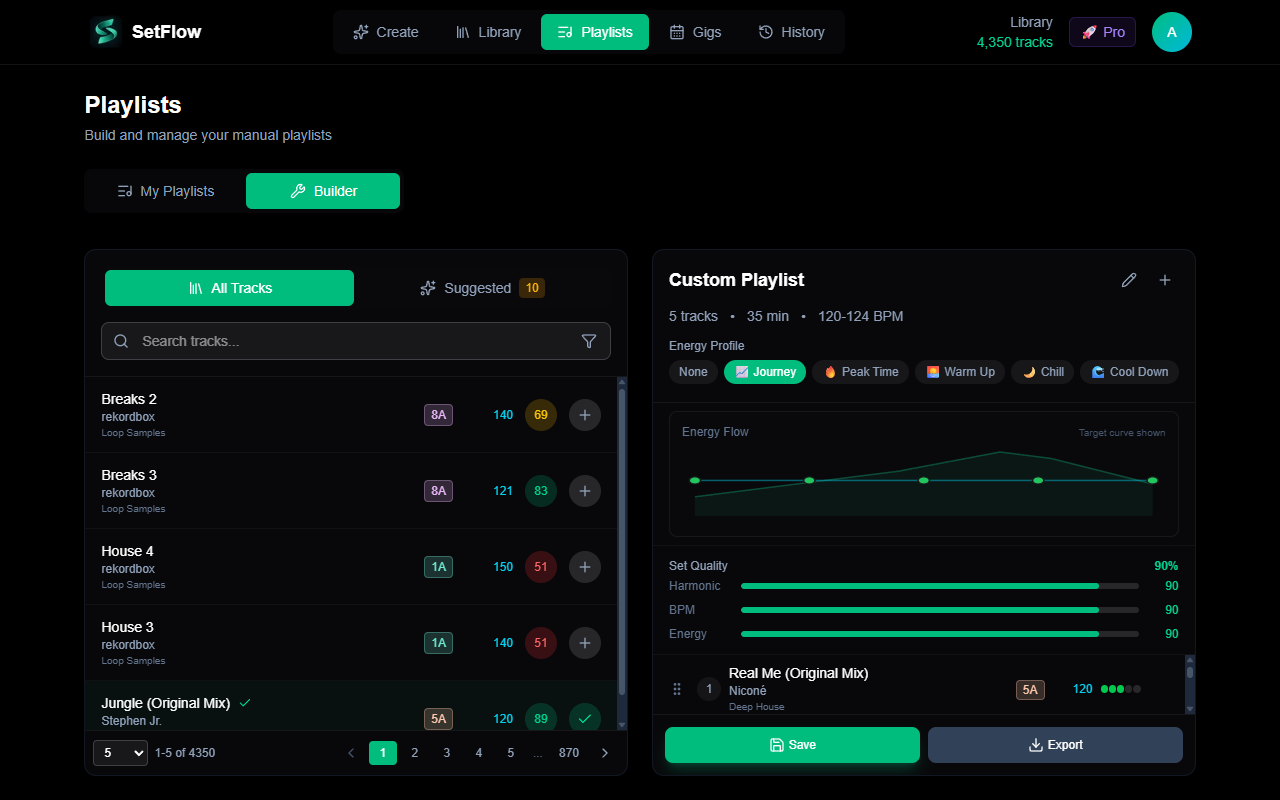
  • •One workspace — the track picker and your set are now side by side. Add, remove, or drag-to-reorder and the whole right-hand panel reacts on the spot — no jumping between separate cards.
  • •Live Set Timeline — the separate energy chart and quality bars are now a single strip: every track's energy in order against your chosen profile, with live Harmonic, BPM, and Energy scores underneath. Watch a set tighten up as you build it.

New

  • •Suggested next tracks — a Suggested tab right in the picker scores your library against your last track and surfaces the cleanest mixes, each with a compatibility score and a plain-English reason (“perfect key match,” “builds energy”).
  • •Draft autosave — the set you're building (name, tracks, energy profile, target duration) saves automatically in your browser. Refresh or come back tomorrow and it's exactly where you left it, marked Editing saved. It only clears when you start a new set.
The rebuilt playlist builder: library with All Tracks and Suggested tabs on the left, the set on the right with a live Set Timeline and Harmonic/BPM/Energy quality scores
One workspace — your library on the left, your set on the right with a live Set Timeline and quality scores.

Same harmonic-mixing engine, a faster way to drive it by hand. Full walkthrough in the companion blog post.

v2.16.0
New

Genre & Artist Fixes — Clean Your Library for Better Sets

Library Health can now fix your messiest metadata for you. Two new Pro tools tackle the things that quietly keep tracks out of your sets: unrecognised or missing genres, and tracks dumped in as “Unknown Artist”. Cleaner, recognised tracks mean fuller, better sets — and it all stays inside SetFlow.

New

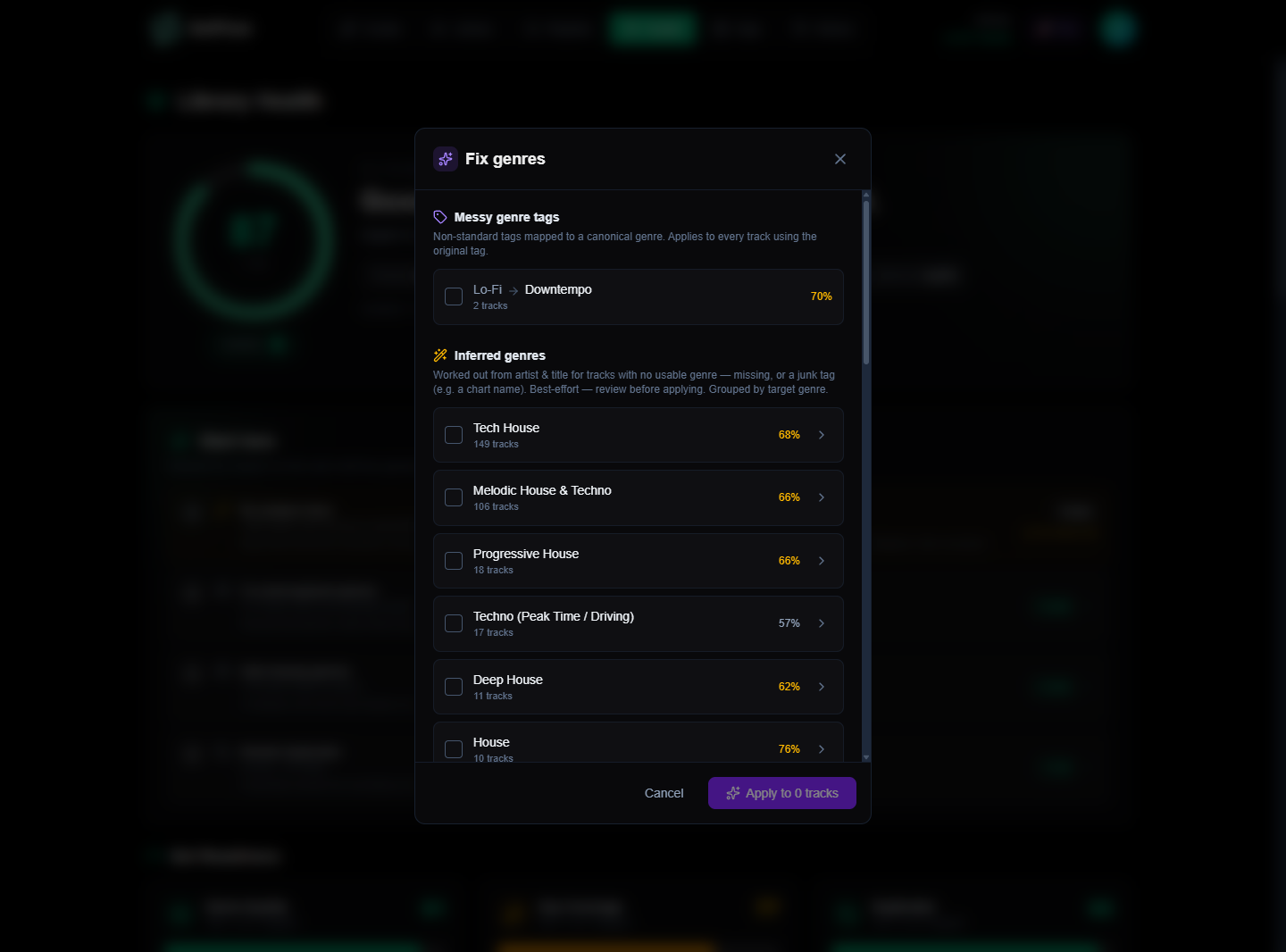
  • •Fix genres — maps non-standard genre tags to SetFlow's canonical list, using context (how many tracks use a tag, plus example tracks) to get ambiguous ones right. It also infers a genre for tracks that have none, from the artist & title. Recognised genres make those tracks eligible for genre and cross-genre sets — tracks that were silently being skipped. Chart / store / junk tags (e.g. “Top 100”) are correctly left alone.
  • •Fix artists — parses the artist (and cleans the title) out of messy imports like “12. Artist - Track (Original Mix)”. Where a track is a duplicate re-import of one you already have cleanly tagged, the messy copy is removed; the genuinely new ones are fixed in place.
  • •Review before anything changes — every suggestion shows the proposed change and a confidence score. High-confidence fixes are pre-selected, duplicates are flagged “will remove”, and nothing is written until you hit apply.
  • •Reflected immediately — applied fixes update your Set Readiness score and your Library on the spot.
The Fix genres modal: a messy tag mapped to a canonical genre plus inferred genres grouped by target (Tech House, Melodic House & Techno, Deep House) with confidence scores
Messy tags normalised, and missing/junk-tagged tracks given a genre inferred from artist & title — grouped by target, with a confidence on each. Review, then apply.

Pro feature. SetFlow reads each track's artist, title and genre to work out the fix, and nothing changes until you review and apply. These fixes exist to improve the sets SetFlow builds for you; SetFlow doesn't write anything back to your DJ software — the only thing you export is your finished set. Full walkthrough in the companion blog post.

v2.14.0
New

Library Health — Score & Fix Your Library for Better Sets

A new Library Health dashboard scores your library on the metadata that actually drives set quality — genre, key and duplicates — ranks the highest-impact fixes, and links you straight to the tracks that need attention. Find it under the new Health tab.

New

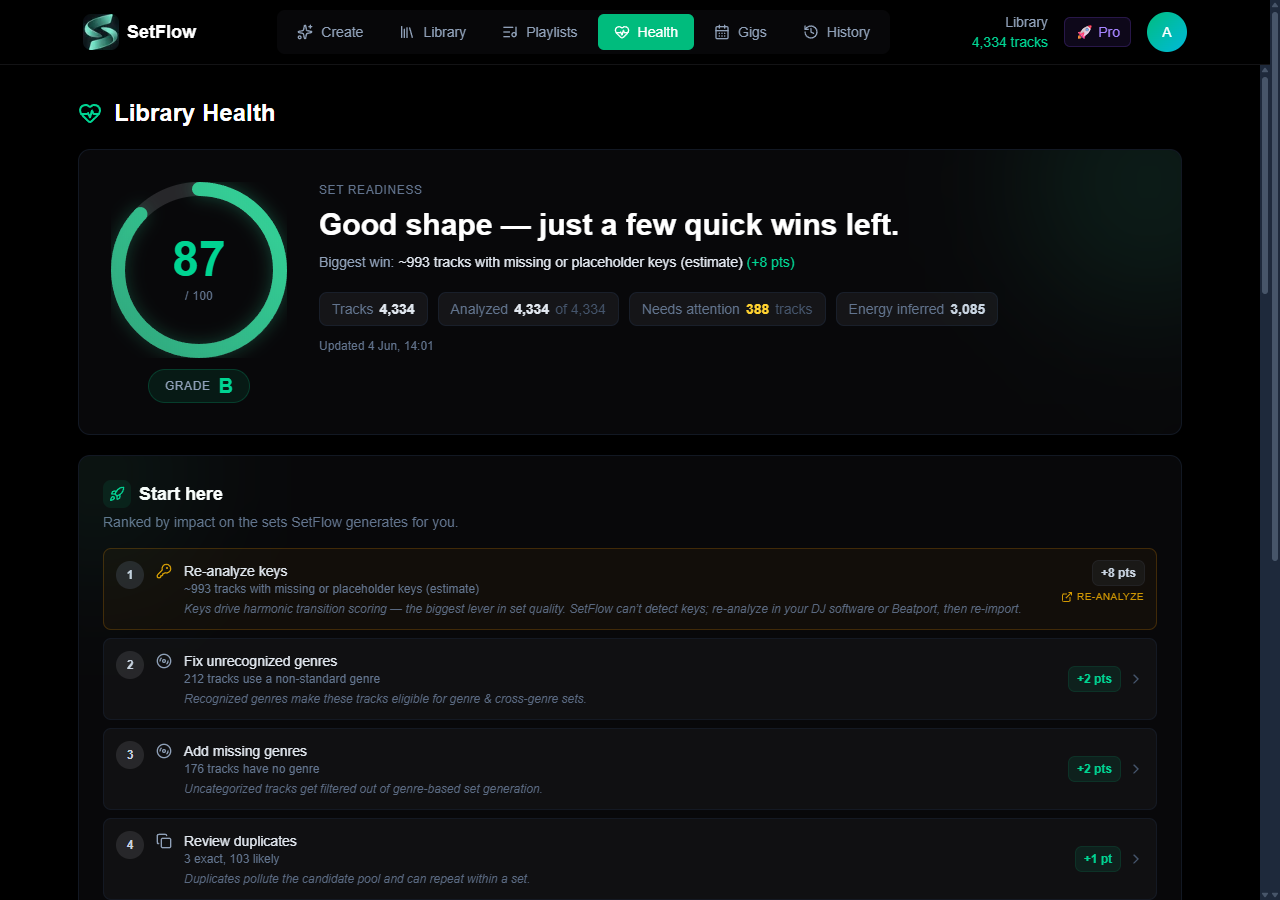
  • •Set Readiness score — one 0–100 score (with a letter grade) weighted only on what the generator consumes: genre (filtering & cross-genre), key (harmonic transitions) and duplicates. Energy is shown as informational (SetFlow infers it), and artist/album are framed as library hygiene — neither drags your score.
  • •“Start here” fixes — issues ranked by their estimated point gain, each explaining why it matters for your sets. Genre fixes and duplicates are actionable in-app; keys appear as a re-analyse advisory (SetFlow can't detect keys).
  • •Harmonic-coverage Camelot wheel — shaded by whether you can mix out of each key, not raw track count. A sparse key stays healthy if its compatible neighbours are full; only genuinely isolated keys are flagged.
  • •Library deep-links — one click from any theme to your Library, pre-filtered to exactly the affected tracks, with a matching count. Plus full per-theme fix lists and duplicate detection (exact + likely).
The Library Health dashboard showing an 87/100 Set Readiness score, grade B, and a ranked 'Start here' fix list
One Set Readiness score, the biggest win called out, and a ranked list of what to fix first.

Full walkthrough — including the honest harmonic-coverage wheel and how to fix what it finds — in the companion blog post.

v2.13.0
NewImprovedFixed

Serato DJ Support, Sidebar Redesign & Cleaner Confirms

Serato DJ Pro is now a first-class library source in SetFlow. Import your _Serato_ folder, generate harmonic sets, and export back as native .crate files. Plus a redesigned Library sidebar and a much cleaner Clear Library flow.

New

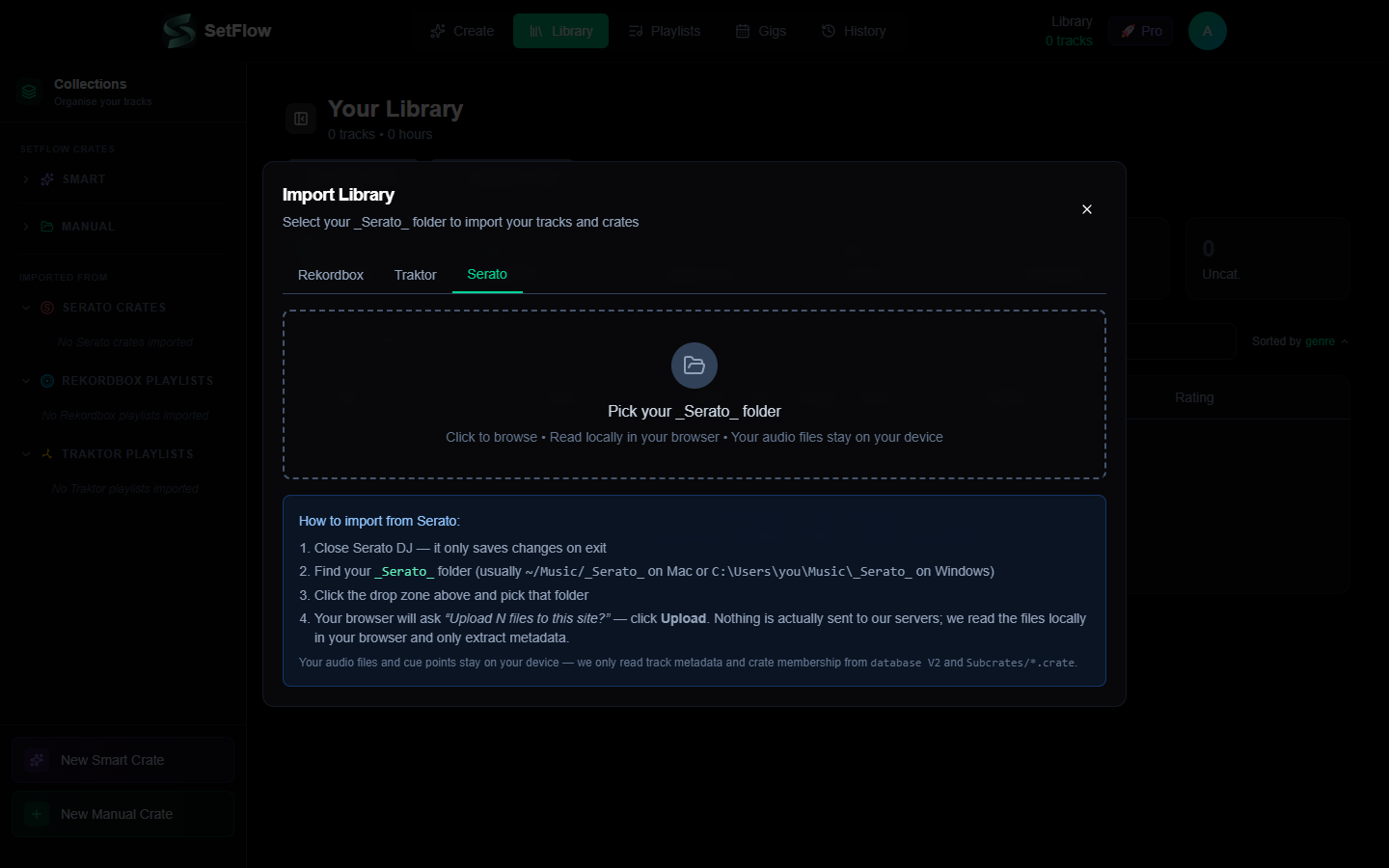
  • •Serato library import — point at your _Serato_ folder and we read the binary database V2 plus every Subcrates/*.crate automatically. Full BPM, key (Open Key → Camelot), genre, rating, and crate metadata imports just like Rekordbox and Traktor.
  • •Serato crate export — new Serato Crate button in every export panel produces a binary .crate file. Drop it into _Serato_/Subcrates/, reopen Serato, the crate appears with all tracks linked.
  • •Folder upload UX — Serato's library is folder-based (not a single file). The import modal's Serato tab uses a folder picker with explicit messaging that nothing is uploaded to our servers — we read everything locally in your browser.
  • •Crate hierarchy — Serato's%% nested-folder convention is parsed correctly (e.g. House%%Deep.crate → folder path House / Deep).
The Serato tab in the Library import modal — folder drop zone with step-by-step instructions
The new Serato tab sits alongside Rekordbox and Traktor.

Improved

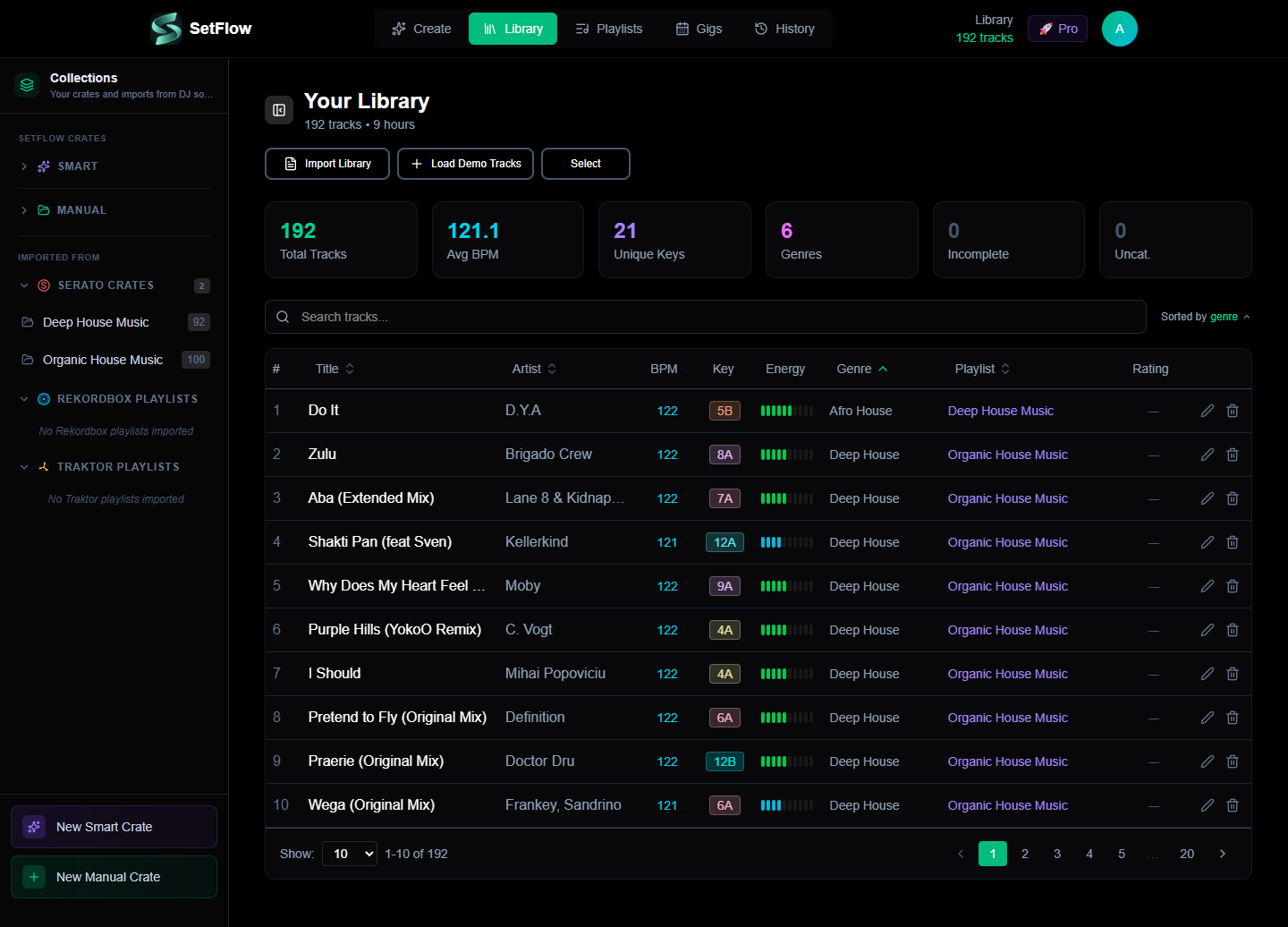
  • •Library sidebar restructured — renamed to Collections with two clear groups: SetFlow Crates (your Smart and Manual crates) and Imported From (Serato Crates, Rekordbox Playlists, Traktor Playlists). All three import sections are always visible so you know where each DJ software's content will land.
  • •Smart expand/collapse — empty sections collapse, sections with 1–5 items expand, large sections collapse to avoid scroll walls. Your manual choices persist across reloads via local storage.
  • •“Import All” now creates playlists / crates — previously this only persisted the flat track list. Now all discovered playlists and crates come with it, regardless of which DJ software you import from.
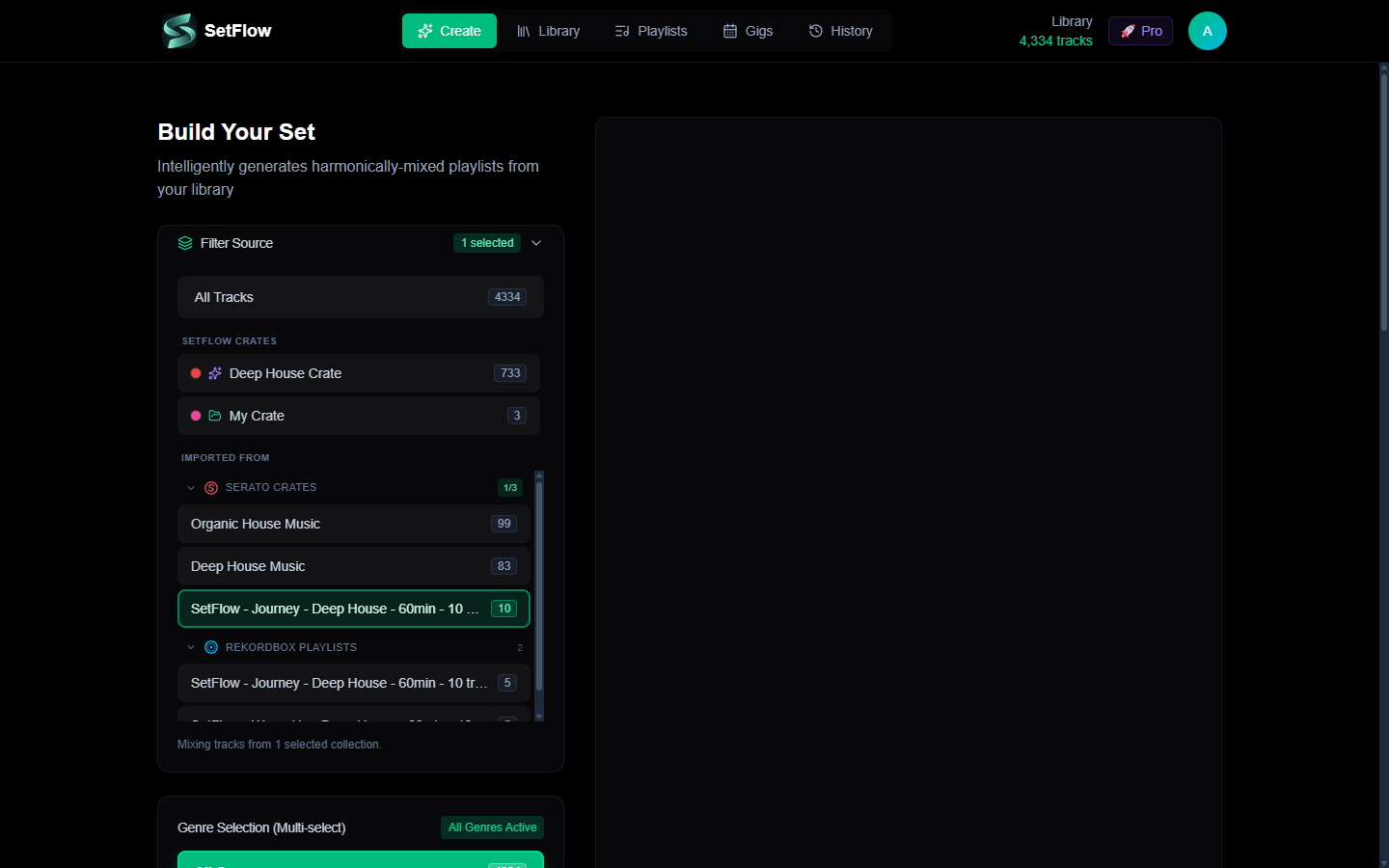
  • •Unified Filter Source on the Create page — the old stacked Filter by Playlist and Filter by Crate cards are replaced by one grouped picker mirroring the Library sidebar (SetFlow Crates / Imported From). Sub-groups for Serato, Rekordbox and Traktor are individually collapsible with smart defaults and localStorage persistence. Per-source 1/3 badges make selection state scannable without expanding.
  • •Confirm dialogs redesigned — the “Are you sure?” modal now supports structured bullets, info notes, and warning callouts with appropriate icons. Replaces walls of paragraph text with scannable visual hierarchy.
The new Collections sidebar with Serato Crates section showing two imported crates
Imported Serato crates show up as a dedicated section, distinct from your SetFlow-native crates.
The new unified Filter Source picker on the Create page — SetFlow Crates group and Imported From group with collapsible Serato/Rekordbox/Traktor sub-sections
One Filter Source card on Create replaces the old stacked Filter-by-Playlist + Filter-by-Crate pair.

Fixed

  • •Clear Library now wipes imported playlists too — previously this only deleted track rows, leaving stale 0-track playlist headers in the sidebar. Now both are cleared in one action. SetFlow Smart and Manual crates are explicitly preserved — those are user-created organisation, not imported data.
  • •Playlist source preserved on import — the POST /api/playlists handler had a stale ternary that silently relabelled any non-recognised source to rekordbox. Serato crates now correctly persist as source: serato. Regression test added to prevent recurrence.

Read the full walkthrough including the round-trip workflow and the format-internals story in the companion blog post.

v2.15.0
NewImprovedFixed

Large Library Performance & Import Fixes

  • •30K+ track library support — fixed an import validation issue that blocked large Traktor and Rekordbox collections with multi-genre tags (e.g. “Downtempo, Ambient, Chillout, Electro”). Genre limit raised from 50 to 200 characters
  • •Set generation Web Worker — set generation now runs off the main thread, so the UI stays fully responsive while your set is being built. No more screen freezes on large libraries
  • •10x faster library loading — tracks now load in parallel batches instead of sequential requests. A 30,000-track library loads in under a second, down from 6–10 seconds
  • •Clean BPM display — BPM values from Traktor (e.g. 127.999252) are now rounded to whole numbers across the entire app. Existing tracks update on re-import
  • •Longer file path support — file path validation limit raised from 500 to 1,000 characters to support deeply nested folder structures and URL-encoded Rekordbox paths
v2.14.1
Fixed

iOS Safari & Mobile Modal Fixes

  • •iOS Safari auto-zoom fix — tapping inputs no longer causes the page to zoom in on iPhone. All form elements use the correct font size on mobile screens
  • •Dynamic viewport height for modals — modals now use dvh instead of vh, properly accounting for Safari's address bar, status bar, and home indicator
  • •Gig form mobile spacing — tighter padding, reduced textarea rows, and better grid gaps so the gig editor fits comfortably on small screens without horizontal overflow
  • •Link set modal viewport fit — search input, sort controls, and pagination no longer overflow on narrow screens
v2.14.0
NewImproved

Free Trial Export & Annual Pricing

  • •1 free export for trial users — trial users can now export one set in any format (M3U8, Rekordbox XML, PDF, TribeXR) before upgrading. Experience the full export workflow during your trial
  • •50% off annual billing — annual plans now save 50%. Hobby from £1.49/mo, Pro from £2.49/mo
  • •Social share buttons — share your public sets directly to X, Facebook, WhatsApp, and more from the public set page
  • •Mobile layout improvements — improved spacing and layout on history and gigs pages for mobile devices
v2.13.0
NewImproved

Track Metadata Editing & Quality of Life

  • •Track metadata editing — edit BPM, key, energy, genre, rating, and tags directly from your library. Changes persist and feed into the set generation algorithm for better results
  • •Compact edit modal — redesigned for mobile with BPM + Key and Genre + Rating side-by-side, a 1–10 energy bar, and a tag system — all visible without scrolling
  • •Install as app (PWA) — SetFlow can now be installed as a standalone app on your phone or desktop via your browser's “Add to Home Screen” or install prompt
  • •Email unsubscribe — all marketing emails now include a one-click unsubscribe link. You'll still receive important account emails (password resets, billing)
  • •Admin metrics optimisation — admin dashboard metrics now load significantly faster via SQL aggregation
v2.12.0
Improved

Mobile Import Experience

  • •Mobile-friendly import modal — the import library modal now works seamlessly on phones and small screens with responsive layouts, scrollable content, and touch-friendly controls
  • •Card-based track list — on mobile, tracks display as compact cards instead of a table, showing title, artist, BPM, and key at a glance
  • •Stacked controls — buttons, filters, and action bars stack vertically on small screens so nothing gets cut off or requires horizontal scrolling
v2.11.0
New

Traktor DJ Support

  • •Traktor NML import — import your Traktor Pro collection directly into SetFlow. The new Traktor tab in the import modal parses your NML file with full BPM, key, genre, and energy metadata
  • •Traktor key conversion — Traktor's MUSICAL_KEY values and Open Key notation are automatically converted to Camelot notation for harmonic mixing compatibility
  • •Playlist resolution — Traktor playlists and folder hierarchies are fully supported. Select which playlists to import, or import your entire collection at once
  • •M3U export for Traktor — new M3U download option on generated sets (Create page, History page, and expanded set view) for Traktor-compatible playlist export
  • •Unified import experience — the import modal now features Rekordbox and Traktor tabs with platform-specific instructions, file validation, and export guides
v2.10.0
New

TribeXR VR DJ Support

  • •TribeXR export — one-click export to TribeXR VR DJ from the Create page and History page. A guided 3-step modal walks you through platform selection (Quest, PC VR, Dropbox), set review, and download with platform-specific file paths
  • •Public set TribeXR section — shared set pages now include a collapsible “Use with TribeXR” section where anyone can download the rekordbox.xml and see platform-specific setup instructions — no account needed
  • •Duration quick presets — new 30m, 45m, 60m, and 90m buttons above the duration slider on the Create page for faster set configuration, especially useful for VR session planning
  • •TribeXR FAQ category — 4 new questions added to the Help Center under a dedicated “TribeXR & VR DJing” category, covering workflow, platform support, harmonic mixing, and VR DJ app compatibility
  • •Energy-to-colour mapping — exported tracks include Rekordbox colour codes derived from energy levels, providing visual energy indicators when loaded in TribeXR
v2.9.0
NewImproved

Help Center

  • •Help Center — the FAQ page has been completely redesigned into a proper help portal at /help with three tabs: Getting Started, FAQ, and Contact Support
  • •Getting Started guide — step-by-step walkthrough from importing your Rekordbox library to generating and exporting your first set, with pro tips and links to relevant blog articles at each step
  • •Contact Support — reach us directly from the Help Center. Pick a subject, describe your issue, and we'll get back to you within 24 hours. Pre-fills your name and email if you're signed in
  • •Tidied FAQ — trimmed from 42 to 28 focused questions, merged Algorithm and Harmonic Mixing into a single “How It Works” section, and organised everything under clear category headings with counts
  • •Blog links throughout — relevant blog articles are linked from both the Getting Started steps and 14 FAQ answers, making it easy to dive deeper into topics like harmonic mixing, energy flow, and Rekordbox tagging
v2.8.0
New

Shareable Set Links

  • •Shareable set links — generate a public link for any set and share it with other DJs, promoters, or on social media. Anyone with the link can view your tracklist, transitions, and energy flow
  • •Public set viewer — beautiful standalone page at setflow.app/s/… showing your set with BPM, Camelot keys, energy bars, transition notes, and an energy flow visualisation
  • •One-click share from History — new share button on every set card. Click to generate a link, click again to copy or remove it. Shared sets show a green indicator so you always know which sets are public
  • •Social media previews — shared links include Open Graph metadata with your set name, genre, track count, and energy profile so they look great when pasted into WhatsApp, Discord, Twitter, or Instagram DMs
  • •Privacy controls — only you can share or unshare your sets. Public pages never expose your account or internal data. Remove a share link at any time to make the set private again
NewImproved

Milestones, Monthly Reports & Smarter Emails

  • •Set milestones — hit 10, 50, or 100 generated sets and we'll celebrate with you. Each milestone email includes your stats and what you've achieved
  • •Monthly usage reports — Hobby subscribers get a monthly summary of sets generated, top genres, and how you're using SetFlow
  • •Hobby monthly reset — your 10 sets/month allowance now resets automatically on the 1st. No more manual intervention needed
  • •Helpful getting-started emails — new subscribers receive tips on days 3, 7, and 14 covering library organisation, energy profiles, and advanced features to get the most out of SetFlow
v2.7.0
NewImproved

Bigger Trial, Better Onboarding

  • •Bigger trial — import up to 500 tracks (was 100) and get 7 days (was 5) to generate 3 sets. More tracks means better harmonic matches and higher-quality results
  • •In-app pricing page — compare Hobby and Pro plans side-by-side without leaving the app, with monthly and annual pricing toggle
  • •New user onboarding — first-time users see a guided welcome on the Create page with a 3-step progress indicator: Import Tracks → Generate a Set → Export & Play
  • •Smarter email notifications — payment failure alerts, cancellation confirmations with your data summary, and win-back emails so you never lose track of your library
v2.6.0
NewImproved

Better Pricing & Your Voice Matters

  • •Annual pricing option on the upgrade prompt — see monthly and annual side-by-side with a Save 33% badge, defaulting to the best-value annual plan
  • •Quick feedback on the trial expired screen — tell us what's holding you back with one tap. Your feedback directly shapes what we build next
  • •Cleaner upgrade experience — refreshed layout with clearer pricing breakdown showing per-month cost for both billing intervals
v2.5.0
NewImproved

Gig Calendar — Smarter Set Linking

  • •Redesigned set linking experience in the Gig Calendar — rich set cards showing energy profile badges, genre, BPM range, star ratings, and mini energy bar visualizations
  • •Energy profile filter pills — quickly narrow sets by Journey, Peak, Warm Up, Chill, or Cool Down energy archetypes
  • •Enhanced search — now searches across set name, genre, energy profile, and crate names
  • •Sort controls — sort by newest, rating, duration, or track count with ascending/descending toggle
  • •Handles large libraries — browse 100+ sets smoothly with paginated results
  • •Crate source badges — see at a glance whether a set was built from a Manual Crate, Smart Crate, or Manual Build
v2.4.1
New

Gig Calendar & Post-Gig Reviews

  • •New Gig Calendar — schedule upcoming gigs with venue, location, time slot, set duration, and pre-gig notes
  • •Dual view modes — switch between a chronological list view and an interactive monthly calendar with colour-coded dot indicators
  • •Set linking — link one or more generated sets to each gig so you know exactly what you're playing
  • •Post-gig reviews — mark gigs complete with crowd reaction and self-performance star ratings (1–5) plus post-gig notes
  • •Time slot badges — categorise each gig as Warm Up, Peak Time, Closing, or Headline for quick reference
  • •Monthly stats in the header — see upcoming gig count and completed gigs this month at a glance
v2.4.0
NewImproved

My Playlists Hub

  • •New My Playlists hub — browse, search, filter, and manage all your saved playlists in one place with stat cards and quality scores
  • •Energy curve chart — see your target energy profile overlaid with actual track energies so you can spot where your set builds and drops
  • •Visual quality bars — instantly see harmonic, BPM, and energy compatibility scores for every playlist at a glance
  • •Smarter suggestions — filter suggested next tracks by energy profile to stay on target while building playlists manually
  • •Manual Build badge — manually-built playlists now show an amber tag in Set History so you can easily tell them apart from algorithm-generated sets, plus a filter to show only manual builds
  • •Smoother experience throughout — faster loading and a cleaner layout across the whole page
v2.3.0
New

DJ Guides & Blog

  • •Launched the SetFlow Blog — in-depth guides written for DJs, accessible from every page
  • •First three articles: Complete Guide to Tagging Tracks in Rekordbox, Harmonic Mixing & the Camelot Wheel, and Understanding DJ Set Energy Flow — everything you need to get more out of your sets
ImprovedFixed

Settings Redesign & Import Fixes

  • •Rebuilt the settings page into clean sections so you can find account, subscription, and preference settings faster
  • •Fixed half/double-time BPM matching — tracks at 128 BPM now correctly pair with tracks at 64 and 256 BPM for smoother transitions
  • •Fixed an issue where some valid Rekordbox XML files were rejected during import — more library formats now work first time
v2.2.0
Improved

Homepage Redesign

  • •Brand new homepage with a bold new look that better shows what SetFlow can do for your DJ sets
  • •Interactive screenshot carousel — see the Set Builder, Library, Playlists, and more in action before you sign up
  • •DJ community highlights, testimonials, and a quick FAQ so you can get answers without leaving the page
  • •Redesigned pricing section with annual/monthly toggle and side-by-side feature comparison to help you pick the right plan
  • •Looks great on every device — fully responsive across mobile, tablet, and desktop
v2.1.0
NewImproved

Google Sign-In, Smart Crates & Annual Billing

  • •Added Google OAuth sign-in with automatic account linking for existing email accounts
  • •Launched Smart Crates (Pro) — dynamic collections that auto-populate based on genre, BPM, energy, key, and rating filters
  • •Manual crates now available on all tiers for hand-picked track collections
  • •Introduced annual billing with 33% savings across Hobby and Pro plans
v2.0.0
NewImproved

Set Planning Canvas & PDF Export

  • •Launched Set Planning Canvas (Pro) — design custom energy curves with 2–6 named sections
  • •Added PDF tracklist export with transition scores, key info, and energy levels
  • •New BPM strictness control with percentage-based thresholds from ±2% to ±12%
NewImprovedFixed

Transition Tooltips & Clearer Upgrades

  • •Added transition tooltips — hover over any transition to see score breakdowns and mixing technique suggestions to help you nail the mix
  • •Clearer feature availability — Pro and Hobby features now show helpful descriptions of what you'll unlock when you upgrade, instead of just a lock icon
  • •Fixed BPM warning badge overlapping other elements in the set view

// Shipped weekly · built for the booth