Why Web DJ Tools Can’t Play Your Tracks — And What Changed
Every web-based DJ planning tool has the same hole in it. You import your library, you get a beautiful grid of titles, BPMs and keys — and you cannot hear a single one of them. The tracks are sitting on the drive six inches from your hand, and the tool showing you their names has no idea where they are.
This is not laziness on anyone's part. It is one of the oldest and most important rules in browser security, and it is worth understanding, because it explains a whole category of “why can't this thing just…” frustration — and because the rule quietly changed a few years ago.
Your library file describes music it cannot give you
When Rekordbox, Traktor or Serato exports your collection, it writes down where each file lives. A Rekordbox XML track carries a Location; Traktor NML has a FILE and DIR; a Serato crate stores a path too. They all look something like this:
D:\Music\House\Fisher - Losing It.mp3Inside Rekordbox that string is everything you need. Handed to a web page it is nothing at all. A page served over the web has no permission to open file:// URLs, cannot list a directory, and cannot check whether that path even exists. And on a second machine it very likely does not — different drive letter, different mount point, library moved to an external SSD in 2023.
So the path is honest metadata that happens to be useless to everyone except the application that wrote it. It is exactly the same shape of problem as missing cover art: the export describes something it cannot carry.
Why the browser refuses, and why that is correct
Imagine the alternative. If any page could read any file, then every site you visited could silently inventory your tax returns, your photos, your saved passwords. The rule that stops that is absolute and has no exceptions for well-meaning software. A DJ tool does not get a pass because its intentions are good, and you would not want a web where it did.
The consequence is that browser-based music tools have historically had two options, both bad: make you upload your audio to a server, or show you metadata and stay silent. Uploading a 4,000-track library is a non-starter — hundreds of gigabytes, someone else's disk, and a licensing question nobody wants to answer.
What actually changed: the File System Access API
Chromium browsers now ship an API that reframes the rule instead of breaking it. Rather than the page asking for a path, you hand it a folder, using your operating system's own folder picker — the same dialog you have used a thousand times, which the page cannot fake, pre-fill or automate.
Once you have chosen, the site gets a narrow, revocable capability:
- That folder only. Not your home directory, not the drive — the one folder you picked and what is inside it.
- Read-only, if that is all it asked for. Nothing is written, renamed or deleted.
- Nothing leaves your machine. The file is decoded by the browser and played locally. There is no upload.
- It expires. Close the last tab and the permission lapses. The site remembers which folder you chose so you are not hunting for it again, but it must ask before it can read anything.
That last point catches people out. Coming back the next day and being asked again is not a bug or a badly-built site — it is the permission model working. A standing, never-expiring grant to read a folder is precisely what you should not want to hand out.
Matching a library to a folder
Knowing where your music lives is only half of it. The tool still has to work out which file on disk is the track in row 47, and the stored path may describe a machine that no longer exists.
The trick is to stop trusting the path as a location and start using it as a name. The last segment — Fisher - Losing It.mp3 — is stable even when everything before it has changed. Index the folder you were given by filename, and a library exported from an old laptop still matches on a new one. Where a track has no path at all (Serato crates and hand-entered tracks often do not), the fallback is to match your artist - title against the filenames themselves, which is how the overwhelming majority of DJ libraries are named anyway.
Why not just use a 30-second clip?
There is an obvious shortcut here, and it is worth explaining why it is a trap. Music catalogue APIs will hand you a 30-second preview of almost any commercially released track, free, no permissions needed, working in every browser including phones.
The problem is what that clip actually is. It is the commercial release. A DJ library is full of things that are not the commercial release: remixes, edits, extended mixes, bootlegs, white labels, your own re-drums. Auditioning those would play you the original recording — confidently, with the right title and the right artwork, and it would be the wrong music.
A preview that is sometimes a different recording is worse than no preview at all, because you cannot tell which time is which. We built the catalogue fallback, listened to it, and took it out.
What this looks like in SetFlow
Connect your music folder once in Settings → Playback, and a play button appears on every track row — in the set Create builds for you, your Library, saved sets in History, the playlist builder, and the swap lists where you are choosing between alternatives. A small player sits along the bottom and follows you between pages, so a track you started in Library is still going while you look at what you are building in Create.
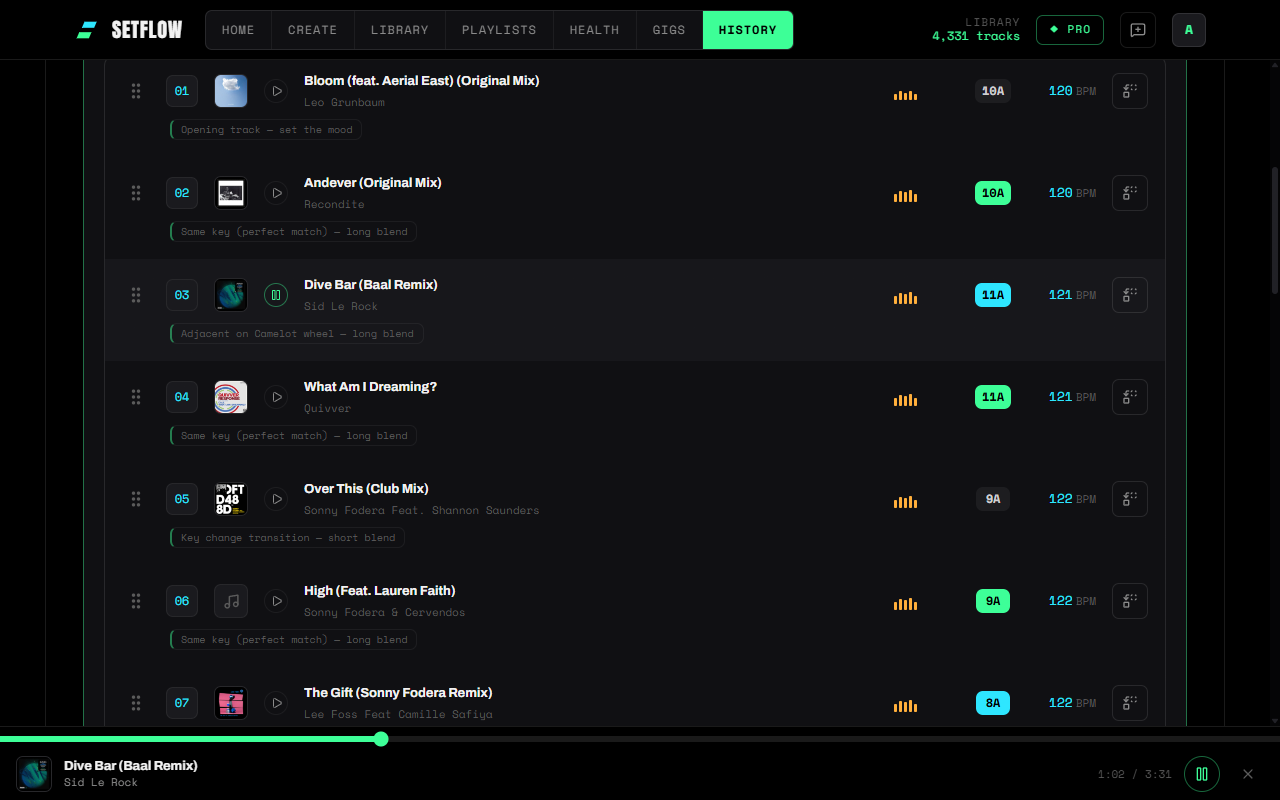
It plays your file, at full length, and nothing else. If a track has no matching file in your folder the button tells you so by name rather than failing quietly. And on Firefox, Safari or a phone the buttons stay inactive, because the honest answer there is that this cannot be done yet.
The short version
- A web page cannot read your drive, and should not be able to. Your library's file paths are text to it.
- The File System Access API lets you grant one folder, read-only, revocably, with nothing uploaded. Chromium desktop only.
- Matching works on filenames rather than full paths, so a library exported from another machine still lines up.
- Catalogue clips are the commercial release — wrong for remixes and edits, which is most of a working DJ library.
- AIFF and ALAC will not play in any browser. MP3, M4A, WAV, FLAC and Ogg will.
Planning a set and hearing the set were separate activities for as long as set planning has happened in a browser. They do not have to be any more — you just have to be asked first.
Ready to build better sets?
Import your Rekordbox, Traktor, or Serato library and generate perfectly mixed DJ sets in seconds.
Try SetFlow Free