SetFlow vs DJ.Studio: Plan a Live Set, or Produce a Recorded Mix?
DJ.Studio and SetFlow both start from your library and both care about key and tempo, so they get compared a lot. But they finish in different places: DJ.Studio produces a recorded mix you publish, and SetFlow plans a set you play live. Here is the honest comparison, from the people who make SetFlow.
DJ.Studio details are taken from dj.studio, checked on 19 November 2026, using its UK prices. A Black Friday sale was running, so we give both prices where they differ. Both products change quickly, so check before you buy.
The 30-Second Verdict
- Choose DJ.Studio if you want a finished recording: a mixtape, a radio show, a YouTube or Mixcloud mix, with every transition designed by hand and rendered to audio or video.
- Choose SetFlow if you're playing the set live and want the tracks chosen and ordered for you, in key, to an exact length and energy curve, ready to load in Rekordbox, Serato or Traktor.
- Use both if you do both: plan the set in SetFlow, play it, then rebuild it in DJ.Studio for the recording.
Side by Side
A Mix You Publish vs a Set You Play
DJ.Studio works like a music production app built for DJ mixes. Your tracks sit on a timeline, and you shape each transition: when it starts, how long it lasts, the EQ and volume curves, and on higher tiers stems, effects and VST plugins. When it sounds right you render it to MP3, WAV or FLAC, or to a video for YouTube. Nothing is left to chance on the night, because there is no night: the mix is the product.
SetFlow plans a set you'll mix yourself, on decks or a controller. It decides what to play and in what order, then hands that running order to your DJ software. The transitions are yours to play live. It doesn't record or render anything.
If you never record mixes, most of DJ.Studio's depth goes unused. If you mostly record, SetFlow stops short of what you need.
Choosing the Tracks
This is the biggest practical difference for a gig. In DJ.Studio, you choose the tracks: you drag them in from your library or a playlist, and Harmonize sorts them into an order that works on key and BPM using the Camelot wheel. When two neighbours still don't fit, its Solver searches your library for a track that bridges the gap.
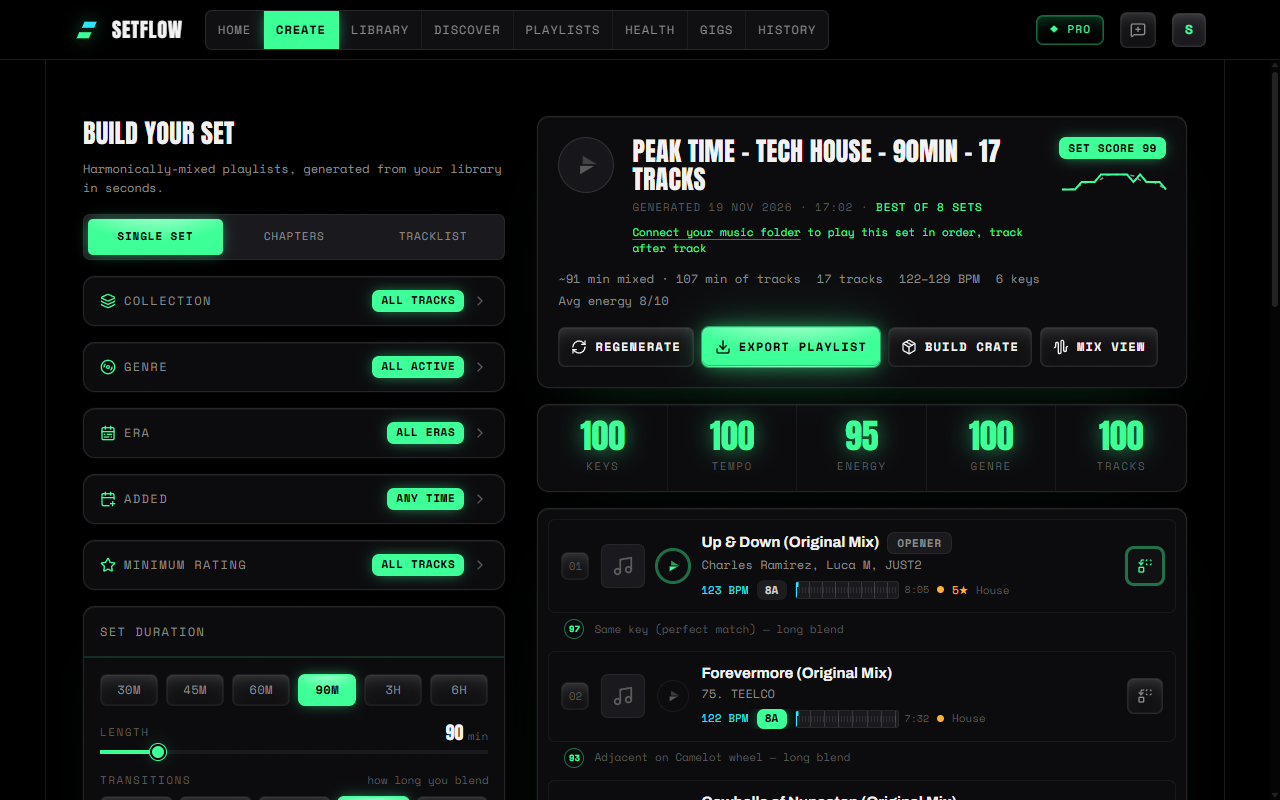
In SetFlow, you choose the brief, not the tracks: a length, a set type (Warm Up, Peak Time, Journey, Chill, or a curve you draw yourself on Pro), and your genre and BPM range. It digs through your whole library for the tracks that mix best together, tries them more than one way and keeps the strongest set, scored out of 100 on keys, tempo, energy, genre and tracks. Then you swap or lock any track. On Pro, Set Chapters plan a whole night of up to eight hours as a run of shorter sets.
Energy
DJ.Studio analyses each track's energy and draws it as a graph, so you can see the shape of your mix. Its own page says Harmonize orders on BPM and key only, not energy, so shaping the energy is up to you.
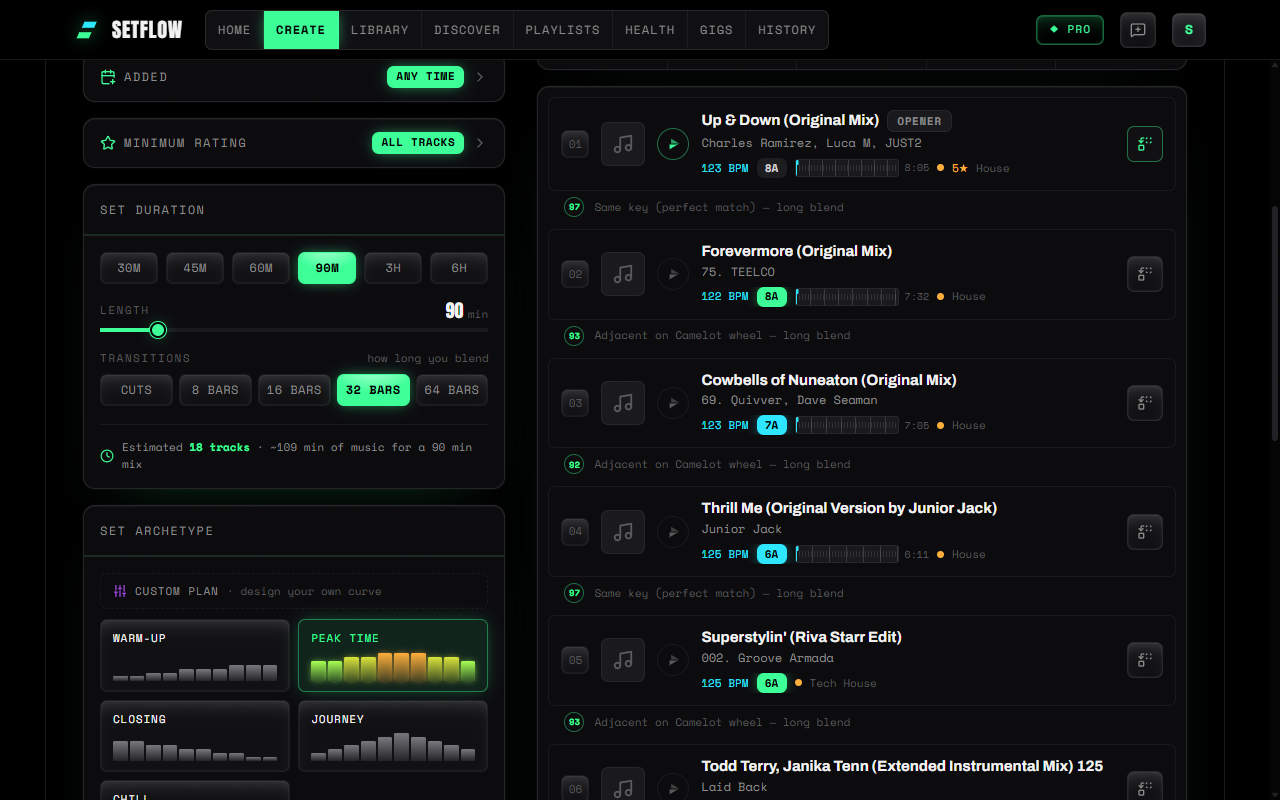
In SetFlow, energy is part of the brief: every set follows an energy curve, and the score tells you how closely it does. Energy comes from your library (a Mixed In Key rating if you have one), or SetFlow can measure it from the audio in your browser. Our guide to energy flow in a DJ set explains why it matters as much as key.
Transitions
DJ.Studio is far ahead here, because transitions are what it's for. You get transition presets on every tier, and manual transitions, automation, stems and effects on the higher ones. Its rekordbox export can mark each transition window with hot cues, so the plan comes with you to the decks.
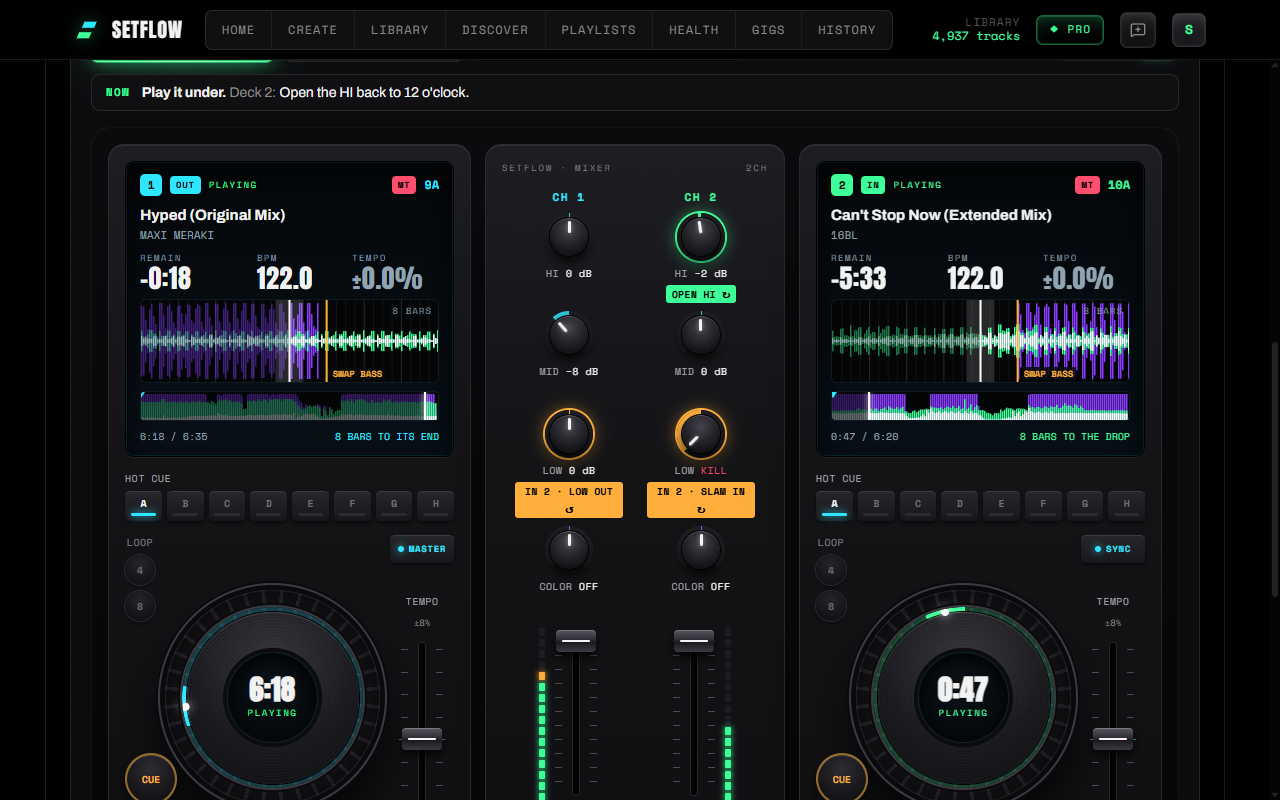
SetFlow's answer is aimed at the DJ who will play the transition, not render it. On Pro, the Mix view shows every transition in the set on two waveforms, with when to start the next track, when to swap the bass and where the drop lands, and plays the blend from your own files so you can hear it before the gig. DJ Tutor then walks you through it move by move on an on-screen controller. It doesn't write cue points into your exports yet.
Getting It Into Your DJ Software
Both export to the booth. DJ.Studio sends a set to rekordbox with its order and, if you want, hot cues, exports playlists to Serato, and writes M3U files for Traktor, VirtualDJ and Engine DJ. Exporting is switched off during its free trial.
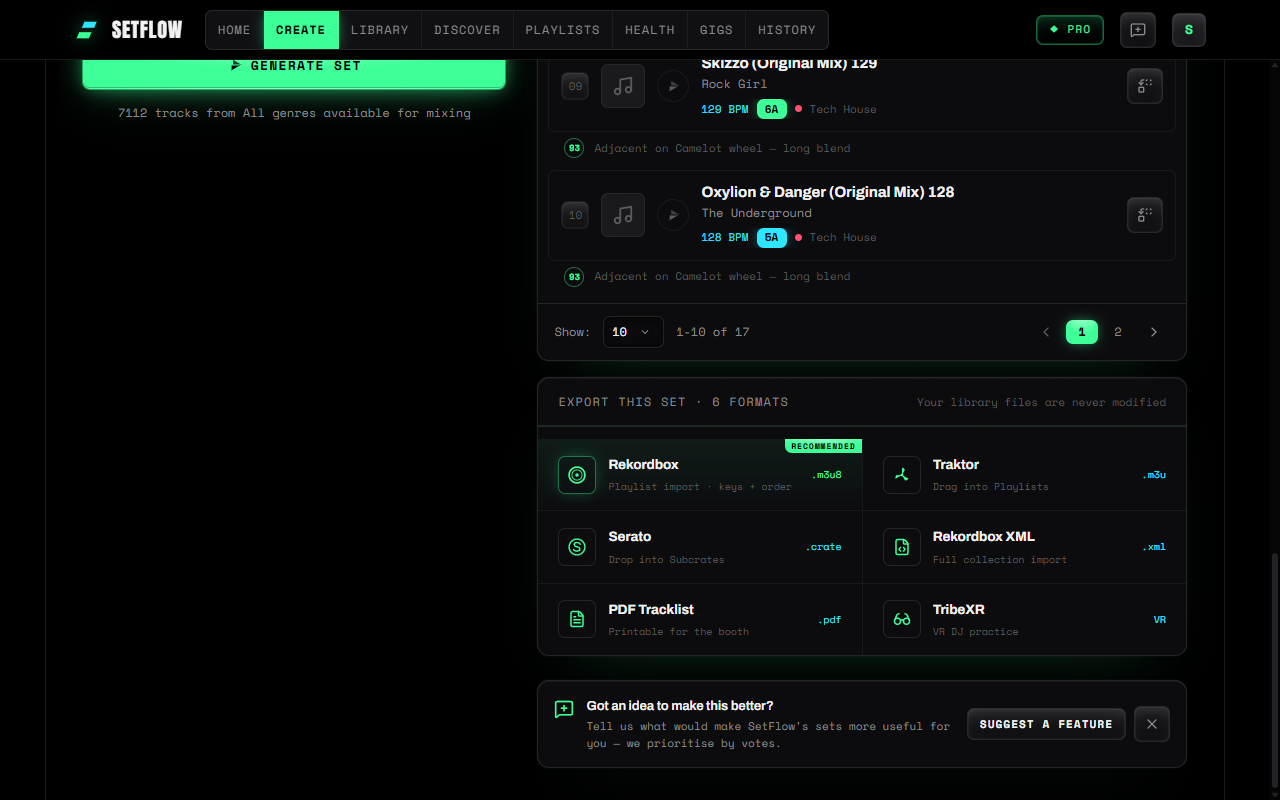
SetFlow exports Rekordbox XML, Serato crates and M3U/M3U8 (which Traktor and most other DJ apps read), a printable PDF, and TribeXR for VR, on every plan including the trial. Our guide to exporting a set to USB covers CDJs.
Pricing
DJ.Studio sells one-time licences that include 12 months of updates and support: Studio £99 (MP3 mixes, transition presets), Pro £129 (WAV, manual transitions, Ableton Live export), Pro + Stems (£149 in the sale, £277 list) and Ultimate (£179 in the sale, £524 list) with video export and VST support. After the first year the software keeps working, and new features need an update package. If you'd rather subscribe, Pro + Stems is £29 a month. There's a 7-day free trial with no card, and a 14-day money-back guarantee on licences.
SetFlow starts with a 7-day free trial (3 sets from your own library, no card). Hobby is £2.99 a month; Pro is £4.99 a month, or £2.49/mo billed annually (save 50%), and adds unlimited tracks and sets, Set Chapters and the Mix view. The £3.99 Weekend Pass gives 72 hours of Pro with nothing renewing.
Where SetFlow Falls Short
- No recordings. It doesn't render a mix to audio or video.
- No stems, effects or hand-drawn transitions. You play the transitions; SetFlow shows you how.
- No cue points in exports. It reads and shows the cues you've set, but doesn't write new ones.
- No streaming sources. It plans from the files in your library, not Beatport or Apple Music.
- No one-time licence. It's a subscription or a 72-hour pass.
Which Should You Use?
- You record mixes for Mixcloud, YouTube or radio: DJ.Studio.
- You want stems, effects or video: DJ.Studio.
- You have a gig and want the set chosen and ordered from your library: SetFlow.
- You want to practise the transitions before you play them: SetFlow Pro's Mix view and DJ Tutor.
- You play several sets a month and don't want to pay up front: SetFlow, or a Weekend Pass for a one-off gig.
For the wider field, including Mixgraph, MixReady, Djoid, Lexicon and Mixed In Key, see our comparison of the best DJ set planning software, or SetFlow vs Mixgraph and SetFlow vs Mixed In Key.
Try SetFlow free for 7 days: import your library and generate a set from your own tracks in a couple of minutes.
Frequently Asked Questions
What is the difference between SetFlow and DJ.Studio?
They make different things. DJ.Studio is a timeline editor for producing a recorded mix: you arrange tracks, design every transition, and render the result as audio or video. SetFlow plans a set you will play live: it picks tracks from your library, orders them to a length and an energy curve, and exports the running order to Rekordbox, Serato or Traktor for you to mix yourself.
Is there a DJ.Studio alternative for planning a live set?
Yes. If you don't need a recorded mix, a set planner is the lighter tool. SetFlow builds the whole running order from your own library in a few seconds, in the browser on Mac or Windows, and exports it to your DJ software. It costs £4.99 a month on Pro, or £3.99 for a 72-hour pass, against a DJ.Studio licence from £99.
Can DJ.Studio build a set from my whole library?
Not on its own, at the time of writing. Its Harmonize feature orders the tracks you've already added to a mix by key and BPM, and its Solver suggests a library track when two neighbours don't fit. Choosing the tracks in the first place is up to you. SetFlow chooses them from your whole library, to the length and energy shape you ask for.
Which is cheaper, SetFlow or DJ.Studio?
They are priced differently. DJ.Studio sells one-time licences (from £99 for Studio and £129 for Pro, with 12 months of updates) or a £29 monthly subscription. SetFlow is a subscription: Hobby £2.99 a month, Pro £4.99 a month or £29.88 a year, or a £3.99 pass for 72 hours with nothing renewing. Over a few years a DJ.Studio licence can cost less; for planning live sets, SetFlow costs less to start.
Can I use SetFlow and DJ.Studio together?
Yes. A sensible split is to plan the running order in SetFlow, which picks and orders the tracks from your library, export it to Rekordbox or Serato, then open that playlist in DJ.Studio if you want to produce a polished recording of the same set.
Ready to build better sets?
Import your Rekordbox, Traktor, or Serato library and generate perfectly mixed DJ sets in seconds.
Try SetFlow Free