DJ Track Energy Levels: Measure Them From the Audio, Not the Tags
Every set plan rests on one number per track: its energy. Build from 4 to 8, peak, bring it back down. But where does that number come from? For most DJs it's a guess, and often a flat one. Here's what DJs actually hear as energy, how to judge it by ear, and how SetFlow now measures it for your whole library.
Why energy numbers go wrong
Your DJ software's collection export doesn't carry an energy rating SetFlow can use, so until now a track's energy came from whatever else was there: a Mixed In Key tag if you had one, the colour you gave it, or a guess from its genre and tempo. Guesses from genre have one big problem. Every track in a genre gets the same level. In one real library every Minimal / Deep Tech and Nu Disco track was a 6, and a set built from a genre that sits at one level has nothing to climb.
Words in comments made it worse. Release-group tags like “Pro FM Danceradio” were read as “dance”, and that set the energy of more than a quarter of the tracks in real libraries.
What DJs actually hear as energy
It isn't loudness: two tracks at the same volume can feel completely different, and your mixer's gain evens out volume anyway. It isn't tempo alone either: a 124 BPM track can lift a room more than a 128.
What people hear is how busy the track is: how often new claps, hats, shakers and percussion hit over the beat. A groove with a kick and a bassline feels calm; the same groove with rolling percussion and open hats feels like it's pushing. In blind listening tests at the same tempo and volume, whenever a difference was heard, the busier track was picked as the more energetic one 23 times out of 24.
How to judge a track's energy by ear
- Listen to the main groove. Skip the intro and the breakdown. Energy is about the part the crowd dances to longest.
- Match tempo and volume first. A faster or louder track always sounds bigger side by side. Sync them and level the gains before you compare.
- Count the layers above the kick. Claps, hats, shakers, rides, percussion loops. More layers, and more hits per bar, usually means more energy.
- Compare within a genre. A busy Deep House track and a calm Techno track can both be “medium”. Rate tracks against others in the same style first.
- Keep a few reference tracks. One you know is a 4, one a 6, one an 8. Rate new tracks against them rather than from memory.
That works for a crate. For a library of thousands of tracks it doesn't, which is why SetFlow now does it for you.
Measure your whole library in SetFlow
- Open Library Health and choose Measure energy.
- Show SetFlow your music folder, the one your DJ software reads. Chrome and Edge remember it; Safari and Firefox ask for it each visit.
- SetFlow listens to short snippets of every track and measures how busy each one is. Your music stays on your computer: only the result is saved.
- Keep using SetFlow while it runs. It goes genre by genre, starting with the genres in your recent sets, and you can pause and pick it up later.
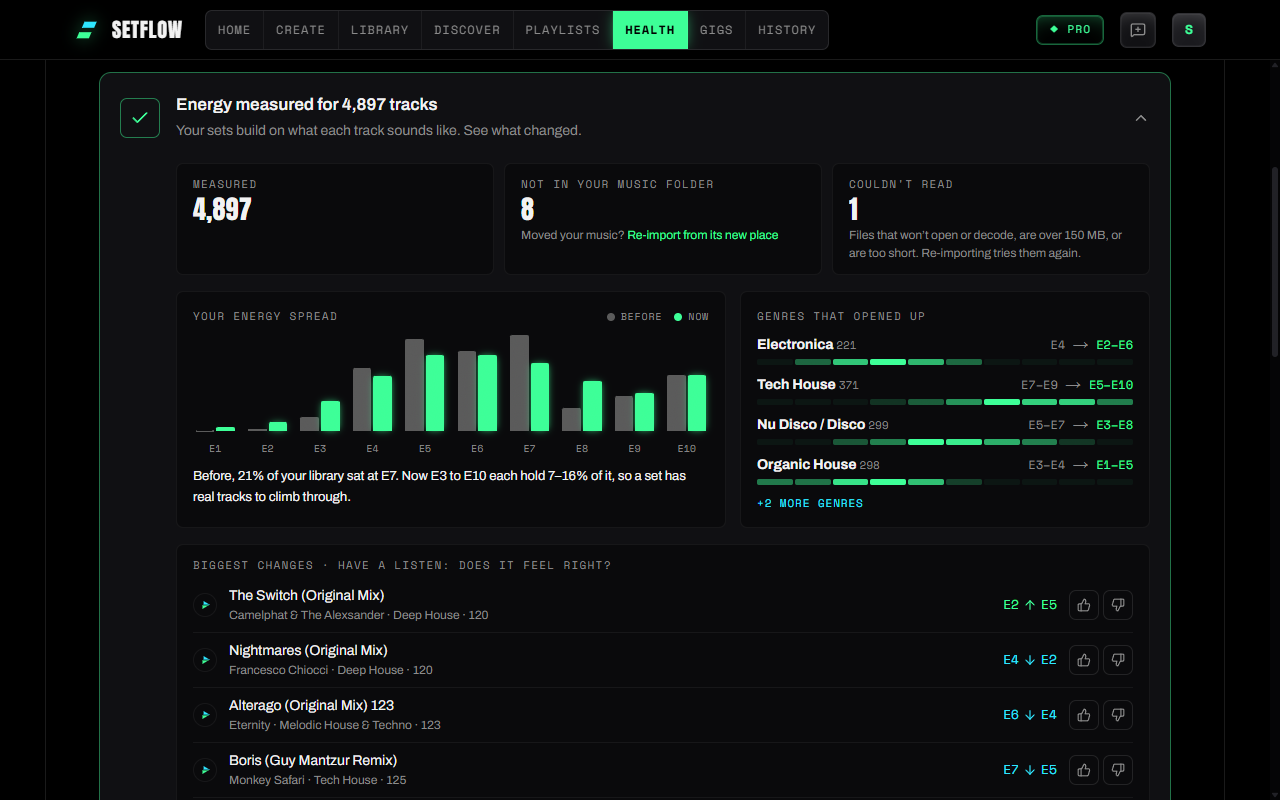
When it finishes, the energy card shows your library's spread before and after, the genres that opened up most, and the tracks that moved most. Play them and tell SetFlow with a thumbs up or down whether the new energy feels right.
What changes in your sets
- Genres that sat at one level spread out. A Minimal or Deep House set now has calm tracks to start on and busy ones to build to.
- Set types land better. A Journey really climbs and comes back down, a Warm-Up really starts low, a Peak Time set stays up.
- Your own choices still win. Energy you've set yourself is never changed, and a Mixed In Key rating still comes first. Measured energy glows on the meters, so you can see which numbers came from the audio.
No music folder on this computer?
Measuring needs your files, but the guesses got better too. SetFlow now reads Mixed In Key's energy from the Label, Grouping or Comments field, ignores words in your comments, and spreads genres like Minimal / Deep Tech and Nu Disco by tempo instead of giving every track the same level. Re-import your collection to pick that up; energy you've set in SetFlow is kept. See everything that changed in the changelog.
Frequently Asked Questions
What is a track’s energy level?
A rating, usually 1 to 10, of how intense a track feels on the dancefloor. DJs use it to plan a set that builds, peaks and comes back down. What people hear as energy is mostly how busy the drums and percussion are, not how loud the track is or its BPM alone.
How do I find the energy level of a track?
By ear, compare it with a track you know, at the same tempo and volume, during the main groove rather than the intro or breakdown, and count how many layers of percussion are playing. Across a whole library that takes too long, so let software measure it: in SetFlow, open Library Health and choose Measure energy.
Does SetFlow use Mixed In Key energy?
Yes. If your tracks carry Mixed In Key’s “Energy 1–10” in the Label, Grouping or Comments field, SetFlow reads it on import, and it comes before measured energy. Energy you set yourself in SetFlow comes first of all.
Is my music uploaded when SetFlow measures energy?
No. Measuring runs in your browser, on the files your DJ software reads. Only the result for each track is saved to your account, so your phone can use it too.
Do I need Pro to measure energy?
No. Measured energy is on every plan. You need a computer with your music on it: Chrome or Edge remember your music folder, and Safari or Firefox ask you to choose it for each visit.
How long does it take?
About 10 minutes for 6,000 tracks on a typical computer. You can keep using SetFlow while it runs, pause it at any time, and it picks up where it stopped. It works through one genre at a time, so each genre is ready as soon as it’s ticked off.
Will it change energy I set myself?
No. Energy you’ve set on a track in SetFlow is never changed, and a Mixed In Key rating still comes first. Measuring fills in every other track.
Get the Camelot cheat sheet
A one-page printable of all 24 keys, compatible moves, and energy jumps — handy next to the decks.
One email with your download. No newsletter, no spam.
Ready to build better sets?
Import your Rekordbox, Traktor, or Serato library and generate perfectly mixed DJ sets in seconds.
Try SetFlow Free