Where to Start the Next Track: See Every Transition in Your DJ Set, Then Hear It
A tracklist tells you the order. It doesn't tell you where to press play. SetFlow's new Mix view lays your set out on two decks and lines up every transition bar for bar: where to start the next track, when to swap the bass and where its drop lands. Then it plays the blend, from your own files, so you can hear it before the gig.
Your whole set on two decks
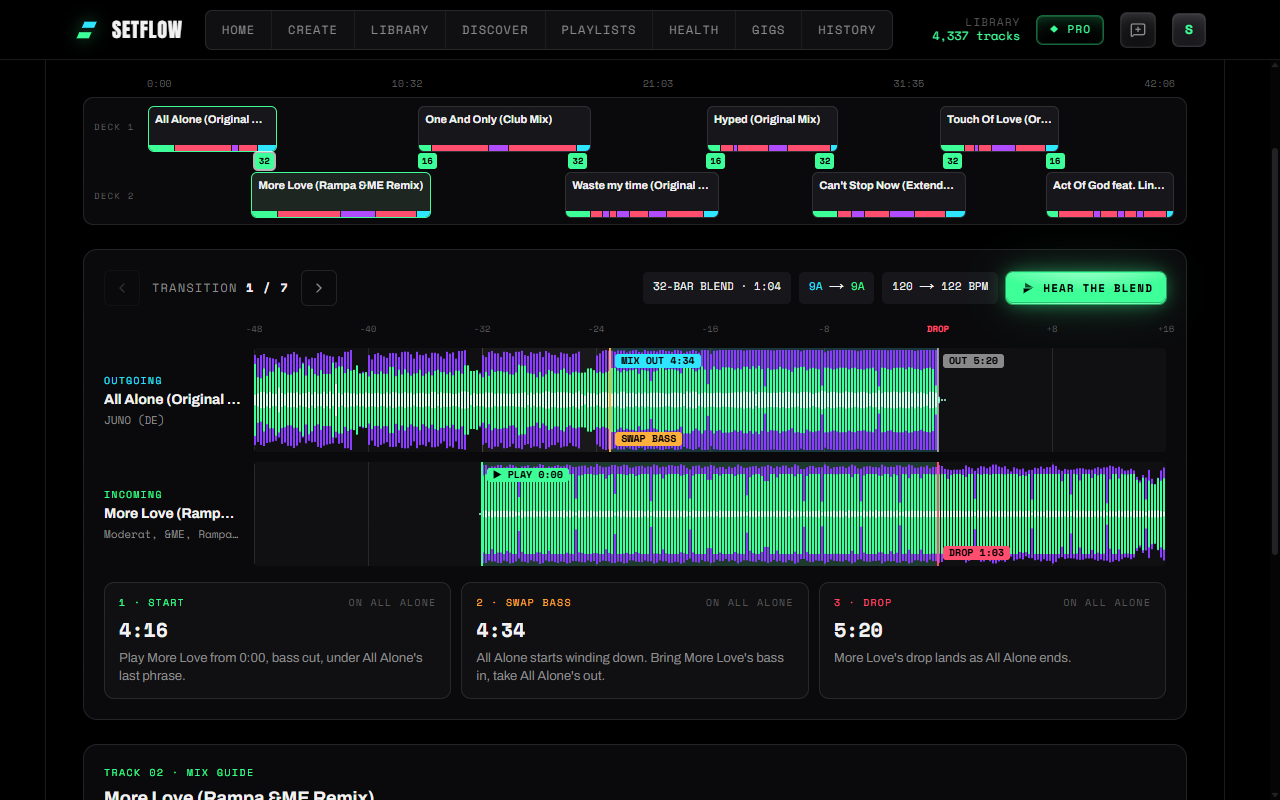
Open any set and press Mix view. Tracks alternate between deck 1 and deck 2, each one coloured by its shape: green for the intro, red for the main parts, violet for breakdowns and cyan for the outro. Where two tracks overlap, the label shows how long the blend is, in bars. An amber LOOP means the incoming track has no DJ intro to blend over.
Every transition, lined up bar for bar
Tap a blend and the two tracks appear one above the other, on the outgoing track's clock, with a ruler counting the bars down to the drop. The outgoing wind-down is shaded cyan, the incoming run-up green. Underneath are the three moves, each with its time on the outgoing track:
- Start. Press play on the incoming track, with its bass cut.
- Swap the bass. When the outgoing track starts winding down, bring the incoming bass in and take the outgoing bass out.
- Drop. The incoming track takes over.
That's how DJs phrase-match house and techno: the new track takes over as the old one ends, so the floor never loses the groove. SetFlow works out the timing for every transition in your set.
Hear the blend
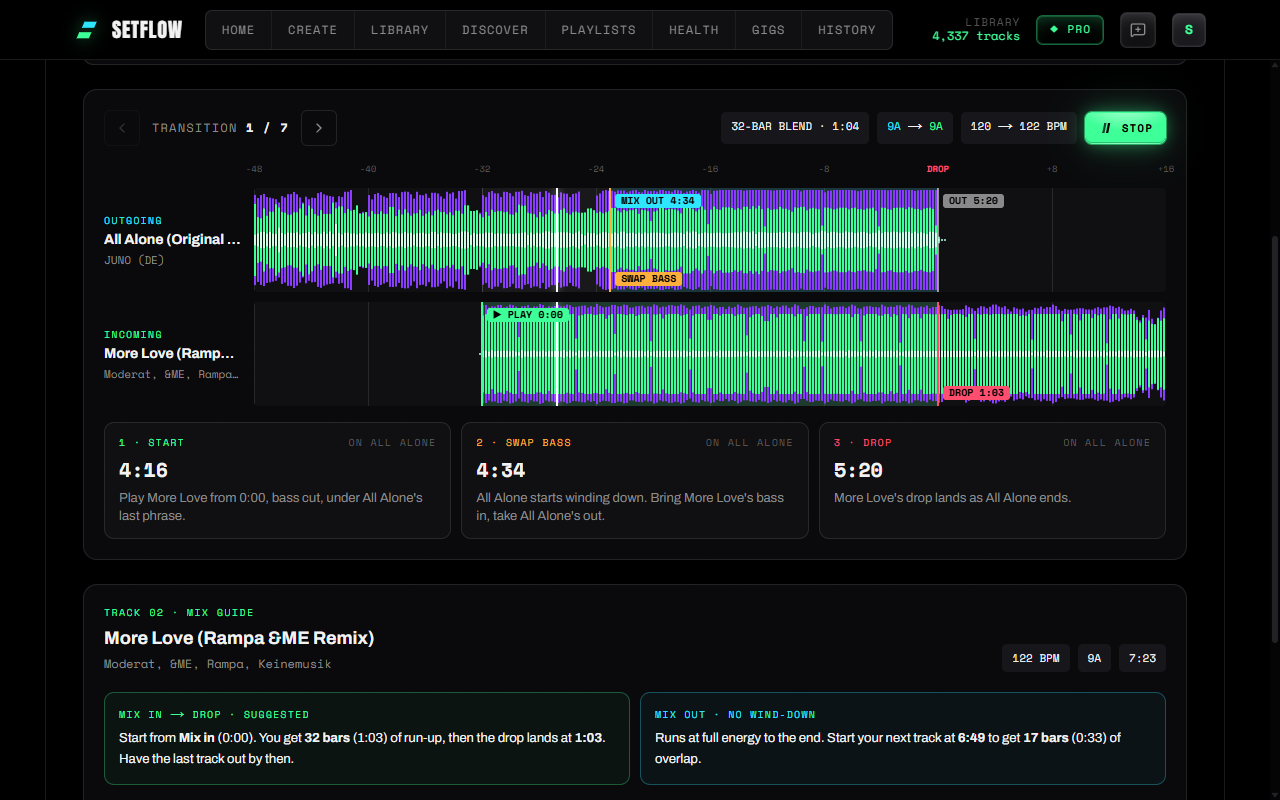
Press Hear the blend and SetFlow plays the transition from the two files in your music folder, beat-matched: the run-up, the bass swap and the drop. It's a fair test of whether two tracks belong together.
To hear the whole set, press Play the mix. SetFlow plays it from the first transition to the last track, blending each track into the next, and the transition panel follows along. Click a waveform or pick another transition to jump the mix there.
A mix guide for every track
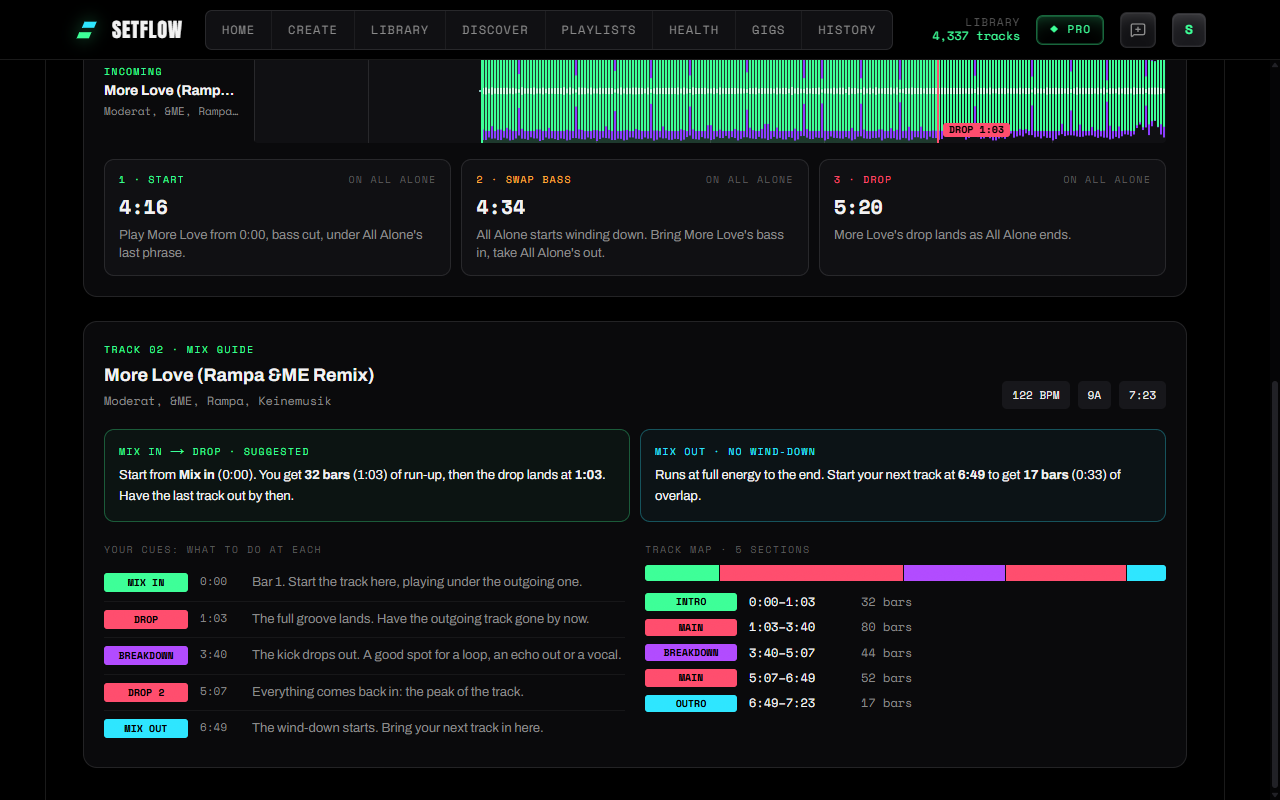
Tap any track on the decks and its guide opens underneath:
- Mix in and mix out. How many bars of run-up it has before the drop, and where its wind-down starts. Tracks that run at full energy to the end say so.
- Your cues: what to do at each. Mix in, Drop, Breakdown, Drop 2 and Mix out, with a line on what each one is for.
- The track map. Its intro, main parts, breakdowns and outro, with times and bar counts.
Your own cues always come first. Live edits whose tempo drifts are flagged, with a tip on keeping the blend short.
Worked out from your own files
Connect your music folder once (Settings, or the chip on your Library) and the Mix view analyses each track in your browser the first time you open a set: its sections and where it mixes in and out. Your music is never uploaded. The results are saved to your account, so the same set shows its mix points on your phone, and tracks you've already analysed open instantly in your next set.
It works best with house, techno, trance and drum & bass. Everything SetFlow finds is a suggestion; your own cues always come first.
The limits
- Analysing and Hear the blend need a computer with Chrome, Edge, Brave, Arc or Opera. Phones and other browsers show the mix points of tracks you've already analysed.
- Tracks have to be in your music folder to be analysed. Others show estimated blends from your library's BPM and length.
- Files over 150 MB, such as long WAV recordings, aren't analysed.
Try SetFlow free for 7 days. Import your Rekordbox or Traktor library, build a set and open it in the Mix view. See the changelog for everything else that's new.
Frequently Asked Questions
Where should I start the next track in a mix?
Count back from the outgoing track’s last bar. In house and techno, start the incoming track so its drop lands on the outgoing track’s final downbeat: if the incoming run-up is 32 bars, press play 32 bars before the outgoing track ends. SetFlow’s Mix view works that out for every transition in your set and shows it on both waveforms.
When should I swap the bass?
When the outgoing track starts winding down. Bring the incoming track in with its low end cut, then swap the bass as the outgoing track’s wind-down begins, so two kicks never play at full weight together.
What is “Hear the blend”?
SetFlow plays the transition from your own two files, in your browser, beat-matched, with the bass swapped where the Mix view says. It’s a quick way to check two tracks work together before the gig.
Is my music uploaded?
No. Tracks are analysed in your browser from the music folder you connect, and Hear the blend plays the files straight from that folder. Only the results (where each track mixes in and out, its sections and a small waveform) are saved to your account, so the Mix view shows them on your phone too.
Does it change my cue points?
No. SetFlow never writes to your DJ software. Your own cues always come first, and everything SetFlow suggests is labelled as a suggestion.
Do I need Pro?
Smart Mix Points is part of Pro, and a Weekend Pass unlocks it too. On other plans the Mix view shows your set on two decks with blends estimated from your library.
Ready to build better sets?
Import your Rekordbox, Traktor, or Serato library and generate perfectly mixed DJ sets in seconds.
Try SetFlow Free