A 3-Band DJ Waveform in Your Browser: See the Bass, Mids and Highs
A single-colour waveform tells you how loud a track is. It doesn't tell you what is loud. A breakdown with a big pad and a drop with a big kick can look the same height. SetFlow's player now splits every track into three bands, bass, mids and highs, so you can see where the kick drops out and where it comes back before you press play.
Reading the three bands
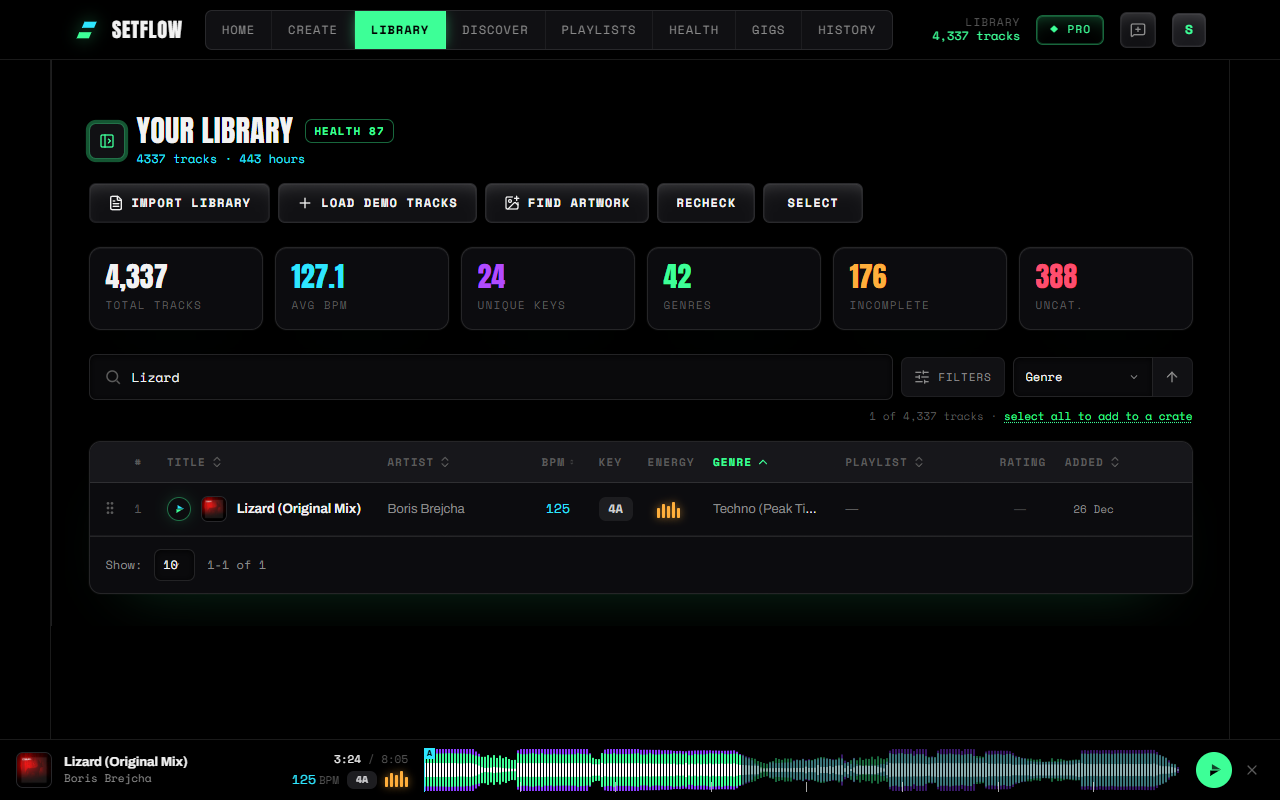
- Violet: the low end, under 200 Hz. The kick drum and the bassline. When the violet disappears, the kick has dropped out.
- Lime: the mids, 200 Hz to 2.5 kHz. Synths, stabs, chords and most vocals.
- White: the highs, over 2.5 kHz. Hi-hats, shakers, claps and cymbals. A build often shows as the white getting denser.
The part you've already played is drawn at full strength and the rest is dimmed, so you can see where you are at a glance. Your hot cues, memory cues, fade markers, loops and 32-bar phrase ticks sit on top, in the same colours as before; see your cue points on a waveform for how those work.
Why it helps when you plan a set
Most mixing decisions are about the low end. Two kicks playing at once sound muddy, so a blend usually swaps the bass of one track for the other. With the bands split you can see where each track's bass is:
- Find the breakdown. A long stretch with no violet is where the kick stops. That's a natural place to bring the next track in.
- Find the drop. The violet coming back at full height is the drop. If you want the next track's drop to land on a phrase, you can see where it is without scrubbing through the whole track.
- Check an intro and outro. A DJ-friendly intro is often kick and hats only: violet and white with very little lime. A track that opens with a full chord section shows lime from the first bar, which is harder to mix into.
That's quicker than listening through every track in a set you're playing in order, and it's the same picture you know from your DJ software.
Worked out on your computer, free on every plan
The player plays tracks straight from the music folder you connect in Settings. The bands are worked out in your browser from the file that's already playing, in the background, so the music starts straight away and the waveform follows a moment later. Nothing is uploaded. SetFlow keeps a small summary of each waveform (about 4 KB) on your device, so a track you play again shows it immediately.
Because it all happens on your machine, it costs nothing to run, so it's free on every plan.
The limits
- Desktop Chrome, Edge, Brave, Arc or Opera for your own files. Opening a music folder from a web page isn't supported in Safari, Firefox or any iPhone browser yet. Discover's previews show the three bands everywhere.
- Very large files get a plain bar. Files over 150 MB, such as long WAV recordings, aren't drawn. Their cues still are.
- The first play after this update takes a moment. Tracks you played before are worked out once more, then kept.
Try SetFlow free for 7 days. Import your Rekordbox or Traktor library, connect your music folder and press play on any track.
Frequently Asked Questions
What do the three colours mean?
Violet is the low end (under 200 Hz): the kick and the bassline. Lime is the mids (200 Hz to 2.5 kHz): synths, chords and most vocals. White is the highs (over 2.5 kHz): hi-hats, shakers and cymbals. Each column of the waveform shows all three, layered from the back.
Is it the same as Rekordbox’s 3 Band waveform?
It works the same way: the track is split into three frequency bands and each band is drawn in its own colour. The colours are SetFlow’s own, chosen so your hot cues, memory cues and fade markers never disappear into the waveform.
Is my music uploaded?
No. The player plays the file straight from the music folder you connected, and the bands are worked out in your browser from that same file, in the background so playback isn’t affected. Your music never leaves your computer.
Do I need Pro?
No. The three-band waveform is free on every plan, for any track you play from your music folder and for Discover’s previews.
Does it work on my phone?
Playing your own files needs a desktop Chromium browser: Chrome, Edge, Brave, Arc or Opera. On a phone, including every iPhone browser, you’ll see the three-band waveform on Discover’s previews.
Ready to build better sets?
Import your Rekordbox, Traktor, or Serato library and generate perfectly mixed DJ sets in seconds.
Try SetFlow Free