Discover New Tracks That Fit Your DJ Sets (and Fill the Gaps in Your Wheel)
Finding new music that actually fits your sets is slow: charts are full of tracks that don't suit your sound, and the ones that do might not mix with anything you own. SetFlow's new Discover starts from the artists you really play, finds their neighbours' newest releases, and checks every pick against your own library — including the keys it's missing.
It starts from your sets, not a chart
Your library says what you've collected; your sets say what you actually play. So Discover weights the artists in your set history above everything else, then looks up the artists closest to them. For each one it takes their newest release from roughly the last 18 months, and it adds new releases from artists you already play, too. Anything already in your library is filtered out, and so is anything you've told it you don't want.
Picks are grouped by the artist that led there — Because you play Dosem, Because you play Huxley — so every suggestion comes with its reason.
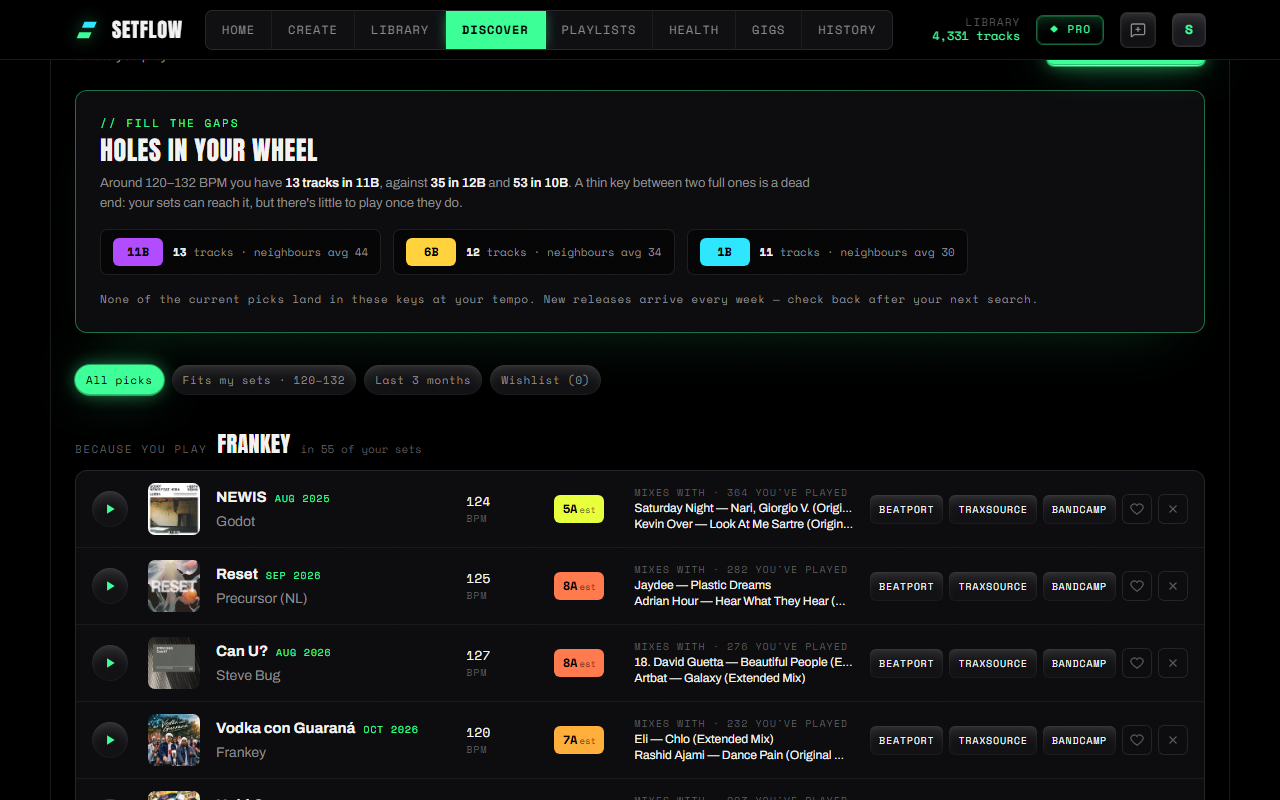
Every pick is checked against your library
A new track is only useful if you can mix it. When your picks load, SetFlow analyses each 30-second preview in your browser to estimate its BPM and Camelot key, then finds tracks from your own sets that it mixes with — same key or a compatible one, within a few BPM. You see two of them by name on every pick, which tells you far more than a match score would: you know exactly where the new track would go.
The Fits my sets filter keeps only picks inside the tempo range you actually play, worked out from your set history.
Fill the gaps in your Camelot wheel
Most libraries are lopsided. You might have fifty tracks in 9A and forty in 7A, but only a dozen in 8A — and that thin key between two full ones is a dead end. Your sets can move into it, but there's little to play once they arrive, so the set generator keeps steering around it.
Discover finds those holes at your tempo and puts them at the top of the page, with the counts either side so you can see why each one matters. Underneath are the new picks whose estimated key lands right in them. Buy a few and the sets you build get more room to move.
Listen, save, buy
- Preview any pick for 30 seconds. It plays through SetFlow's player bar, on desktop and on your phone.
- Save picks to your wishlist. Saved picks stay put when you look for new ones.
- Not for me removes a pick for good.
- Buy from Beatport, Traxsource or Bandcamp with one click, then re-import your library and the track is ready for your next set.
On Home, New for your sets shows your top picks, playable straight from the dashboard — it's also how you reach Discover on a phone.
How accurate are the BPM and key?
We tested the analysis on 120 house and techno previews whose BPM and key we already knew from DJs' own Rekordbox libraries. The BPM was within 2% on 117 of them. The key was an exact match about two times in three, and the same, one step away or the relative major/minor about four times in five. That's in line with how often two DJ apps agree on a key — but a preview is only 30 seconds of the track, so keys are marked est. Check them in your DJ software after you buy.
Try it
Discover is part of SetFlow Pro and included in the Weekend Pass. Open Discover in the app and press Find new picks — it takes about half a minute. It only searches when you ask; nothing runs in the background.
Frequently Asked Questions
How does SetFlow choose which new tracks to show me?
It starts from the artists in the sets you have built — an artist in your set history counts for more than one sitting in your library. It finds artists close to those in the Deezer catalogue, takes each one’s newest release from the last 18 months, and drops anything already in your library or anything you have dismissed.
How accurate are the BPM and key?
Both are estimated from the 30-second preview in your browser. Tested against DJs’ own Rekordbox analysis, the BPM was within 2% on 117 of 120 tracks; the key matched exactly about two times in three and was harmonically compatible about four times in five. Treat the key as a strong hint and check it in your DJ software after you buy.
What does Fill the gaps mean?
It looks at how many tracks you have in each Camelot key at the tempos you play, and flags keys that are thin while the keys either side of them are full. A gap like that is a dead end for key changes. Discover then shows the new picks whose estimated key lands in those gaps.
Can I buy or download tracks in SetFlow?
No. Each pick links to Beatport, Traxsource and Bandcamp so you can buy it from the store you already use. SetFlow only plays a 30-second preview.
Is Discover free?
Discover is part of SetFlow Pro, and it is included in the Weekend Pass. Finding new picks only runs when you ask — nothing searches in the background.
Get the Camelot cheat sheet
A one-page printable of all 24 keys, compatible moves, and energy jumps — handy next to the decks.
One email with your download. No newsletter, no spam.
Ready to build better sets?
Import your Rekordbox, Traktor, or Serato library and generate perfectly mixed DJ sets in seconds.
Try SetFlow Free