How to Build a DJ Set Track by Track, and See Where Each One Lands
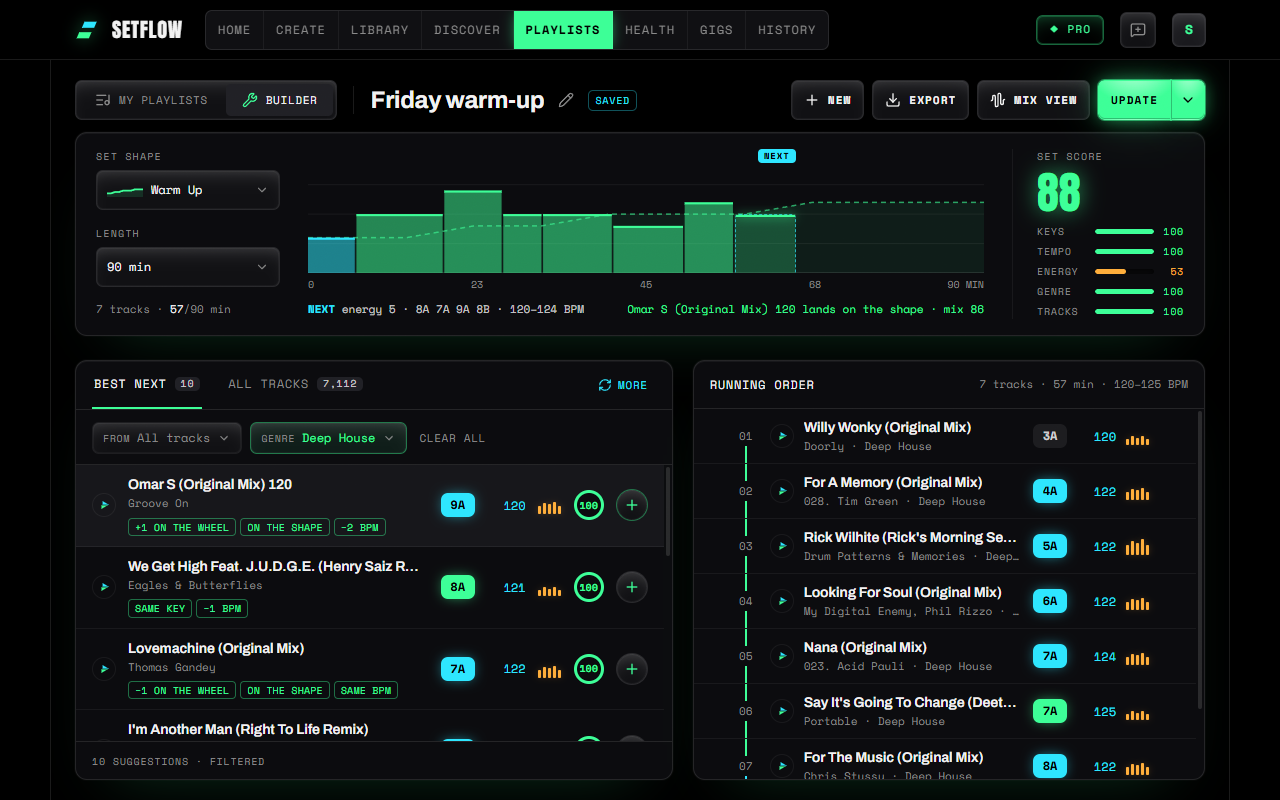
Building a DJ set by hand is a run of small decisions: what comes next, and will it work? SetFlow's Playlists Builder now shows each decision on one picture: the shape you're aiming for, your set so far, and the slot the next track has to fill. Point at any track in your library and you see where it would land before you add it.
Start with a shape and a length
A set has a shape before it has tracks. A warm-up builds slowly, a peak-time set stays high, a journey goes up and comes back down. Pick one in the Builder, along with how long you're playing, and it's drawn across the top as a dashed line: the energy your set should have at each point in the night.
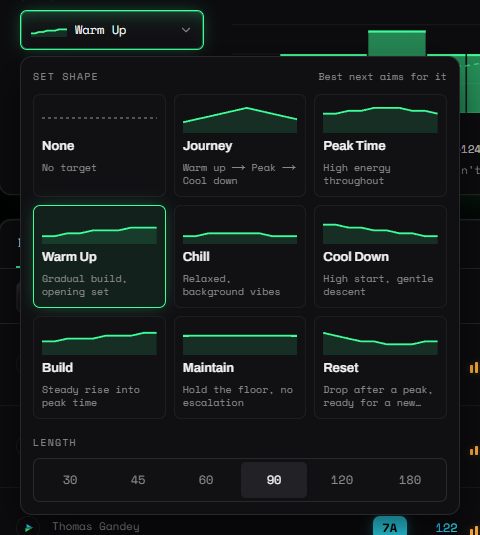
If you're not sure which shape you need, our guide to energy flow in a DJ set walks through when each one works.
Your set, drawn on the shape
Every track you add appears on the canvas: as wide as it is long, as tall as its energy, and coloured by how well it mixes in from the track before. Green mixes cleanly, amber is workable, red needs a look. A key clash is flagged on its bar, and clicking any bar jumps the running order to that track.
The same colours run down the track numbers in the running order, so you can see the weak mixes without reading a single score. Only the weak ones show a number.
The next slot: what to play next
After your last track, the canvas outlines the next slot, and the Builder spells out what fills it:
- The energy your shape asks for at that point in the set.
- The keys that hold a long blend: the same key, one step either way on the Camelot wheel and the relative key.
- The tempo: within 2% of your last track, so the pitch change won't be heard.
Best next lists the ten tracks in your library that fit that slot best, each with a fit score and a few words on why: Same key, On the shape, +2 BPM. Press More for the next ten. Narrow them to one playlist, crate or genre with the filters at the top.
Point at a track to see where it lands
Hover over any track, in Best next or in your whole library, and the canvas draws it in the next slot. You see straight away whether it sits on your shape, above it or below it, and how well it mixes in. In All tracks, the library sorts by that fit, best first, and every column heading sorts too: title, artist, key, BPM and energy.
A score for the whole set
Once you have two tracks, the set gets the same score Create gives a generated set: out of 100, on keys, tempo, energy, genre and tracks, with the thing that cost it the most points underneath. It judges a half-built set against the part of the shape it has reached, so an opening hour isn't marked down for a peak it hasn't got to yet. We explain how the score works in what makes a good DJ set.
Hear it mixed, then come back and change it
When the order looks right, press Mix view. Your playlist opens on two decks with every transition lined up, and you can play the blends from your own files (here's how the Mix view works). Hear a mix you don't like? Press Back to set and you're in the Builder again with the playlist open. Anything you changed in the Mix view, a swapped track or a shorter blend, comes back with you. The Mix view is part of Pro, and a Weekend Pass unlocks it too.
Your playlists at a glance
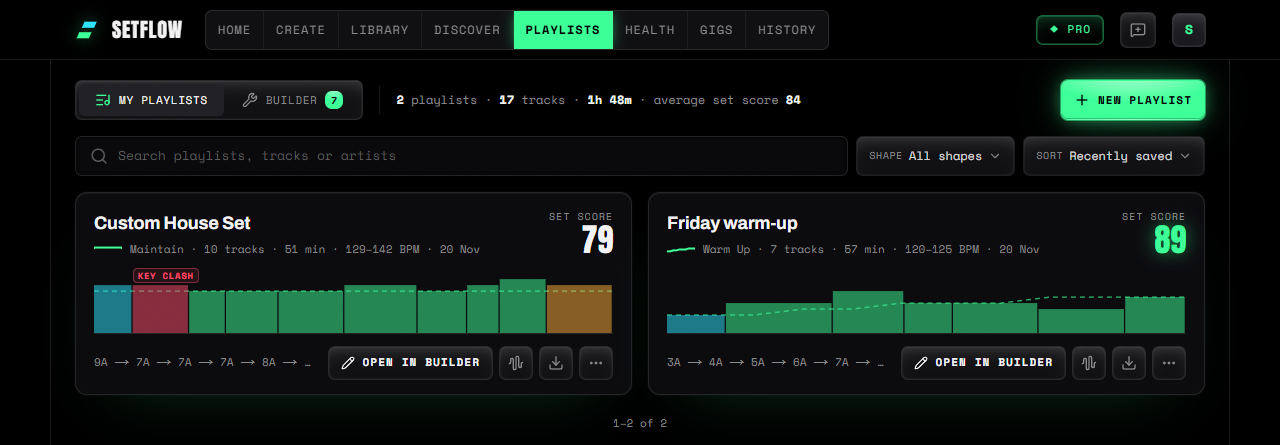
Saved playlists keep the same picture. My Playlists shows each one as a small canvas with its set score and the key path through it, so a playlist that needs work stands out before you open it. Search finds a playlist by any track or artist in it, and each one opens in the Builder or straight in the Mix view.
On your phone
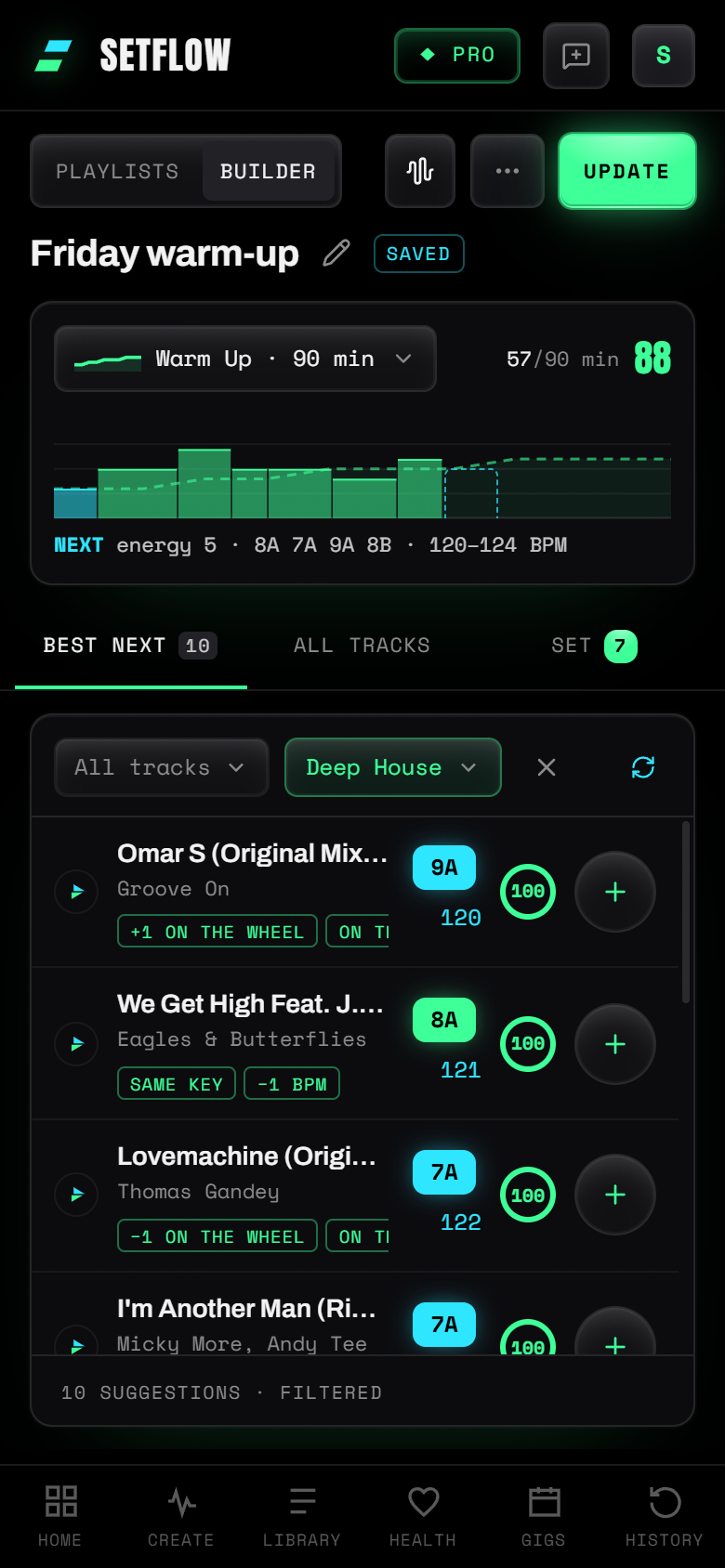
The Builder works on a phone too. The canvas sits at the top, and one row of tabs switches between Best next, All tracks and your set.
Try SetFlow free for 7 days. Import your Rekordbox, Traktor or Serato library, open Playlists and switch to Builder. See the changelog for everything else that's new.
Frequently Asked Questions
How do I choose the next track in a DJ set?
Start from the last track and check three things: the key (the same key, one step either way on the Camelot wheel, or its relative major or minor), the tempo (within 2% needs no pitch change you can hear) and the energy (where your set should be at this point). SetFlow’s Builder works these out for the next slot and lists the tracks in your library that fit best.
Which keys mix well over a long blend?
The same key, one step either way on the Camelot wheel (8A to 7A or 9A) and the relative key (8A to 8B). A two-step "energy boost" such as 8A to 10A works for a quick cut, but over a 32-bar blend the two keys play together long enough to clash.
How far can the tempo change between two tracks?
Within 2% you won’t hear the pitch change. Up to 4% is still a good match, and around 8% is the limit before a track sounds out of key without key lock. A 124 BPM track mixes cleanly into anything from 122 to 126.
What is the set score?
A mark out of 100 for the whole set, on the five things a DJ hears: keys, tempo, energy, genre and tracks. SetFlow shows what cost it the most points. When most of the energy in a set is guessed from genre and tempo, energy isn’t scored.
Can I hear the playlist mixed before the gig?
Yes, with Pro or a Weekend Pass. Press Mix view in the Builder to hear every transition from your own files, then press Back to set to change the playlist. Anything you changed in the Mix view comes back with you.
Is the Builder free?
The Builder is on every plan, including the free trial. The Mix view, which plays your playlist mixed, is part of Pro.
Get the Camelot cheat sheet
A one-page printable of all 24 keys, compatible moves, and energy jumps — handy next to the decks.
One email with your download. No newsletter, no spam.
Ready to build better sets?
Import your Rekordbox, Traktor, or Serato library and generate perfectly mixed DJ sets in seconds.
Try SetFlow Free