See Your Rekordbox Cue Points on a Waveform in the Browser
A waveform tells you where a track opens up, where it breaks down and where the drop lands. Your cue points tell you where you decided to mix in and out. Put the two together and you can read a track at a glance. SetFlow's preview player now does that in the browser: the real waveform of the file you're playing, with your Rekordbox or Traktor cue points on it.
What you see in the player
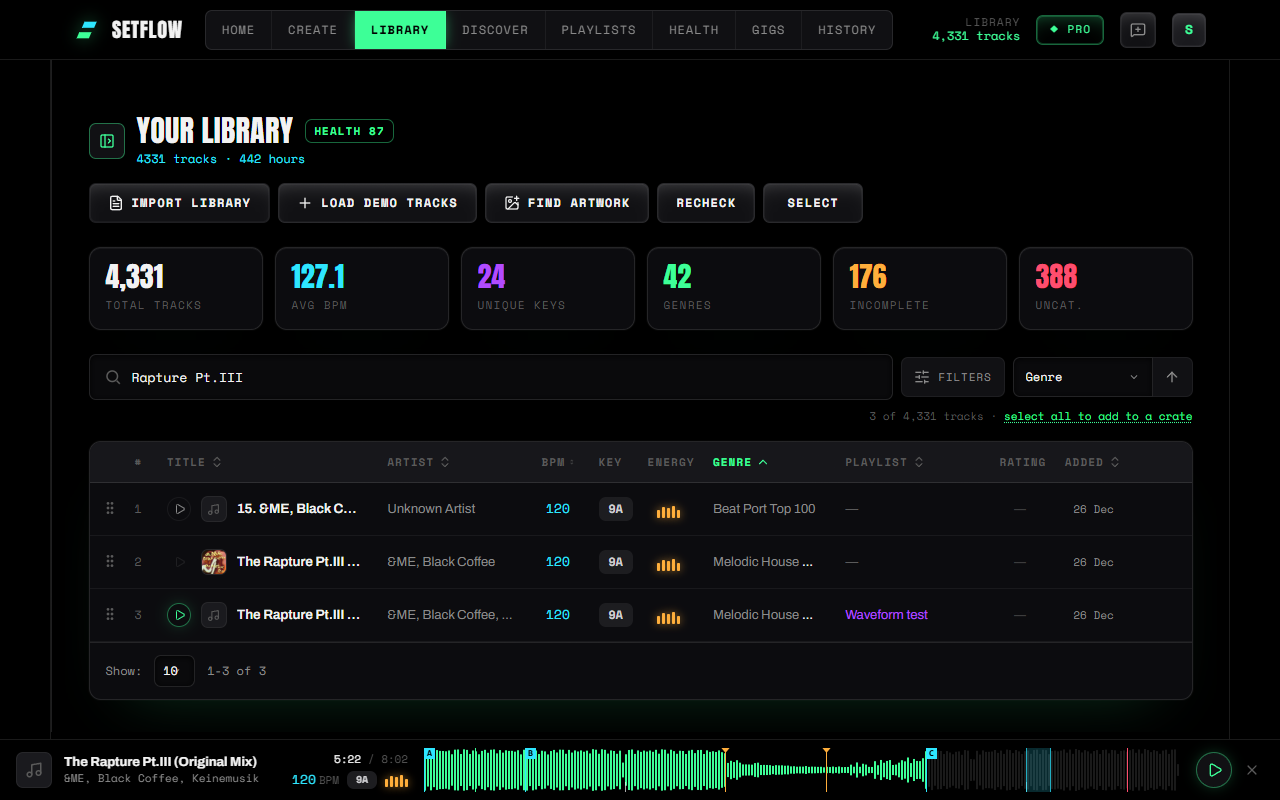
- The waveform. Loud parts are tall, quiet parts are short, and the part you've already heard is green. An intro, a breakdown and a drop are easy to tell apart before you hear them.
- Hot cues A–H as small lettered flags, like the pads on a controller.
- Memory cues as amber markers, and your fade-in and fade-out points as green and red lines.
- Loops as a shaded band from where the loop starts to where it ends.
- 32-bar phrase ticks along the bottom edge, worked out from the beatgrid in your import. They only appear when the grid is steady, because a grid with several tempo changes would put them in the wrong place.
- The time, BPM, key and energy of the track, so you don't have to look back at the row.
Jump to a cue
Click anywhere on the waveform to jump there, or drag along it to scrub. Click a marker and you jump to that exact cue; hover over one to see its name and time. If you click the waveform first, the number keys 1 to 8 jump to hot cues A to H, the same way the pads work in your DJ software. On a touchscreen the markers have a wider tap area, so they're easy to hit with a finger.
This makes checking a transition quick. While you build a set, play the outgoing track, jump to your fade-out cue, then play the next track from its first hot cue. You hear the exact part you'll mix, not the first 30 seconds of the intro.
Your cue points, in the right place
SetFlow reads your cues when you import your library from Rekordbox or Traktor, and draws each one at the position your DJ software saved. They are placed against the length of the file you're actually playing, not the length stored in your library, which can be a second or two out. If a cue sits beyond the end of the file (for example, cues set on an extended mix while your folder has the radio edit), SetFlow leaves that cue out rather than pinning it to the end of the waveform.
The same cues already show up as a small cue strip next to the key on your set rows. The colours match, so a hot cue is the same cyan on a row as in the player.
Nothing is uploaded
The player plays tracks straight from the music folder you connect in Settings; see preview DJ tracks in the browser for how that works. The waveform is worked out in your browser from the file that's already playing, about half a second for a typical track, after the music has started. Your music never leaves your computer, and SetFlow keeps a small summary of each waveform (under 1 KB) on your device so a track you play again shows its waveform straight away.
The limits
- Desktop Chrome, Edge, Brave, Arc or Opera. Opening a music folder from a web page isn't supported in Safari or Firefox yet.
- Very large files get a plain bar. Files over 150 MB, such as long WAV recordings, aren't drawn. Their cues still are.
- Serato cues can't be shown. Serato keeps them inside the audio files, not in the crates SetFlow imports.
- Discover previews show no cues. A 30-second preview is a short excerpt, so cue positions from the full track wouldn't line up with it. You get the waveform of the clip on its own.
Try SetFlow free for 7 days. Import your Rekordbox or Traktor library, connect your music folder and press play on any track.
Frequently Asked Questions
Where do the cue points come from?
From your own DJ software. When you import a Rekordbox XML or a Traktor collection, SetFlow reads the hot cues, memory cues, fade markers and loops you set there and draws them at the same positions. SetFlow only reads them; it never changes your cues.
Is my music uploaded to draw the waveform?
No. The player plays the file straight from the music folder you connected, and the waveform is worked out in your browser from that same file. Your music never leaves your computer.
Why don’t I see any cue points on a track?
Cues come in with a Rekordbox or Traktor import, so a track imported before SetFlow read cues needs re-importing once. Serato keeps its cues inside the audio files rather than in its crates, so Serato cues can’t be shown. Tracks with no cues still get the waveform.
Why does a track show a plain bar instead of a waveform?
Very large files (over 150 MB, like long WAV recordings) and a few formats the browser can’t read, such as some AIFF and Apple Lossless files, get a plain progress bar instead. The cue points are still drawn on it, and playback isn’t affected.
Which browsers does it work in?
Playing your own files needs a desktop Chromium browser: Chrome, Edge, Brave, Arc or Opera. Safari and Firefox can’t open a music folder from a web page yet.
Ready to build better sets?
Import your Rekordbox, Traktor, or Serato library and generate perfectly mixed DJ sets in seconds.
Try SetFlow Free