Plan a Long DJ Set in Chapters: Warm-up, Build, Peak, Reset, Close
A three-hour slot isn't one set — it's a warm-up, a climb, a peak, a breather and a second peak, each with its own job. SetFlow's new Set Chapters lets you plan it that way: line up the phases, set a length for each, and generate the whole night with every join already mixed.
What a chapter is
A chapter is one phase of your set: a type and a length. The type is any of SetFlow's set shapes — the whole-set ones (Warm-up, Peak Time, Closing, Journey, Chill) or the new sections built for long nights: Build, Maintain and Reset. Two to eight chapters, 15 minutes to two hours each.
The important part is the joins. Every chapter ends on the track the next one starts with. So the last track of your warm-up is the first track of your build — there's no gap to bridge, and every handover is a real, scored transition like any other in the set. No track appears twice, and neither does another mix of the same song.
Step 1: Switch Create to Chapters
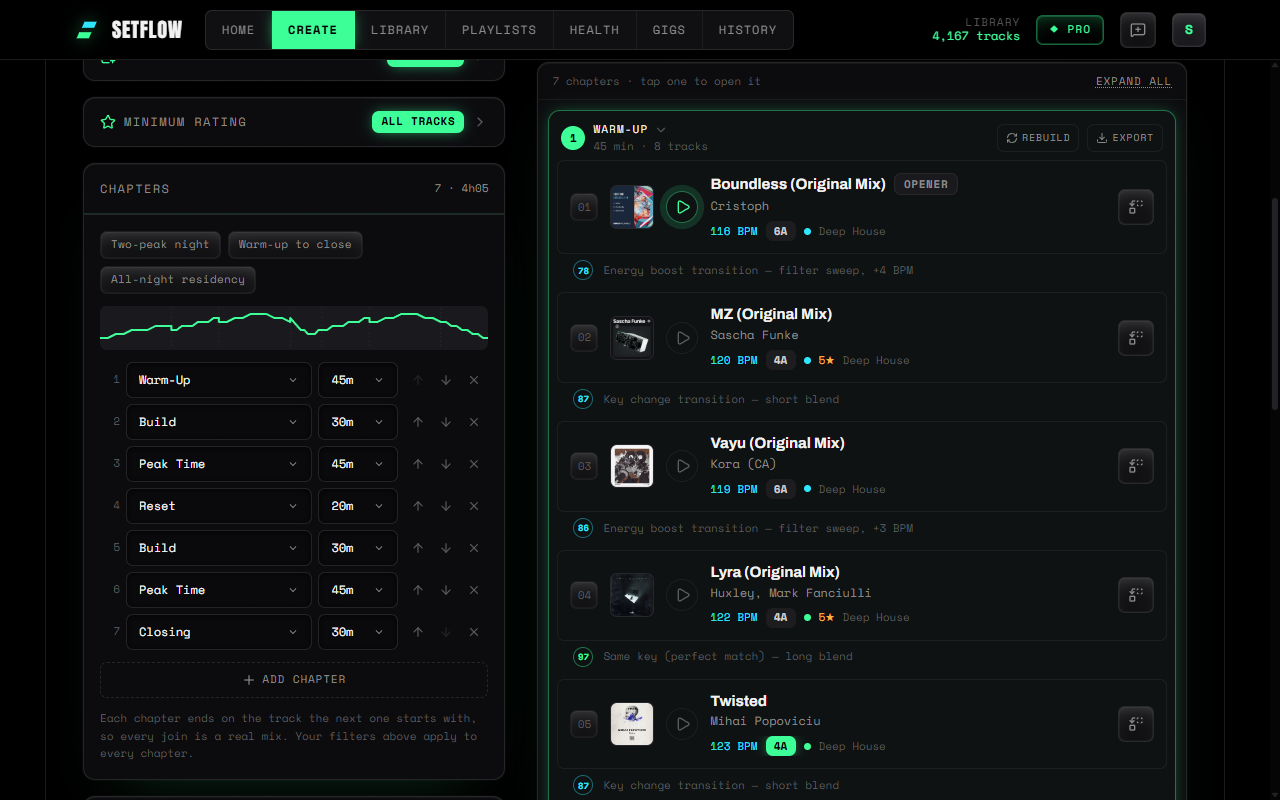
At the top of Create, switch from Single set to Chapters. Your filters — collection, genre, era, when tracks were added — stay where they are and apply to every chapter. The length and set-type controls are replaced by a chapter list.
Step 2: Line up your chapters
Start from a preset or build your own. Warm-up to close is a classic four-chapter night; Two-peak night adds a Reset and a second Build so the room gets two climaxes; All-night residency leans on a long Maintain in the middle. Change any chapter's type or length, reorder them, add or remove. The strip above the list draws the energy arc of the whole night as you go, chapter boundaries marked.
Step 3: Generate, then shape it
Hit Generate chapters. Each chapter is built in order from your filtered library. The first chapter opens; the rest arrive as compact previews — the energy of every track and how the chapter opens and closes — so you see the shape of the whole night before scrolling. Tap a chapter to open it, or Expand all — open chapters are outlined in green, so you always know which one you're in. Join tracks are marked — Joins ch. 3 — so you can see exactly where each phase hands over.
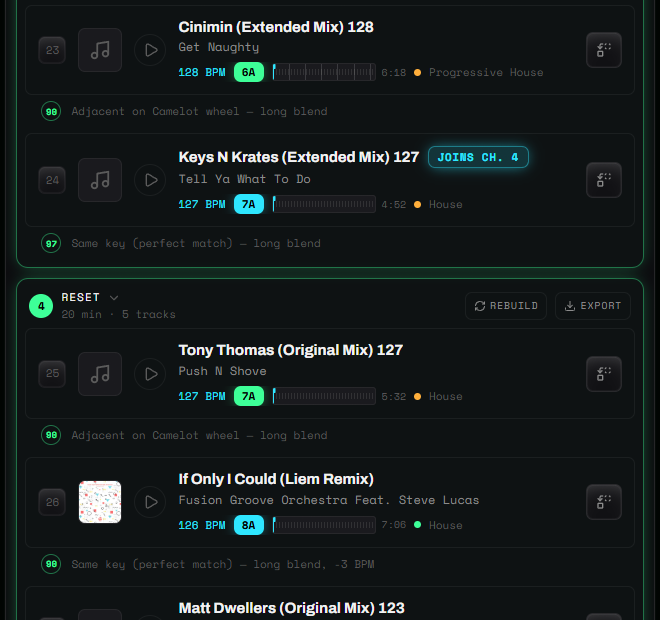
- Rebuild a chapter you don't love. Its first and last tracks stay exactly where they are, so the chapters either side don't move — and SetFlow reaches for fresh tracks rather than reshuffling the same ones.
- Swap single tracks as usual, with the same per-slot alternatives as any set.
Step 4: Take it to the booth
Export the whole night as one playlist, or export any chapter on its own — Rekordbox, Traktor, Serato, Rekordbox XML, a printable PDF or TribeXR. Chapter exports are named by chapter and date (Chapter 2 · Build · 1 Oct), so they sit cleanly side by side in your DJ software.
That's where chapters earn their keep live. Rebuild your second peak a couple of times and export each version: because every rebuild keeps the same first and last track, any of them drops into the night at the same point. Read the room, pick the one that fits. For more on keeping options open mid-set, see backup tracks and gig crates.
How long should each chapter be?
As a starting point for a club night: 45–60 minutes of warm-up, 20–30 for a Build, 40–60 for a peak, 15–20 for a Reset and 30 for the close. Longer chapters give the generator more room to find great transitions; very short ones in a small library can run out of tracks that fit — if a chapter can't be built, SetFlow tells you which one so you can shorten it or widen your filters. Our guide to how many tracks fit in a set helps size each one.
Who gets it
Set Chapters is part of SetFlow Pro (a Weekend Pass unlocks it too). The Build, Maintain and Reset set types are available to everyone, on any plan, as ordinary sets.
Ready to build better sets?
Import your Rekordbox, Traktor, or Serato library and generate perfectly mixed DJ sets in seconds.
Try SetFlow Free