How to Build a DJ Set Like One You Love (Without Copying It)
Every DJ has a set they keep going back to: a radio show, a closing set, a mix that made something click. You want to play something like it — not a copy, but with the same pacing, the same lift in the middle, the same feel at the end. Here is how to study a set you love and build your own version from your own records.
Learn from a set without copying it
A tracklist is the visible part of a set. The part worth learning is underneath it: how long the warm-up lasts, when the energy steps up, how often the key moves, where the breathing space sits before the peak. Those are choices, and you can borrow choices without borrowing the records.
There is also a matter of respect. Another DJ spent years finding those tracks and working out that order. Playing their set back note-for-note, in the same order, and presenting it as yours, takes something that wasn't given to you. Using it as a study — the way a musician learns a solo and then writes their own — is how the craft has always passed on. If someone asks where an idea came from, credit it.
Step 1: Get the tracklist down
Copy the tracklist from wherever you found it: a mix description, a radio show's playlist, a write-up of a festival set, or your own notes on your phone. It will be messy — numbers, timestamps, labels in brackets, a few lines of “ID - ID”. That's fine. What matters is one track per line, in order.
Step 2: Read the shape, not the names
Before you think about what you own, look at what the set does. Roughly how long is it? Where does it sit in tempo at the start and the end? Is there one peak or two? A long set often has more than one peak, and the quiet stretches between them matter as much as the peaks do. Sketching the energy flow on paper — even as “low, building, high, dip, high, out” — gives you something you can reuse with any records.
Step 3: Find out what you already own
Go through the list and check each line against your library. You will usually find three kinds of overlap:
- The exact track. You have the same record, same mix.
- Another version. You own the original where the set used a remix, or the other way round. Often just as good, sometimes better for your crowd.
- The same artist. You don't have the track, but you have something else by them that sits at a similar tempo. It isn't the same record, but it's a reasonable stand-in for that slot.
Everything else is missing. Some of those you will want to buy; others are better left as gaps for your own picks.
Step 4: Fill the gaps with your own records
This is where your version becomes yours. For each gap, look at the tracks either side of it: their key and their BPM. You need something that mixes out of the track before and into the track after — a compatible Camelot key and a tempo close enough to blend. Matching the energy of the slot matters too: a gap on the climb wants something pushing upwards, not a deep cut.
Doing this by hand for a two-hour set is slow, and it's easy to fix one gap and break the transition into the next. That is the part SetFlow now does for you.
How it works in SetFlow
Open Create and switch to Tracklist (next to Single set and Chapters). Paste the tracklist — numbering, timestamps and [LABEL] tags are ignored, and ID lines keep their place — and press Build my version.
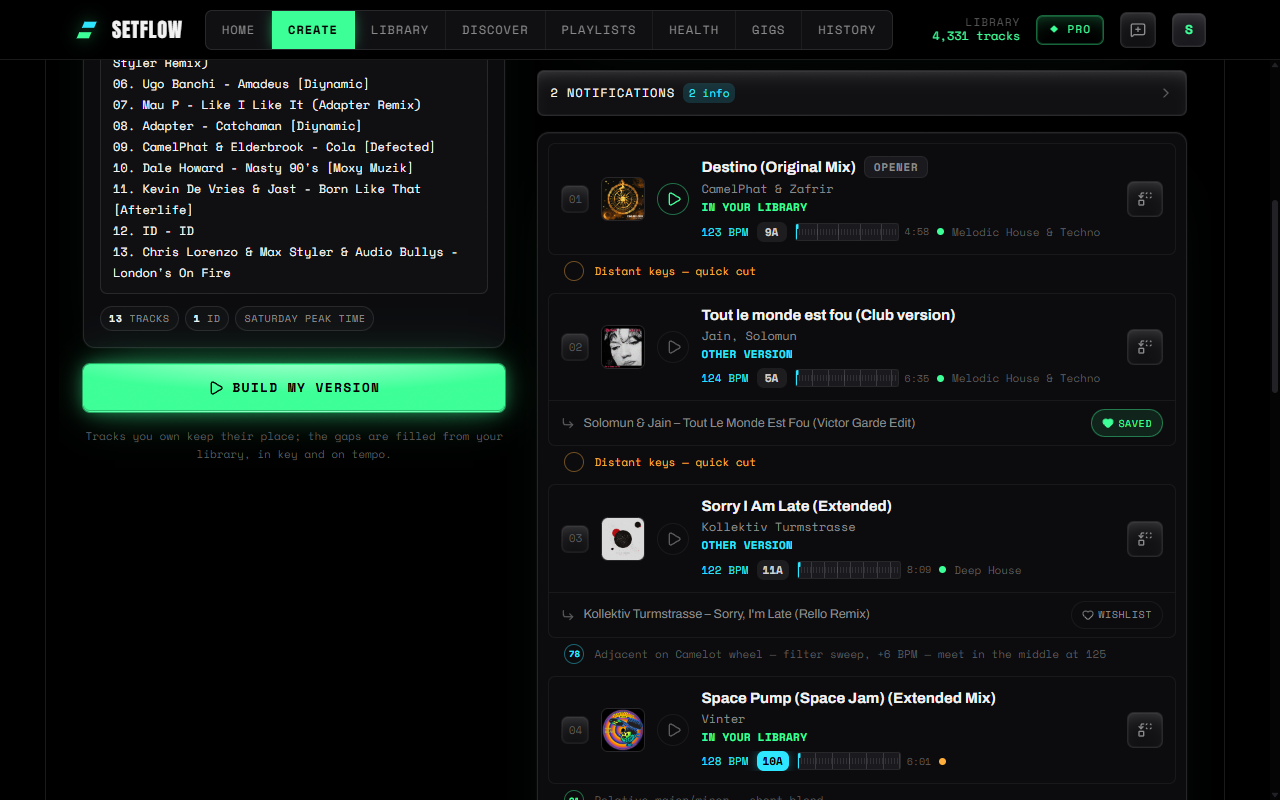
The result panel shows each step as it happens. Every line is checked against the library you've already imported: In your library, Other version, Same artist (picked to sit near the set's tempo), or a gap. Matching happens in your browser; the pasted list isn't sent anywhere.
Then the gaps fill in. SetFlow keeps every matched track in its original position, fills the gaps with tracks from your library that fit the key and tempo either side, follows an energy curve taken from the reference, and plans the set to roughly the same length. It settles into a normal set on the same page — each row notes what it replaced — and it's saved to History automatically, so you can swap tracks, tweak the order and export it to Rekordbox, Traktor or Serato straight away. Under each row you'll see the track from their set it stands in for; press Wishlist next to one you don't own and it goes on your Discover wishlist. There you can play a 30-second preview, see its cover and an estimated BPM and key when the track is in the catalogue, and follow Beatport, Traxsource and Bandcamp links when you're ready to buy.
A good habit: build it, then go through and replace a few of the matched tracks with your own favourites. The shape stays; the set becomes more yours each time.
The honest limits
- It can't see tracks you don't own. SetFlow only knows the BPM and key of records in your library, so missing slots are filled from the matched tracks around them. If you own very little of the list, your version will follow the original loosely.
- “Same artist” is a stand-in. It's a different record that happens to sit at a similar tempo, not the one that was played. Listen before you rely on it.
- Matching depends on your tags. Badly spelled artists or titles in your library can hide a track you do own. Tidying your library first helps.
- Building is Pro. Pasting and matching are free on every plan; Build my version needs SetFlow Pro or an active Weekend Pass.
Make it yours
The best reason to study someone else's set is to find out what you would do differently. Use the reference for its shape, fill it with your records, then play it, listen back and change what doesn't sound like you. For more on building a set from scratch, see how to plan a DJ set, and for finding the records your library is missing, try Discover.
Try SetFlow free for 7 days — import your library, paste a tracklist and see how much of it you already own.
Frequently Asked Questions
Is it OK to play a set based on another DJ’s tracklist?
Using a set you admire as a study is how most DJs learn: its pacing, its key moves, where it peaks. Lifting the whole thing note-for-note and playing it as your own is a different matter. Keep the shape, swap in your own records, and if a set shaped yours, say so when people ask.
Where do I get the tracklist from?
Anywhere you can copy text: a mix description, a radio show’s published playlist, a festival set someone wrote up, or your own notes from the dancefloor. SetFlow never fetches tracklists from other sites — you paste the list you have.
What happens to tracks I don’t own?
SetFlow fills those slots with tracks from your own library that fit the key and tempo of the tracks either side. Under each of those rows is the track from their set it stands in for, with a Wishlist button that saves that track to your Discover wishlist. There it gets cover art, a 30-second preview and an estimated BPM and key when the track is in the catalogue, plus Beatport, Traxsource and Bandcamp search links.
Does SetFlow know the BPM and key of tracks I don’t own?
Not while building your version: it only knows the BPM and key of tracks in your library, so gaps are filled by looking at the matched tracks around them. The more of the list you own, the closer your version follows the original. Once you save a track to your Discover wishlist, SetFlow estimates its BPM and key from a 30-second preview, when it can find the track in the catalogue.
Is it free?
Pasting a tracklist and matching it against your library is free on every plan. Building your version is part of SetFlow Pro and is included in the Weekend Pass.
Ready to build better sets?
Import your Rekordbox, Traktor, or Serato library and generate perfectly mixed DJ sets in seconds.
Try SetFlow Free