Library Health: Score Your DJ Library and Fix What Actually Improves Your Sets
Every set SetFlow generates is only as good as the metadata inside your library. The harmonic engine reads key, the transitions read BPM, the candidate pool is filtered by genre. If those are missing or messy, your sets quietly get worse — and you'd never know why. The new Library Health dashboard scores your library on exactly the data the set generator uses, tells you the highest-impact things to fix, and links you straight to the tracks that need attention.
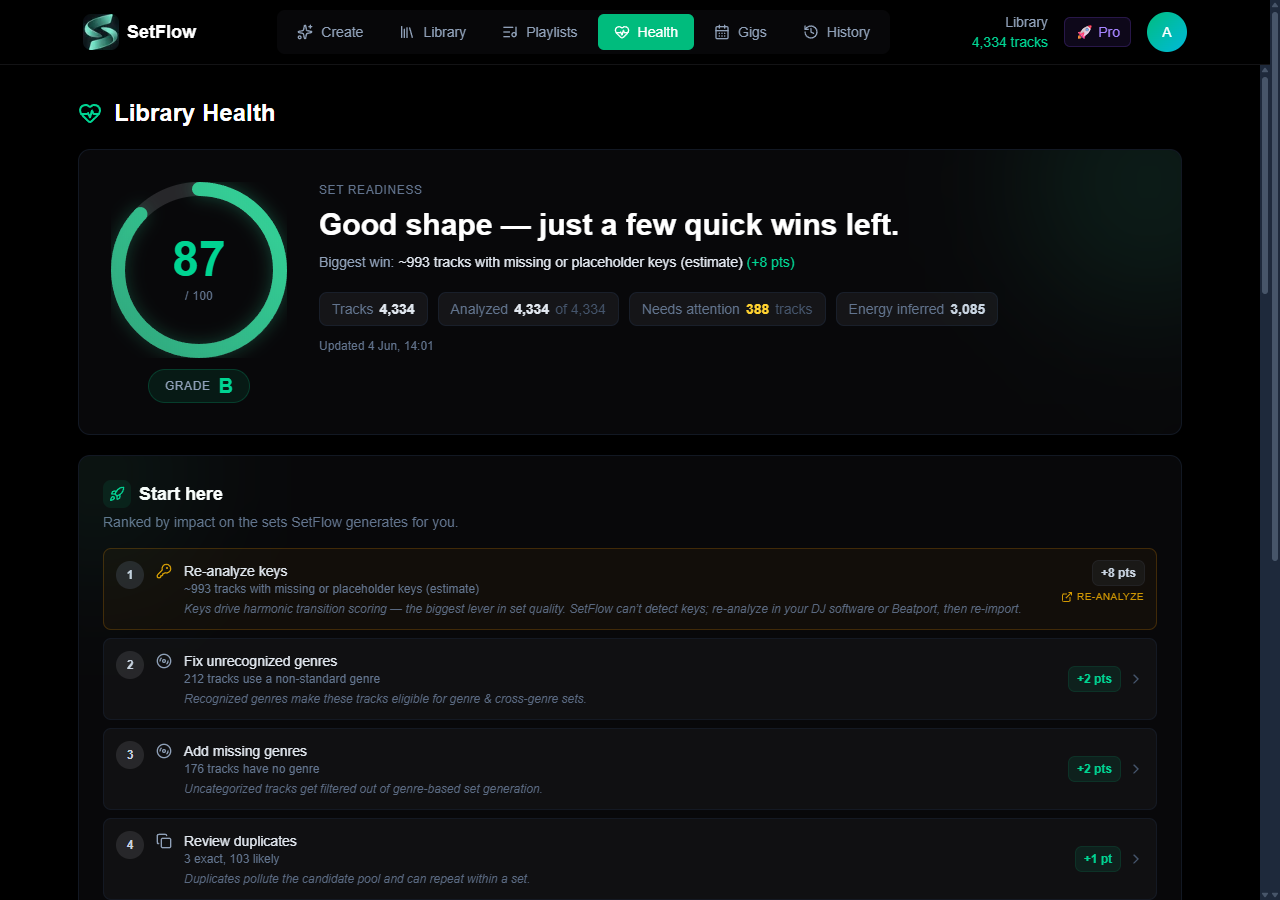
It scores set quality — not metadata trivia
Most “library cleanup” tools measure raw completeness: how many fields are blank. That sounds useful but it's misleading, because plenty of blank fields don't change a single generated set. We built Library Health around a sharper question: does this data actually affect the sets we build for you?
So the headline Set Readiness score is weighted on only what the generator consumes:
- Genre — decides which tracks are even eligible for a genre-based set, plus cross-genre compatibility. A track with an unrecognised genre can get filtered out of generation entirely.
- Key — drives the harmonic transition scoring on the Camelot wheel. Missing or placeholder keys can't be scored.
- Duplicates — pollute the candidate pool and can repeat within a set.
Everything else is shown for transparency but kept out of the score, and we're honest about why:
- Energy is informational. DJ software doesn't store an energy value — SetFlow derives it from colour, genre and BPM to power your energy curve. That's the expected state, not a defect, so it never drags your score.
- Artist & album tags are library hygiene. They're great for browsing and searching, but the generator already handles “Unknown Artist” gracefully — so a library full of blank artists isn't a worse library for mixing. We say so plainly instead of marking it red.
“Start here” ranks fixes by set impact
The fastest way to a better library is knowing which single thing to fix first. The Start here panel ranks every issue by its estimated point gain to your Set Readiness score, and tells you why each one matters for your sets. Two kinds of items show up:
- Fixable in SetFlow — genre problems and duplicates. Click one and the fix list filters to exactly those tracks.
- Advisories — keys are usually your biggest harmonic lever, but SetFlow can't detect a track's key. So instead of a dead button, you get an honest “re-analyse in your DJ software or Beatport, then re-import” callout, with the point gain it would unlock.
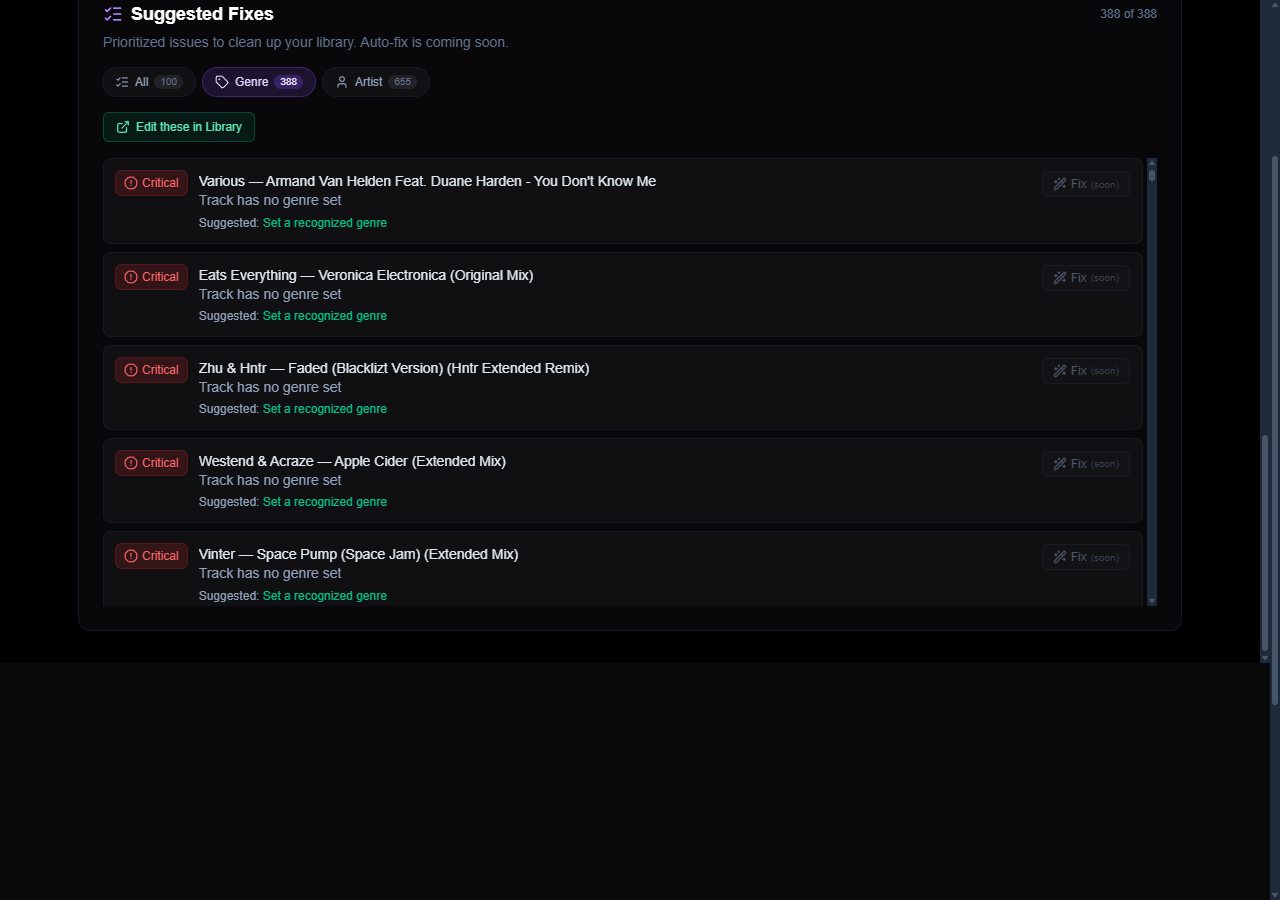
Every fix is one click from action. The Edit these in Library button opens your Library pre-filtered to just the affected tracks, so you can correct them in place using the inline metadata editor. For a whole library of messy genres, the bulk route is even faster — see our guide to auto-tagging with beets + Beatport, which writes canonical genre strings that map cleanly into SetFlow's genre normalisation table.
Harmonic coverage, told honestly
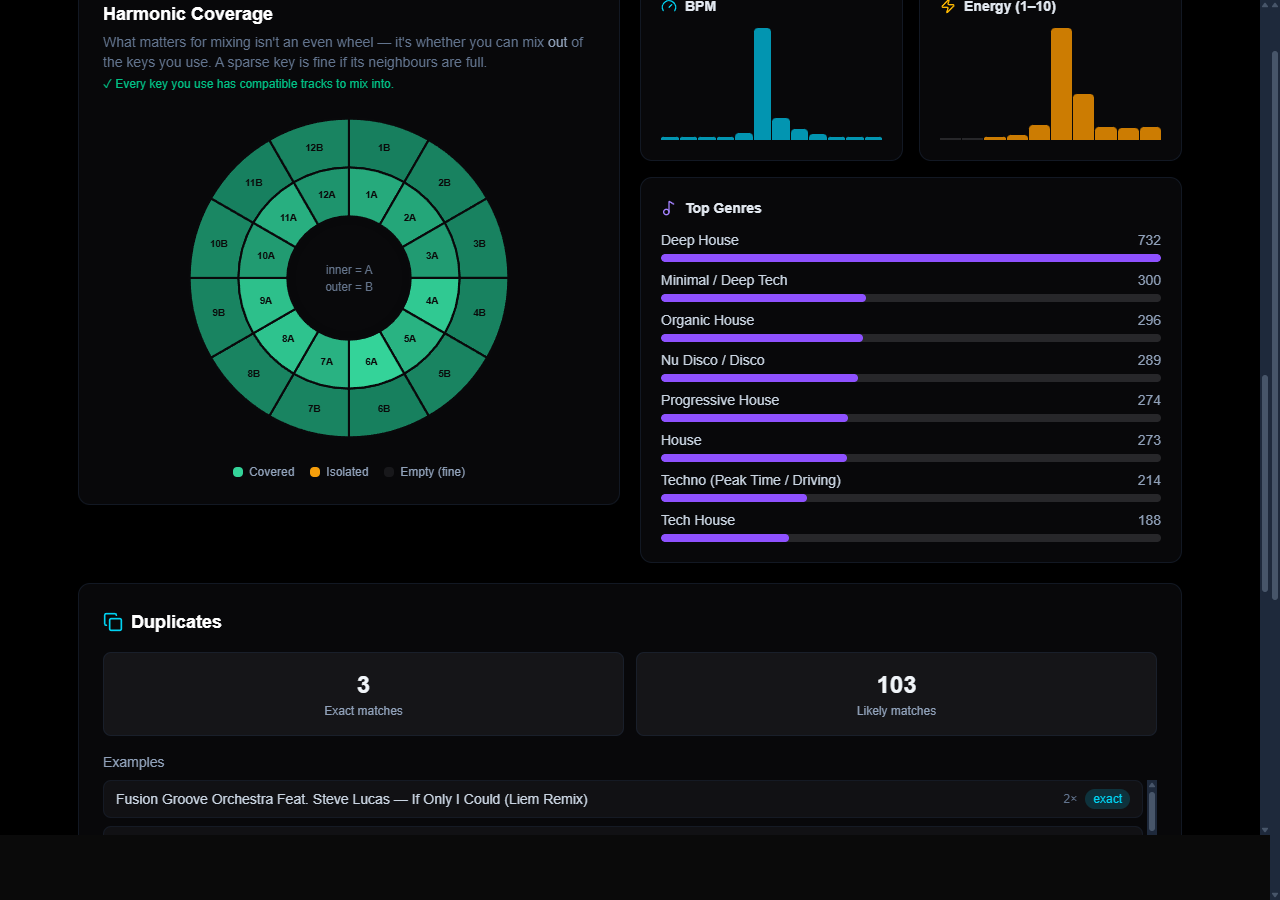
The Camelot wheel on the dashboard answers the question that actually matters for mixing: can you mix out of the keys you use? Most coverage charts shade by raw track count, which makes a perfectly healthy library look broken — a minor-key-heavy collection lights up half the wheel as “empty” even though it mixes beautifully.
Ours shades by harmonic coverage instead. A sparse key is shown as healthy if its compatible neighbours are full, because you can still mix out of it (its relative major/minor and ±1 neighbours give you somewhere to go). The only warning state is isolated — a key where you have tracks but almost nothing compatible to transition into. Hover any key to see how many compatible tracks you can mix into.
How to fix what it finds
- Genres & artists — the fastest route is to let SetFlow fix your genres and artists for you; you can also fix in place via the Library deep-link, or bulk-tag the whole library with the beets workflow. Clean, canonical genres are the single biggest thing you can do for set quality.
- Keys — re-analyse in Rekordbox / Serato / Traktor (or Beatport / Mixed In Key), then re-export and re-import. SetFlow reads whatever key your DJ software wrote.
- Duplicates — the dashboard surfaces both exact and likely-duplicate groups so you can prune them before they double up in a set.
Where to find it
Library Health lives under the Health tab once you've imported a library. It works with every source SetFlow supports — Rekordbox, Traktor and Serato — and it scales to big collections (if you're running tens of thousands of tracks, see our notes on large-library performance). Nothing is uploaded anywhere new; it analyses the library you've already imported.
Spend five minutes on your top two fixes — recognised genres and a key re-analysis — and the difference shows up immediately in the sets SetFlow builds for you.
Get the Camelot cheat sheet
A one-page printable of all 24 keys, compatible moves, and energy jumps — handy next to the decks.
One email with your download. No newsletter, no spam.
Ready to build better sets?
Import your Rekordbox, Traktor, or Serato library and generate perfectly mixed DJ sets in seconds.
Try SetFlow Free