Edit Track Metadata Directly in SetFlow
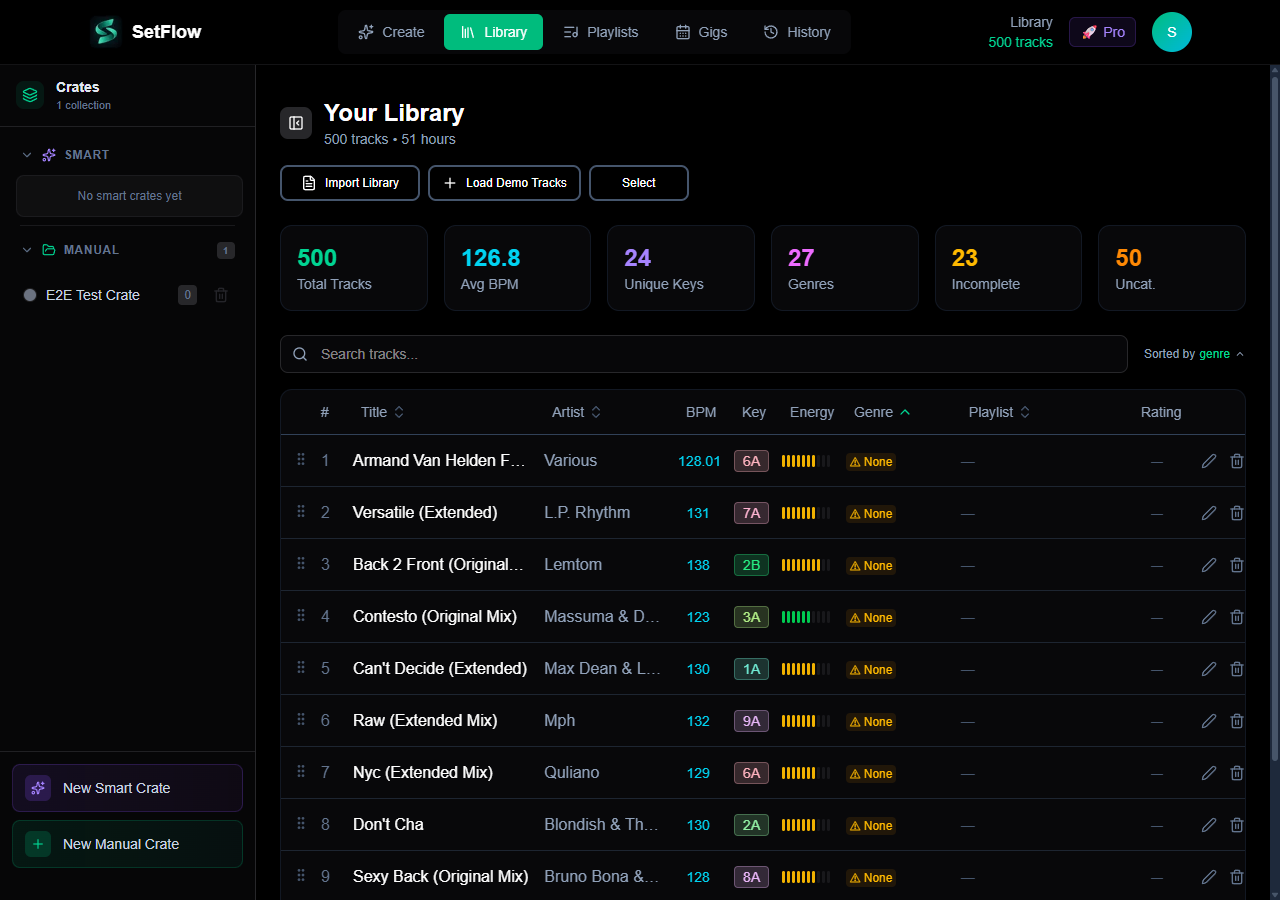
Your DJ software got the BPM wrong. The key analysis missed. The energy level doesn't match how the track actually feels on the floor. Until now, you had to fix it in Rekordbox or Traktor and re-import. Starting today, you can edit track metadata directly in SetFlow — and the set generator will use your corrected values immediately.
Why Track Editing Matters
SetFlow's set generation algorithm scores every transition using harmonic compatibility, BPM matching, and energy flow. If the metadata is wrong, the algorithm makes decisions based on bad data. A track analysed at 128 BPM that actually sits at 126 BPM gets paired differently. A track tagged as 6A that's really 5A breaks the harmonic chain.
With direct editing, you correct these errors once and every future set benefits. No re-importing, no external tools, no workarounds.
What You Can Edit
Click the edit button (pencil icon) on any track in your library to open the edit modal. You can change:
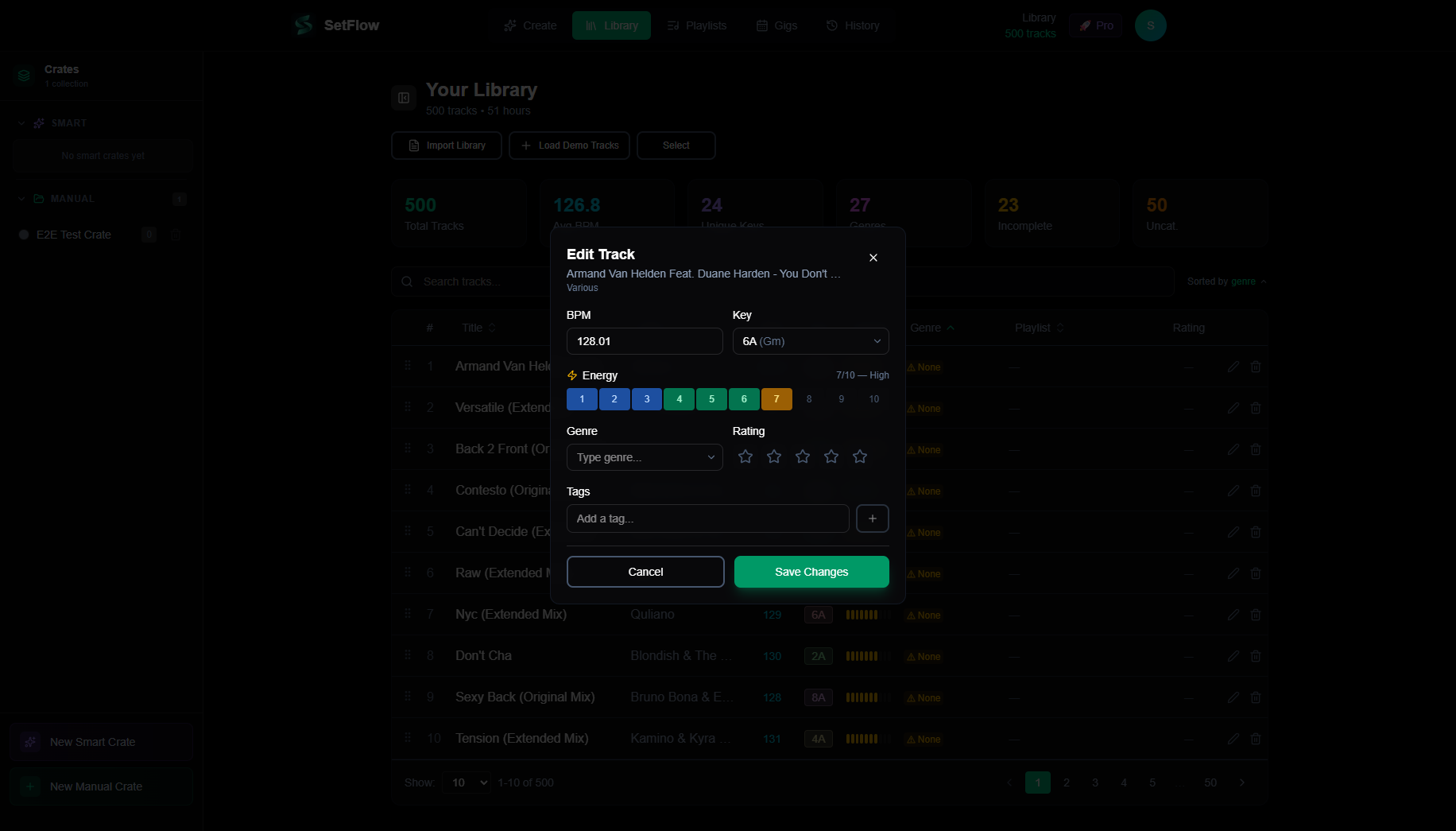
- BPM — correct the tempo if your DJ software got it wrong or detected a half/double-time value
- Key (Camelot) — select from all 24 Camelot keys with both Camelot notation and musical key shown side-by-side
- Energy (1–10) — set the energy level based on how the track actually feels on the dancefloor, not just what the algorithm guessed from BPM and genre
- Genre — assign or correct the genre with autocomplete from SetFlow's genre list
- Rating (1–5 stars) — rate your tracks so the algorithm can prioritise your favourites
- Tags — add custom tags like “peak time”, “opener”, or “b2b” to organise your library your way
Designed for Mobile
The edit modal is compact and touch-friendly. BPM and Key sit side-by-side, Genre and Rating share a row, and the energy bar is a single tap. Everything fits on screen without scrolling — even on an iPhone SE.
This matters because you might spot a wrong BPM while reviewing your library on the bus, or want to bump a track's energy rating while listening back on headphones. Quick edits shouldn't require a laptop.
How Edits Improve Your Sets
Every field you edit feeds directly into the set generation algorithm:
- Corrected BPM means smoother transitions — the algorithm won't pair tracks with a 6% tempo gap it thinks is only 2%
- Corrected key means proper harmonic chains — no more clashing keys that sounded wrong despite the algorithm saying they're compatible
- Manual energy is the big one — you know how a track feels better than any algorithm. A slow track with heavy bass might be high energy. A fast track with gentle pads might be low energy. Your rating overrides the heuristic
- Ratings give the algorithm a preference signal — 5-star tracks are more likely to appear in generated sets
Install SetFlow as an App
While we were building track editing, we also added PWA (Progressive Web App) support. This means you can install SetFlow directly to your phone's home screen or your desktop — it launches like a native app, with no browser chrome and a dedicated app icon.
On mobile Chrome or Safari, look for the “Add to Home Screen” or install prompt. On desktop Chrome or Edge, click the install icon in the address bar. SetFlow opens in its own window, just like a native app.
Email Preferences
All marketing emails from SetFlow now include a one-click unsubscribe link at the bottom. Click it and you're immediately unsubscribed from feature announcements and promotional emails. You'll still receive essential account emails like password resets and billing notifications.
Try It Now
Head to your Library, click the pencil icon on any track, and correct anything that's off. Your next generated set will be better for it.
New to SetFlow? Start your free trial and import up to 500 tracks from Rekordbox or Traktor. Edit your metadata, generate a set, and hear the difference accurate data makes.
Quick Summary
- ✓Edit BPM, key, energy, genre, rating, and tags directly in your library
- ✓Compact, mobile-friendly modal — no scrolling needed
- ✓Edits feed directly into the set generation algorithm
- ✓Install SetFlow as a standalone app (PWA) on phone or desktop
- ✓One-click email unsubscribe on all marketing emails
Get the Camelot cheat sheet
A one-page printable of all 24 keys, compatible moves, and energy jumps — handy next to the decks.
One email with your download. No newsletter, no spam.
Ready to build better sets?
Import your Rekordbox, Traktor, or Serato library and generate perfectly mixed DJ sets in seconds.
Try SetFlow Free