How to EQ a DJ Transition: Lows, Mids and Highs Through a Blend
Beat-matching gets two tracks playing together. The EQ is what makes them sound like one. Here's the three-knob routine most house and techno DJs use through a blend, and how SetFlow now plays every transition in your set with it.
Three knobs, three jobs
Every DJ mixer gives each channel a low, a mid and a high. During a blend each one does a different job:
- Lows: one bass at a time. Two kicks and two basslines at full weight turn to mud. Start the incoming track with its bass cut, then swap: bring its bass in and take the outgoing bass out, in one move, on a phrase.
- Highs: bring them in gently. Two hi-hat patterns on top of each other fizz, and the incoming hats give the game away before you want the crowd to hear the new track. Start the incoming highs turned down and open them up as the blend goes on, so they're fully open by the bass swap.
- Mids: make room. The mids hold the chords, stabs and vocals. As the new track comes in, ease the outgoing mids back a little. The blend sounds full rather than crowded, and the new track seems to take over on its own.
Keep the moves gradual. A slow turn over the first half of the blend sounds like the music changing; a sudden one sounds like a knob.
A blend, step by step
- Start the incoming track with its bass cut and its highs down, its fader coming up.
- Over the first half of the run-up, bring the fader all the way up and ease the outgoing mids back.
- Open the incoming highs as you head for the swap.
- Swap the bass as the outgoing track starts winding down.
- Drop: the incoming track takes over, and the outgoing one fades out through its last bars.
Cuts are the exception: the new track drops in on the beat at full volume, with nothing to EQ. Key clashes and two vocals on top of each other are the other: keep those blends short, and SetFlow's Mix view already caps them at 8 bars.
Hear it in SetFlow
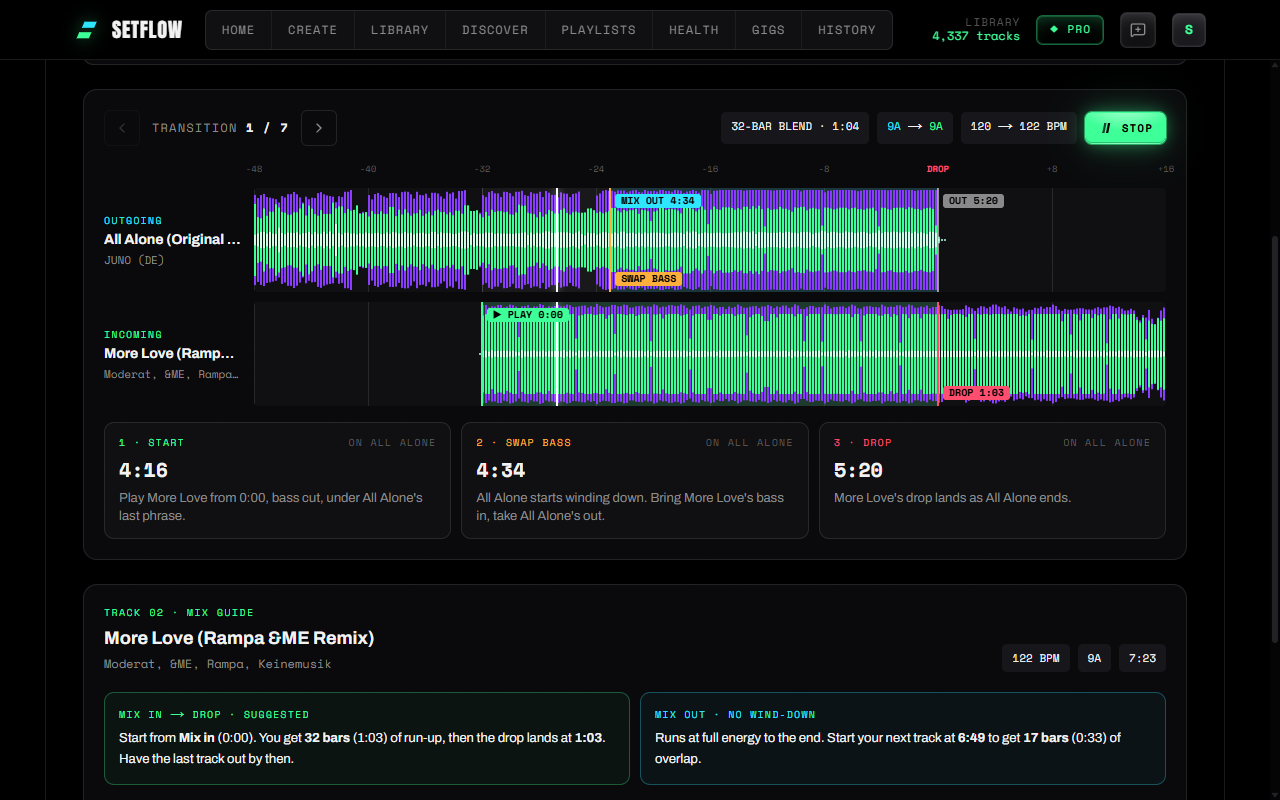
SetFlow's Mix view lines up every transition in your set bar for bar: where to start the next track, when to swap the bass and where its drop lands. Hear the blend plays that transition from the two files in your music folder, beat-matched, and Play the mix plays the whole set through.
Both now ride the EQ the way described above. The incoming track fades in with its bass cut and its highs down, the highs open by the bass swap, the outgoing mids ease back over the first half of the blend, and the bass swaps on the phrase. Cuts play straight in. It's the quickest way to hear whether two tracks belong together before the gig, and to hear what a clean blend between them sounds like.
Choose how long you blend (Cuts, 8, 16, 32 or 64 bars) on Create or in the Mix view, and every transition follows.
The limits
- Hear the blend needs a computer with Chrome, Edge, Brave, Arc or Opera, and the tracks in your connected music folder.
- It's a guide, not your mix. Every track and every room is different: use it to check a pairing, then ride the knobs your own way on the night.
Try SetFlow free for 7 days. Import your Rekordbox or Traktor library, build a set and open it in the Mix view. See the changelog for everything else that's new.
Frequently Asked Questions
How should I use the EQ when mixing two tracks?
Treat the three knobs as three jobs. Lows: only one kick and bassline at full weight, so cut the incoming bass and swap it over at one moment. Highs: bring the incoming track in with its highs turned down and open them gradually, so two hi-hat patterns never fizz on top of each other. Mids: ease the outgoing mids back a little to make room for the new track’s chords and vocals.
When should I swap the bass?
When the outgoing track starts winding down, on a phrase. Cut the incoming bass when you press play, then in one move bring it in and take the outgoing bass out. SetFlow’s Mix view marks that moment on both waveforms as SWAP BASS.
Why does my blend sound muddy or crowded?
Usually because both tracks are playing at full range. Two basslines turn to mud, two sets of hats turn to fizz, and two sets of mids fight for the same space. Cut the incoming bass, bring its highs in low, and dip the outgoing mids while the two overlap.
Should I EQ a cut?
No. A cut drops the new track in on the beat at full volume, with no overlap to manage, so there is nothing to EQ. In SetFlow a blend length of Cuts plays that way.
Does Hear the blend use my DJ software?
No. SetFlow plays the two files from your music folder in your browser, beat-matched, with the EQ moves a DJ would make. Your music is never uploaded and SetFlow never writes to your DJ software.
Do I need Pro?
Hear the blend and Play the mix are part of Smart Mix Points in Pro, and a Weekend Pass unlocks them too.
Ready to build better sets?
Import your Rekordbox, Traktor, or Serato library and generate perfectly mixed DJ sets in seconds.
Try SetFlow Free