Learn DJ Transitions Move by Move, Without a Controller
Most DJ tutorials explain a transition in a paragraph. Then you stand at the decks, the track is already playing, and you can't remember which knob comes first. SetFlow's new DJ Tutor shows every transition in your set on a controller, move by move, in time with the music.
A transition is five moves
A house or techno blend looks like magic from the floor, but on the mixer it is the same short routine every time:
- Set up the incoming deck. Cue the track. Turn its LOW fully down and its HI down a little, keep its fader down, and press SYNC.
- Start it on the downbeat. Press play on the first beat of a bar and ease the fader up. Most of the rise comes late, so it doesn't jump in.
- Make room. Open the incoming HI back up as you go, and dip the outgoing MID a little.
- Swap the bass. On a bar line, turn the outgoing LOW out and the incoming LOW in, in one move. Two basslines at once turn to mud.
- Fade out. Bring the outgoing fader down so the old track has gone a bar after the new one's drop.
If you want the why behind each knob, our guide to EQing a DJ transition goes deeper, and DJ transitions explained covers the other ways to mix, from cuts to echo outs.
Watch the moves happen
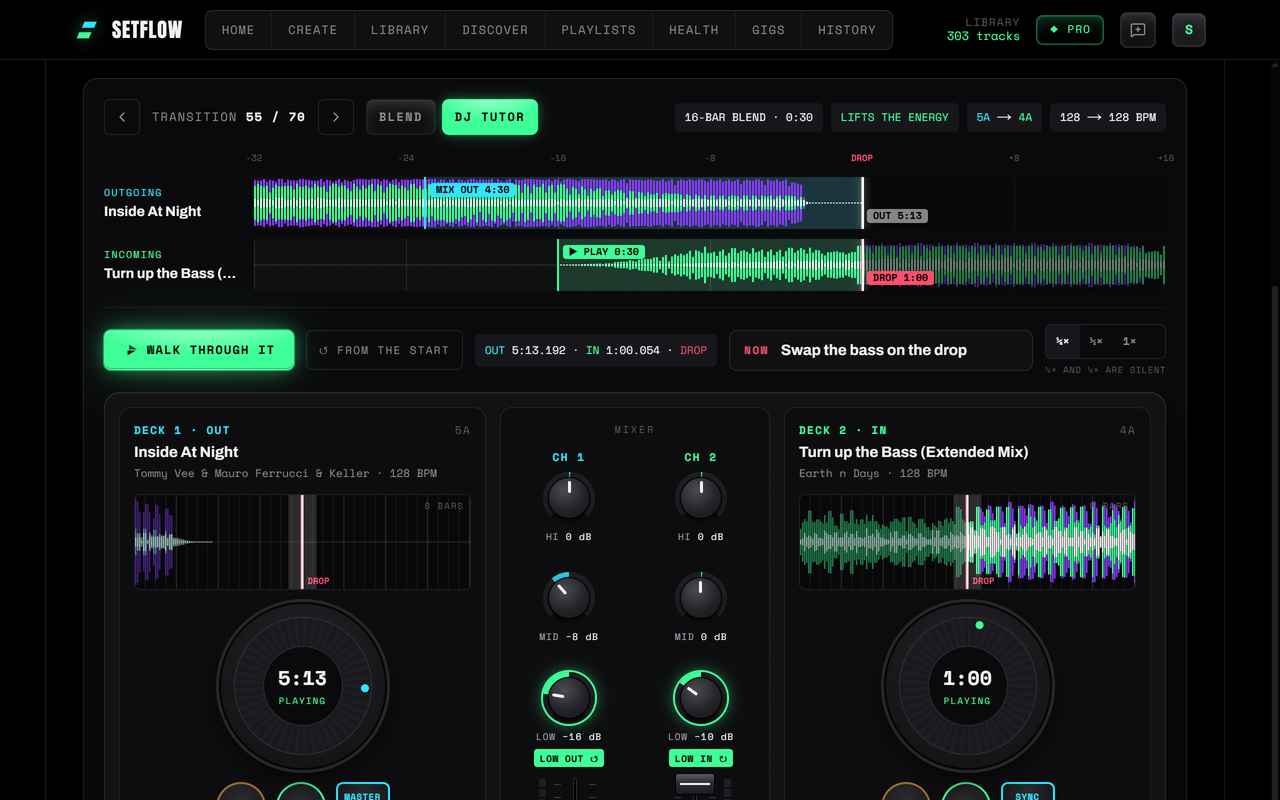
Open a set in the Mix view and switch to DJ Tutor. Each transition appears on two decks and a mixer:
- Each deck has a screen showing 8 bars of the track around the playhead, like a CDJ, with the swap and the drop sliding in towards you.
- The knobs and faders move exactly as SetFlow plays the blend: the incoming LOW starts at kill, its HI opens from -15 dB, the bass swaps in one beat, the old track fades.
- A badge lights the next control to touch. Blue means set it before you start, amber pulses with a countdown, and green means now.
- A guide under each deck says what to do with that deck and why, counts the bars to the drop, and shows the next move.
Slow it down, then hear it
Play a transition at half or quarter speed and it walks through the moves silently, so you can follow every knob. Then switch back to full speed and press Hear the blend: SetFlow plays the two files from your music folder, beat-matched, with the same moves. Your music never leaves your computer.
The steps along the bottom (prep, start, swap the bass, drop) are clickable, so you can jump straight to the part you want to practise. Prefer the waveforms on their own? The Blend view keeps them big, and now shows the blend as you hear it, with the incoming bass missing until the swap.
Every transition is different
A tutorial teaches one blend. Your set has dozens, and each one is planned from the two tracks it joins: how long the intro is, where the outgoing track runs out of bass, whether the keys clash. When a track has no bass until its drop, the guide tells you to keep the old bass on and swap on the drop. When the blend is a cut, it shows you a cut. You learn the routine on your own music, in the order you'll play it.
See what else is new in the changelog, or build a set and open its Mix view.
Frequently asked questions
Can I learn DJ transitions without a controller?
Yes, the moves at least. A blend is a short sequence of the same few moves: cue the next track, start it on the downbeat, raise its fader, swap the bass, fade the old track out. SetFlow’s DJ Tutor plays every transition in your set on an on-screen controller, so you can learn the order and the timing before your hands are on the decks.
What should I touch first when I start a blend?
Before you press play: turn the incoming track’s LOW fully down, its HI down a little, keep its fader down and press SYNC. Then press play on a downbeat and ease the fader up. The bass comes in later, at the swap.
When exactly do I swap the bass?
On a bar line, usually where the outgoing track starts winding down. Turn the outgoing LOW out and the incoming LOW in, in one move. SetFlow picks the bar for each transition from your own files and counts you into it, in bars and then beats.
Why practise at half speed?
At full speed a 16-bar blend is over in half a minute and the swap takes one beat. At half or quarter speed you can watch which knob moves when, then play it back at full speed with the sound to hear the result.
Does it work on my phone?
Yes. Phones can’t play the music files in your folder, so on a phone the DJ Tutor walks through each transition without sound, using the analysis from your computer. On a computer in Chrome or Edge you can hear it too.
Do I need Pro?
The DJ Tutor is part of Smart Mix Points in Pro, and a Weekend Pass unlocks it too.
Ready to build better sets?
Import your Rekordbox, Traktor, or Serato library and generate perfectly mixed DJ sets in seconds.
Try SetFlow Free