DDJ-FLX4: Your First Transition, Control by Control
You've plugged in your Pioneer DDJ-FLX4, loaded two tracks and got sound out of it. Now you want one clean blend: the new track creeping in, the bass swapping over, the old track gone, and nobody on the floor noticing the join. This guide walks through that single transition, control by control.
Still setting up? Start with our DDJ-400 & FLX4 beginner's guide, which covers installing the software, the layout and your first mix. This post picks up once both decks are playing.
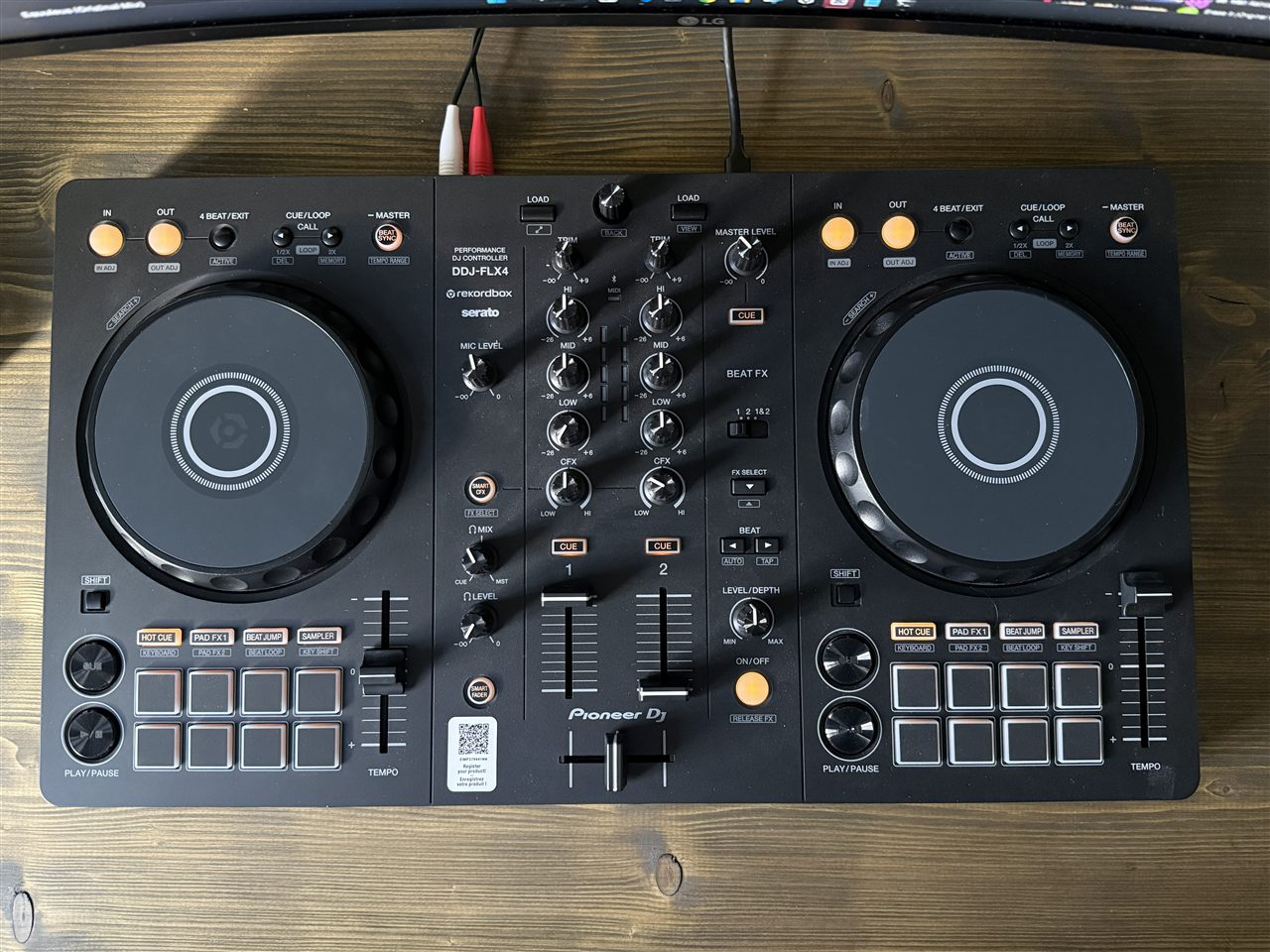
Before you start
- Software. The FLX4 works with rekordbox and Serato DJ Lite out of the box. Either is fine for this; if you can't decide, read rekordbox vs Serato.
- Two tracks that suit each other. Pick two tracks in the same genre, a few BPM apart, ideally with a long, simple intro on the incoming one. House and techno are the easiest to learn on.
- Headphones in. Plug them into the PHONES socket. The headphones MIXING knob balances what you cue against the master; start it near the cue side.
- Track A playing on deck 1, its channel fader up, the crossfader in the middle. Track B loaded on deck 2, fader down.
Your first FLX4 transition, step by step
1. Cue the incoming track in your headphones
Press the headphone CUE button above channel 2's fader. Now deck 2 plays in your headphones only, with the fader still down. On the deck itself, set a cue point on the first beat of track B's intro so you can start from exactly there.
2. Set the TRIM
Play track B in your headphones and turn channel 2's TRIM until its level meter sits roughly where track A's does. Out of the red. Then go back to your cue point. Matching levels here means the fader does the work later, not your ears guessing.
3. Set the EQ before you start
On channel 2, turn the LOW fully down and the HI down a little. Leave the MID where it is. The new track will come in thin and quiet at the top, and its bass stays out of the way until the swap. Leave the CFX knob in the middle: it's a filter by default, and you don't need it for this blend.
4. Match the tempo
Press BEAT SYNC on deck 2. It matches track B's tempo and beatgrid to the master deck. If you want to learn by ear instead, move deck 2's tempo slider until the BPMs match, then nudge the jog wheel until the kicks line up in your headphones. Sync is fine while you learn the rest.
5. Press PLAY on the phrase
Count track A in bars of four beats, and wait for the start of a new phrase: usually 16 or 32 bars into a section, where something changes. Press PLAY/PAUSE on deck 2 exactly on that first beat. If phrasing is new to you, DJ phrasing: how to mix on the phrase explains how to hear it.
6. Fade it in with the channel fader
Slowly raise channel 2's fader over a few bars. Most of the rise should come late, so the new track doesn't jump in. As it settles, open its HI back up and dip track A's MID a touch to make room.
7. Swap the bass
This is the moment the transition lives or dies on. On a bar line, turn channel 1's LOW down and channel 2's LOW up, in one move, one hand on each knob. Two basslines at once turn to mud; this way only one track ever carries the low end. Our guide to how to do a bass swap goes deeper, and how to EQ a DJ transition covers the HI and MID too.
8. Fade the old track out
Bring channel 1's fader down over the next few bars, so track A has gone shortly after track B's drop. Press channel 1's CUE in your headphones and you're ready to load the next track. That's one blend.
What about Smart Fader and Smart CFX?
The FLX4 has a Smart Fader mode that adjusts volume, bass and BPM for you as you move a fader, and a Smart CFX button that applies a preset effects combination with one knob. Both are genuine and both can sound good. But they do the very moves you're trying to learn. Get the manual blend into your hands first, then try them so you know what they're doing on your behalf.
Common FLX4 beginner mistakes
- Forgetting the LOW. Fading track B up with its bass at full. Check channel 2's LOW is down before you press PLAY.
- Using the fader as a volume knob. If one track is quieter, fix it with TRIM, not by pushing its fader higher than the other.
- Moving the crossfader by accident. If a track vanishes mid-blend, check the crossfader is still in the middle.
- Starting off the phrase. Beats can line up perfectly and the blend still sounds wrong because the two tracks change sections at different times.
- Rushing. A blend over 16 or 32 bars feels slow behind the decks and right on the floor.
For twelve more habits that clean up your mixing, see DDJ-400 & FLX4 tips and tricks.
Practise it in SetFlow's DJ Tutor, then on the FLX4
One blend between two tracks you picked is a good start. A real set has a dozen, and every one is different: a short intro here, a track with no bass until its drop there. That's where SetFlow's DJ Tutor helps.
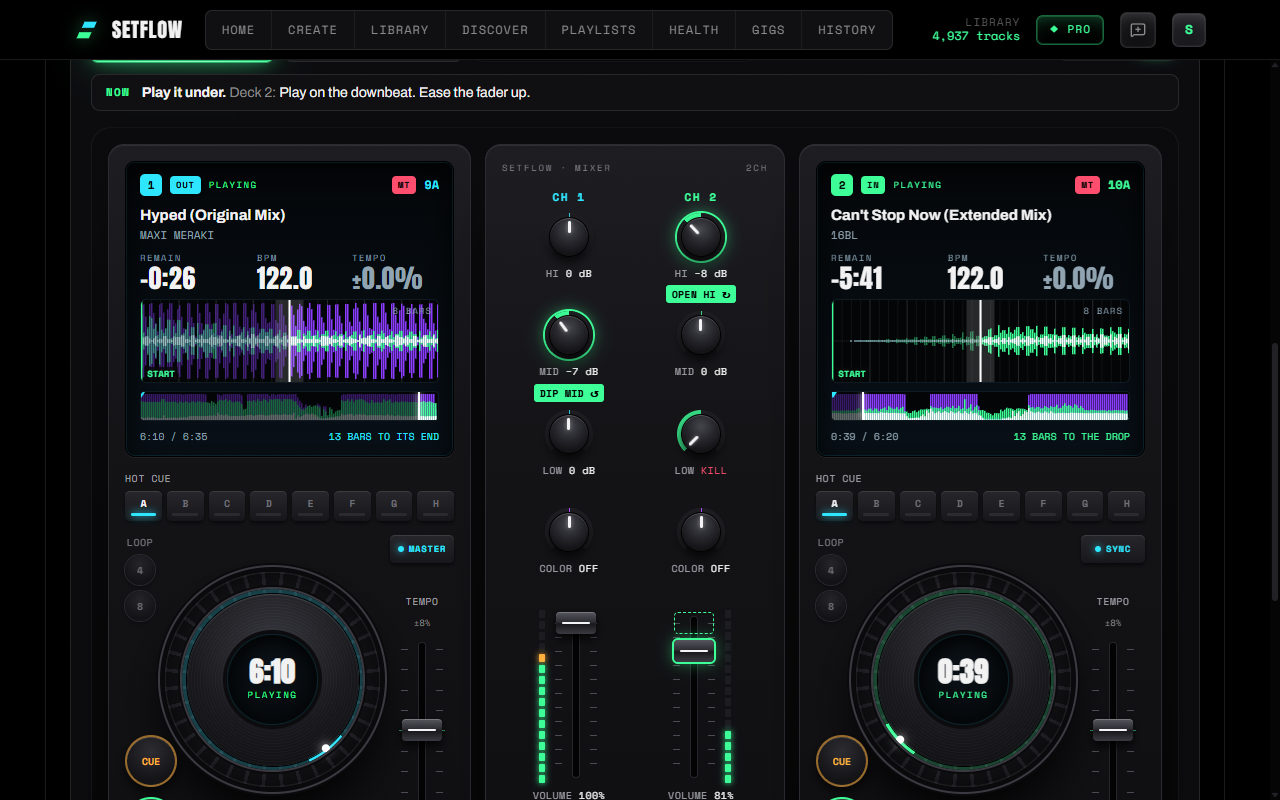
Build a set from your own library, open its Mix view and switch to DJ Tutor. Each transition plays out on an on-screen controller with the same controls you just used on the FLX4: LOW, MID and HI knobs, channel faders, SYNC, play and cue. The knobs move as the blend plays, a badge lights the next control to touch, and a guide under each deck counts you into the swap. Slow it to half speed to follow every move, then press Hear the blend to hear it played from your own files.
Then do it for real. Load the same two tracks in rekordbox or Serato, and play the transition on the FLX4 the way the DJ Tutor showed you. SetFlow doesn't control the controller; it's the practice partner you plan with, so your hands already know the moves when you get to the decks.
A few honest notes. The DJ Tutor is part of SetFlow Pro, and a Weekend Pass unlocks it too. Hearing the blend needs a computer with your music folder connected; your music never leaves it. On a phone, the DJ Tutor walks through each transition silently. For more on how it works, read learn DJ transitions move by move, or start from the hub: learn to DJ with your own music.
Ready? Build a set from your library and open its first transition.
Frequently asked questions
What is the easiest transition to learn on the DDJ-FLX4?
A long EQ blend between two house or techno tracks at similar tempos. Press BEAT SYNC, start the new track on the first beat of a phrase with its LOW turned down, fade it up, swap the bass, then fade the old track out. It uses only the mixer and the PLAY button, so you can focus on timing.
Should I use Smart Fader on the FLX4?
Smart Fader is a real FLX4 feature: it adjusts volume, bass and BPM for you as you move a fader. It works, but it hides the moves you are trying to learn. Learn the manual blend first, then try Smart Fader so you know what it is doing for you.
Do I use the crossfader or the channel faders?
For a blend, leave the crossfader in the middle and use the two channel faders. They give you separate control of each track. The crossfader is handy for quick cuts and scratching, but channel faders are easier to learn on.
Why does my FLX4 transition sound muddy?
Almost always two basslines playing at once. Keep the incoming LOW turned down until the swap, then turn the outgoing LOW out and the incoming LOW in together. Also check the TRIM: if either channel meter hits the red, the mix will distort.
Does SetFlow connect to my DDJ-FLX4?
No. SetFlow does not control the FLX4 or read its knobs. It plans your set and its DJ Tutor shows each transition on an on-screen controller, so you can learn the moves on your own tracks. Then you play them for real in rekordbox or Serato on the FLX4.
Is the DJ Tutor free?
The DJ Tutor is part of Smart Mix Points in SetFlow Pro, and a Weekend Pass unlocks it too. Hearing a blend needs a computer with your music folder connected; on a phone it walks through each transition silently.
Ready to build better sets?
Import your Rekordbox, Traktor, or Serato library and generate perfectly mixed DJ sets in seconds.
Try SetFlow Free