12 DDJ-400 & FLX4 Tips to Instantly Improve Your Mixing
You've got the basics down on your Pioneer DDJ-400 (or DDJ-FLX4) — now here are twelve tips that close the gap between “technically mixing” and “actually sounds good.” None of them require new gear; most take minutes to learn and pay off every time you play.
1. Set your gain before you set your fader
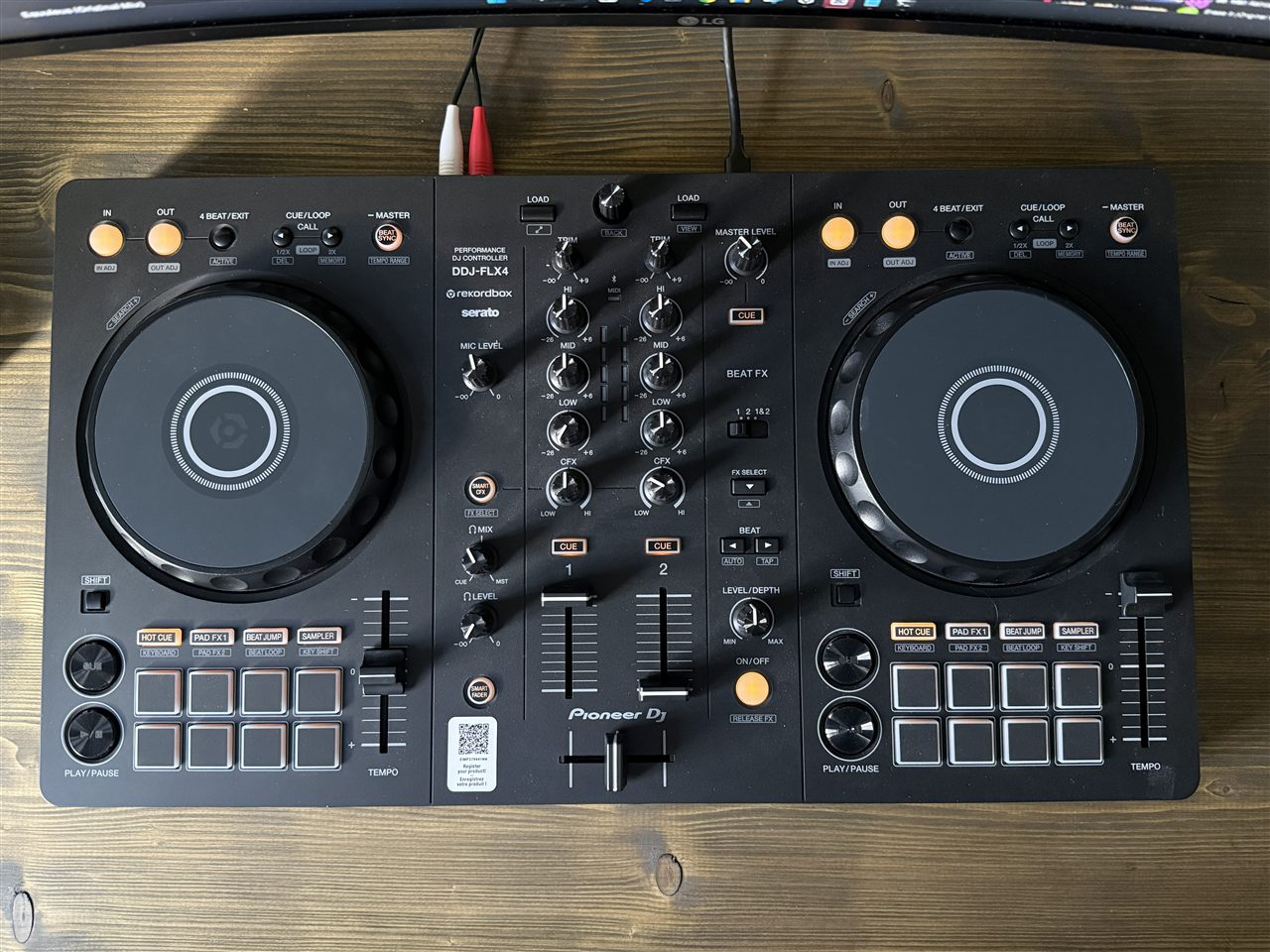
The most common beginner mistake is pushing the channel faders up to get louder while the gain is wrong. Instead, use the Trim/gain knob so each track's meter peaks in the amber range — never the red. That keeps levels consistent and leaves headroom so transitions don't distort. Loudness is the speakers' job, not the mixer's.
2. Mix with your ears, not your eyes
The waveforms in Rekordbox are a guide, not the truth. It's easy to line up two waveforms perfectly on screen and still be slightly off-beat. Cue the incoming track in your headphones and trust what you hear — close your eyes if it helps.
3. Cut the bass on the incoming track
Two basslines at once is the number one cause of a muddy mix. Before you bring a new track in, pull its low EQ all the way down. As you complete the transition, swap the bass over: track A's low down, track B's low up. Only one track carries the low end at any moment.
4. Count in phrases of 8, 16 and 32 bars
Dance music is built in blocks — intros, breakdowns and drops usually land on 8, 16 or 32-bar boundaries. Start your transitions at the top of a phrase and they line up musically, not just rhythmically. Counting 1–2–3–4, 2–2–3–4 up to eight teaches your ear where the phrases turn.
5. Use Hot Cues to give yourself more time
Set a Hot Cue on the first beat of a track's intro and another on the drop. Now you can jump straight to the part you need — and re-trigger the intro to extend your mixing window if you need a few more bars to nail the blend.
6. Loop an intro or outro to extend your mix
Got a track with a short intro? Drop a 4 or 8-beat loop on it to buy yourself time to bring it in cleanly. Looping the outro of the outgoing track does the same on the way out. The DDJ-400's Beat Loop pads make this a one-press move.
7. Go easy on the Beat FX
The Beat FX section is fun, and that's the trap. A single tempo-synced echo to carry a transition sounds professional; three effects stacked at once sounds like a beginner messing about. Pick one, use it with intent, get your hand off it.
8. Treat Sync as a training wheel, not a crutch
There's no shame in pressing Sync while you learn. But spend part of every practice session beatmatching by hand with the jog and tempo fader. That skill is what lets you walk up to any club setup and play with confidence — and it sharpens your timing for everything else.
9. Mix in key (it's easier than it sounds)
Tracks in compatible musical keys blend smoothly; clashing keys produce that sour, out-of-tune feeling that empties dancefloors. You don't need music theory — the Camelot wheel turns key matching into simple number rules. Rekordbox already analyses and displays the key of every track, so half the work is done for you.
10. Tag your library so the right track is findable
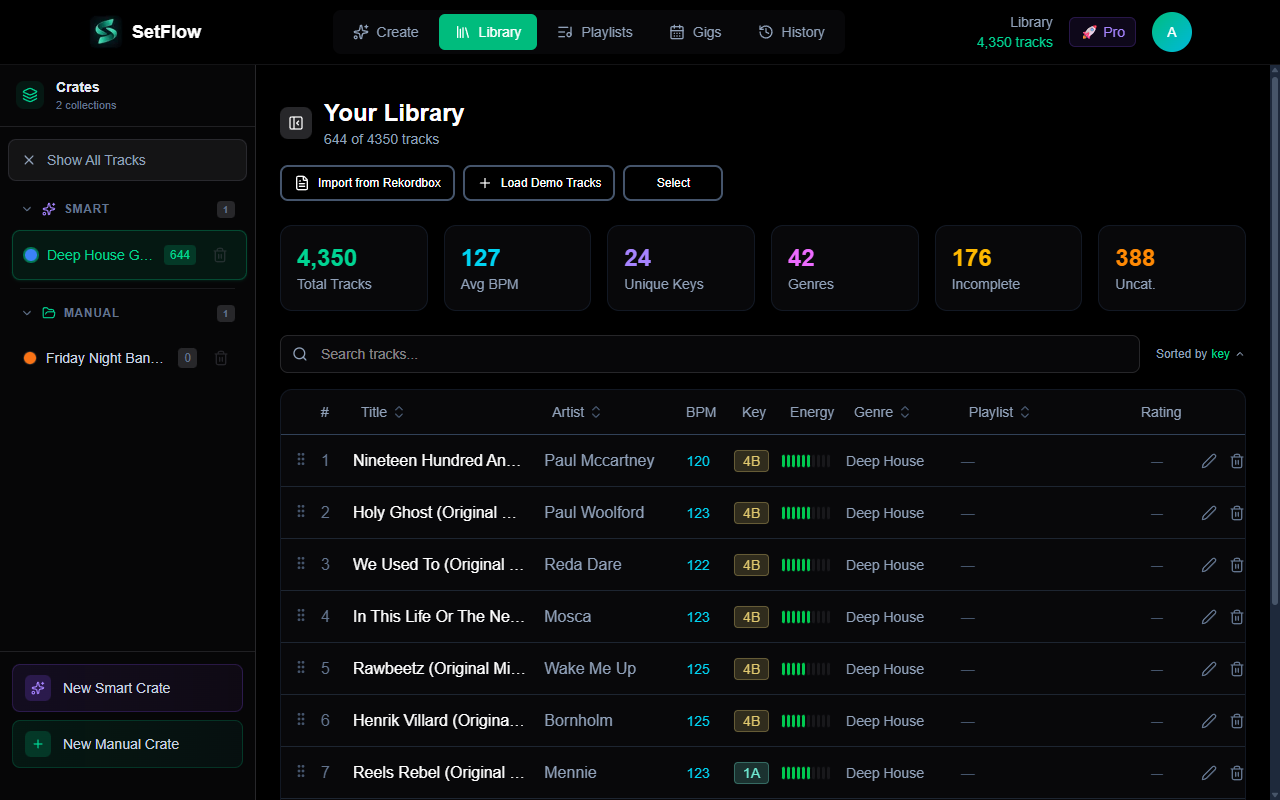
The DDJ-400 is only as good as the library behind it. Tracks with accurate BPM, key, genre and energy data let you find the perfect next record in seconds instead of scrolling in a panic. Spend an evening tagging your tracks in Rekordbox and every set after it gets easier. If your collection is large or messy, scoring your library's health shows you exactly what's missing.
11. Record every practice mix and listen back
Both Rekordbox and Serato can record your master output with one button — no extra hardware. Recording yourself is the fastest feedback loop there is: a timing slip or a key clash you didn't notice in the moment is glaringly obvious on playback the next day.
12. Plan a set instead of always freestyling
Freestyling is a great way to discover combinations, but a planned set teaches structure — how energy should rise and fall, how keys should flow from one track to the next. Try building a 60-minute set on paper (or let SetFlow generate a harmonically ordered one from your own library), then practise playing it on the DDJ-400. You'll learn more in a week of this than a month of random mixing.
Ready to put one together properly? Follow the step-by-step guide to planning your first DJ set on the DDJ-400. New to the controller entirely? Start with the DDJ-400 beginner's guide.
Frequently Asked Questions
Should I use Sync on the DDJ-400?
Sync is fine as a learning aid and for quickly locking tempos in a busy mix, but you should still practise beatmatching by ear with the jog wheel and tempo fader. Beatmatching builds the timing instinct that every other skill relies on, and it means you can perform on any gear — including club CDJs where you may choose not to use Sync.
Why does my mix sound muddy on the DDJ-400?
The usual culprit is two basslines playing at once. When you bring a new track in, cut its low EQ first, then swap the bass over as you complete the transition — only one track should carry the low end at a time. Muddiness is also caused by red-lining the gains, so keep your channel meters out of the red.
What are performance pads used for on the DDJ-400?
The eight performance pads switch between modes: Hot Cues (jump to saved points), Beat Loop (loop a set number of beats), Beat Jump (skip forward or back), Pad FX, and Sampler. Hot Cues and Beat Loops are the most useful for beginners — they let you re-arrange a track live and extend intros or outros to give yourself more time to mix.
How do I record a mix on the DDJ-400?
Use the record button in Rekordbox or Serato — it captures the master output directly, no extra hardware needed. Recording your practice sessions and listening back is the single fastest way to improve: you hear timing slips and clashing keys far more clearly as a listener than in the moment.
Ready to build better sets?
Import your Rekordbox, Traktor, or Serato library and generate perfectly mixed DJ sets in seconds.
Try SetFlow Free