How to Mix Two Songs with Different BPMs (and Get Back to Tempo)
A DJ who's just starting out told us the hardest part of a transition wasn't the EQ or the timing. It was the change in BPM. Getting two tracks at different tempos to play together is half of it, and the half nobody explains is what to do afterwards. Here's the whole move, and how SetFlow's DJ Tutor now shows it.
Step 1: match the tempo
The track that's playing sets the tempo. The incoming track follows it. Say the floor is at 120 BPM and the next track is 124: it has to play 3.2% slower to line up, beat for beat.
- With SYNC: press SYNC on the incoming deck. It matches the playing deck's tempo and keeps the beats together. The playing deck is the MASTER.
- Without SYNC: move the incoming TEMPO fader until its BPM on screen reads the same as the playing deck. Read the display, not the fader's marks, which drift from deck to deck. Start it on the downbeat, and if the kicks start to flam, nudge the jog wheel rather than the tempo.
How far apart can they be? Up to about 4% sounds natural, and up to 8% works. Past that, the track you've sped up or slowed down starts to sound out of key, so don't blend: use an echo out or a vinyl brake instead. Our BPM by genre chart shows where the usual jumps are.
Step 2: blend as usual
Once the tempos match, it's a normal transition: bring the new track in under the old one with its LOW off, swap the bass, and lower the old fader. Leave the tempo alone while both tracks are playing. Our guide to EQing a DJ transition covers this part move by move.
Step 3: ease back to its own tempo
This is the step beginners miss. When the old track has gone, the new one is still playing 3.2% slower than it was made. Leave it there and do the same on every transition, and your whole set ends up at whatever tempo the first track was.
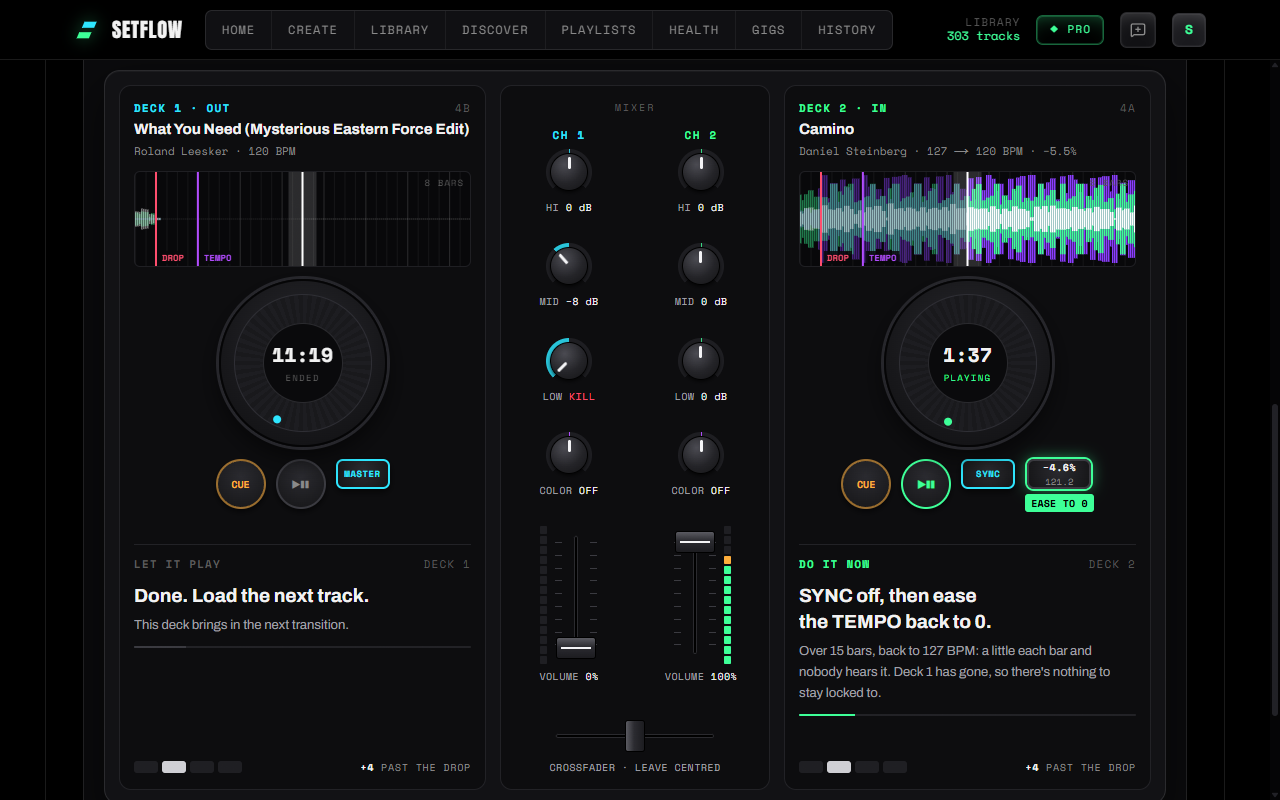
So once the old fader is down, turn SYNC off and ease the TEMPO back to 0 over about 16 bars. That's 0.2% a bar: small enough that nobody on the floor hears it, and you're back at 124 before the next transition. Without SYNC it's the same move, just without the button.
Step 4 (optional): choose where the drop lands
By default the next track's drop lands on the old track's last bar. Sometimes you'd rather bring it in a phrase earlier, while the old one still has its energy, or on a vocal you want to keep. Move it a whole phrase, 8 bars, at a time: anywhere else and the two tracks' phrases stop lining up.
Tempo in SetFlow's DJ Tutor
SetFlow knows the tempo change in every transition in your set, so the DJ Tutor now walks you through it:
- A TEMPO step after the drop, whenever the incoming track plays 1% or more off its own BPM. Deck 2 shows its TEMPO as it plays (−3.2%, 120.0 BPM), with a badge telling you when to turn SYNC off and ease it back.
- NO SYNC under the walkthrough: pick it if your decks have no SYNC, and the DJ Tutor gives the exact TEMPO to set before you start.
- Hear the blend plays it that way: the new track eases back to its own tempo once the old one has gone, from your own files. Your music never leaves your computer.
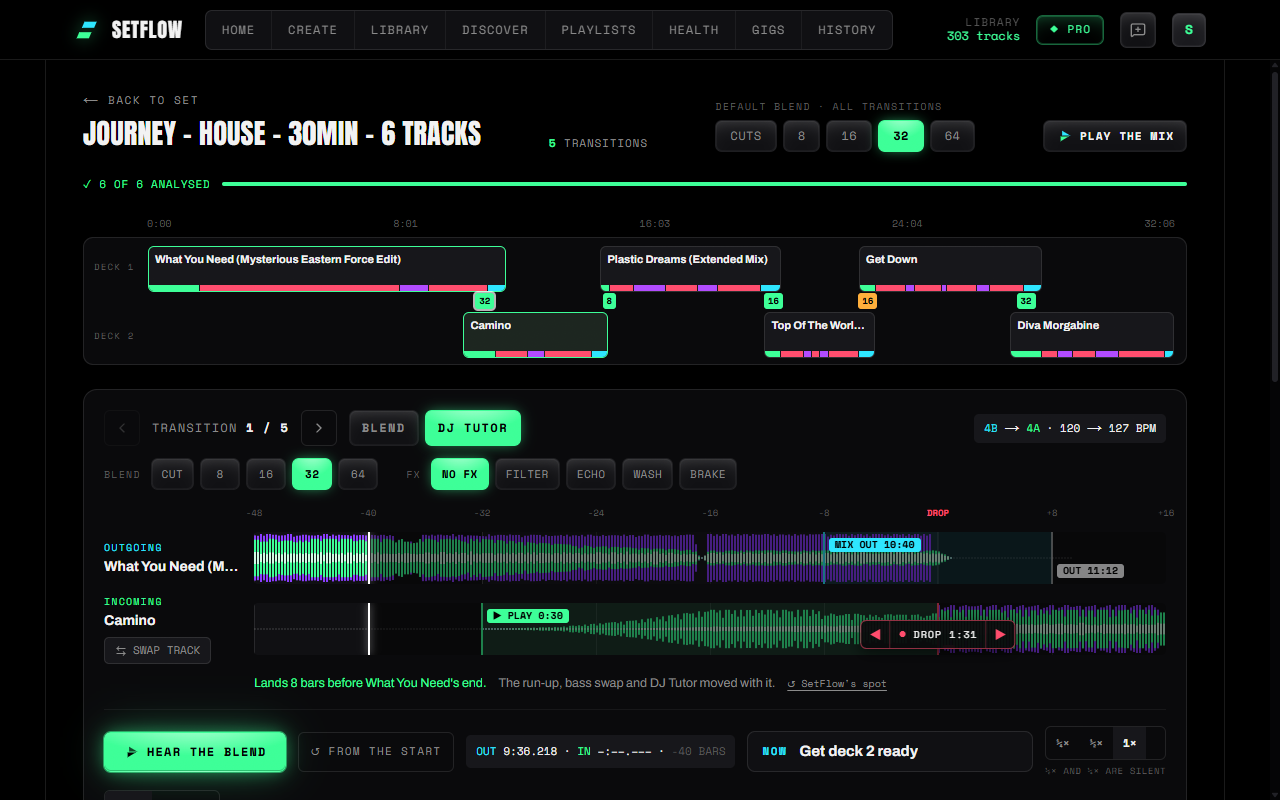
- Move the drop: in the Mix view, the arrows on the red drop line move the incoming drop a phrase earlier or later. The run-up, the bass swap and the DJ Tutor all move with it, it's saved with the set, and “SetFlow's spot” puts it back.
See everything in this release in the changelog, or build a set and open its Mix view.
Frequently asked questions
How do you mix two songs with different BPMs?
Match the incoming track to the one playing. Press SYNC, or move its TEMPO fader until its BPM on screen matches the playing deck. Blend as usual, and once the old track has gone, ease the new one back to its own tempo over about 16 bars.
How far apart can two BPMs be and still mix?
Up to about 4% sounds natural, and up to 8% works. Past 8% the sped-up or slowed-down track starts to sound out of key, so skip the blend: use an echo out, or a vinyl brake for a big jump.
Should I put the tempo back after a transition?
Usually, yes. Leave every track at the previous one’s tempo and your whole set drifts with the first track. Ease each one back to its own BPM after the mix, a little each bar, and nobody on the floor hears it.
Is it cheating to use SYNC?
No. SYNC matches the tempo so you can spend your attention on phrasing and EQ, which is what the crowd hears. It is still worth learning to match by ear for gear without SYNC, or when a beatgrid is off.
What if my decks have no SYNC?
Set the TEMPO fader to the percentage that matches the playing deck, read off the BPM display rather than the fader’s marks. Start the track on the downbeat, and if the kicks drift apart, nudge the jog wheel rather than the tempo.
Can I choose where the next track’s drop lands?
In SetFlow’s Mix view, yes. The arrows on the drop line move the incoming drop a phrase (8 bars) earlier or later, and the run-up, the bass swap and the DJ Tutor all move with it. It is part of Pro.
Ready to build better sets?
Import your Rekordbox, Traktor, or Serato library and generate perfectly mixed DJ sets in seconds.
Try SetFlow Free