When to Start a DJ Transition (and How Long to Blend)
Most people learning to DJ can get two tracks in time. The harder question is when. Start the next track too early and its drop crashes into the old track's groove. Start it too late and the floor hears a gap. Here's how to time it, in bars, every time.
The short answer: work backwards from the drop
Don't ask when to start the next track. Ask where its drop should land. In most sets the answer is where the outgoing track finishes its last phrase, the moment its music would end.
Then count back. If the new track has a 32-bar intro, press play on it 32 bars before that point. If you only want a 16-bar blend, skip into the intro and start it 16 bars before. Either way, start on a phrase line: the first beat of an 8-bar block. Get that right and the drop lands on its own, on the one, as the old track bows out.
If phrases are new to you, read how to mix on the phrase first. Everything below counts in them.
Mix out and mix in points
Every dance track gives you somewhere to leave and somewhere to arrive:
- Mix out: the outro. Most club tracks thin out over their last 16 or 32 bars, often down to drums and bass. That's your window to bring the next track in.
- Mix in: the intro. The same in reverse: drums first, little melody, built to be played over something else. The top of the intro is the natural place to press play.
- Breakdowns. A breakdown halfway through a track is a second way out. Mixing out early into a breakdown is a good trick when a track has outstayed its welcome.
The ideal transition lays one track's outro over the other's intro, so neither melody fights the other. Our guide to DJ transitions covers the other ways to get from one track to the next, from cuts to echo outs.
A worked example, in bars
Say the outgoing track runs at 128 BPM and its music ends after bar 160. Its outro starts at bar 129.
- Pick the landing. The new track's drop should hit right as bar 160 finishes.
- Measure the run-up. The new track has a 32-bar intro, so its drop is at its bar 33.
- Count back. 160 minus 32 is 128, so press play on the new track's bar 1 on the first beat of the outgoing bar 129: the top of the outro, a phrase line.
- Swap the bass somewhere in those 32 bars, on a phrase, often as the old track drops its bassline. Our bass swap guide explains how.
- Land the drop. 32 bars later the new track drops just as the old one runs out. Fade it away.
At 128 BPM those 32 bars last a minute. If that's too long for the tracks, start 16 bars in instead: press play on the new track's bar 17 at the outgoing bar 145, and the drop still lands in the same place.
How long should a DJ transition be?
There's no single right length. It depends on the genre and on the two tracks:
- 32 bars or more for deep, hypnotic house and techno, where long blends are half the point.
- 16 bars as an everyday default for most house, tech house and disco edits.
- 8 bars for busier or faster music, like drum and bass, and for any blend that sounds crowded.
- A cut when a track has no proper intro, or for hip hop, pop and open-format sets. Drop it in on the one.
The tracks overrule the genre. Keep it short when the keys clash (see harmonic mixing) or when two vocals would sing over each other. And a blend can't be longer than the intro you're mixing into, unless you loop it.
Signs you started too early or too late
- Too early: the new drop arrives while the old track is still in full flow, so two main grooves fight. Or the old outro keeps rumbling on long after the new track has taken over.
- Too late: the old track runs out before the new one is ready, leaving a thin bar of nothing, or you rush the fader and the bass swap to catch up.
- Off the phrase: the drop lands a few bars early or late, mid-phrase. It sounds "nearly right", which is worse than obviously wrong. Count again from a phrase line.
Slide the start of the next track and see how far a few bars throws the drop:
On the phrase, or off it
On the phrase · the drop lands where the old track changes anyway
Mind the tempo gap
Timing in bars only works if the two tracks are beat-matched. Close tempos are easy: sync and go. Big gaps are harder, because one track has to play well away from its own speed through the blend. Keep those blends short, or ease the new track back to its own tempo once the old one has gone. Our guide to mixing songs with different BPMs covers it in detail.
How SetFlow plans every transition for you
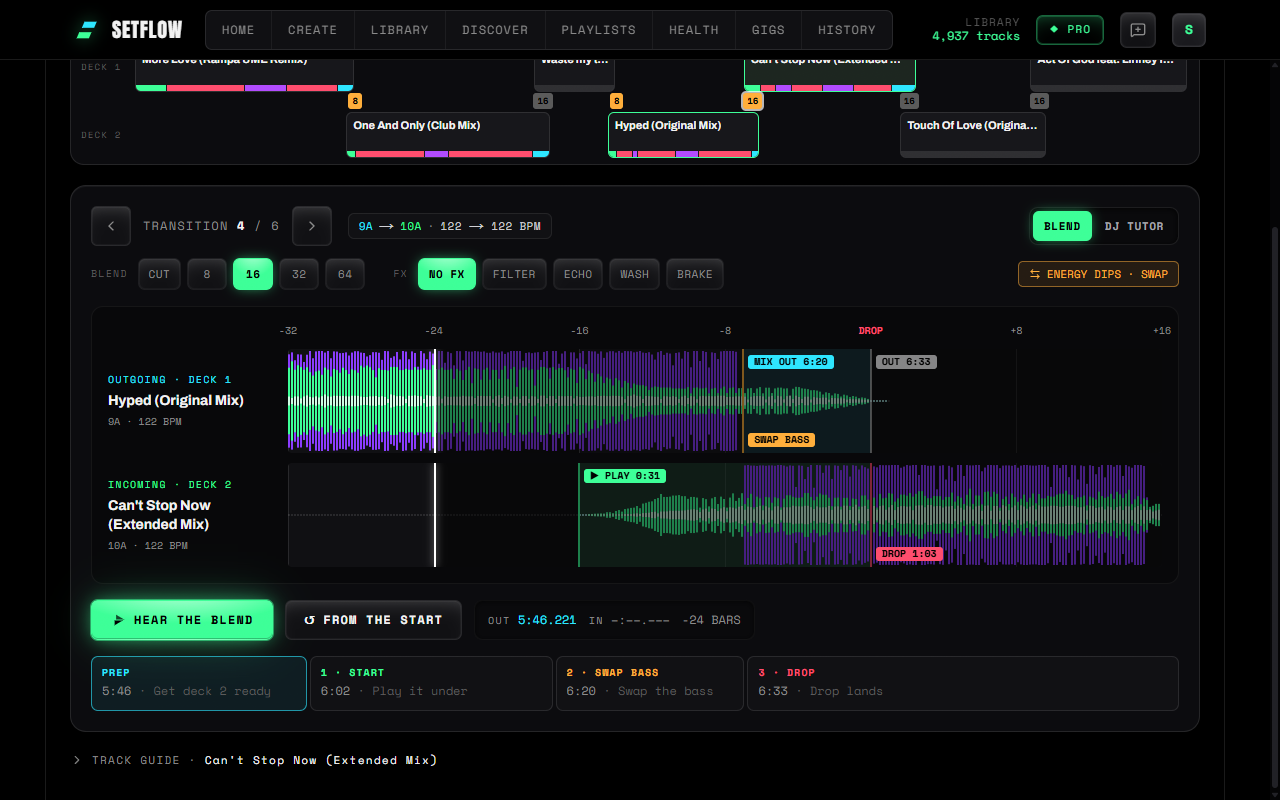
Counting bars on every transition gets old fast. SetFlow's Mix view does it for each one in your set, from your own tracks. It reads each pair and shows where to start the incoming track, how long the run-up is, when to swap the bass and where the drop lands. It keeps blends short where the keys clash, and never runs a blend longer than the intro it mixes into.
You choose the blend length (8, 16, 32 or 64 bars, or cuts) for the whole set, and can change it on any single transition. If you'd rather the drop landed somewhere else, move it a phrase earlier or later with the arrows on the drop line, and the rest of the transition follows.
DJ Tutor then walks through it move by move on two decks and a mixer, counting you in (see learning transitions move by move), and Hear the blend plays it from the files in your music folder. Your music is never uploaded.
The limits
- It's Pro. The Mix view, DJ Tutor and Hear the blend are part of Smart Mix Points in Pro, and a Weekend Pass unlocks them too.
- Hearing needs a computer with your music folder. On a phone, DJ Tutor walks through each transition without sound.
- It's a guide. Use it to learn the timing and check a pairing, then trust your ears on the night.
New to all this? Start with our guide to learning to DJ with your own music. Or build a set from your library and open it in the Mix view to see where every transition starts.
Frequently Asked Questions
When should I start mixing in the next track?
Work backwards. Decide where the new track’s drop should land, usually where the outgoing track finishes its last phrase, then press play on the new track that many bars earlier: 16 bars before for a 16-bar intro, 32 for a 32-bar one. Always start on a phrase line, the first beat of an 8-bar block.
How long should a DJ transition be?
Long enough for the two tracks to agree, and no longer. 16 or 32 bars suits most house and techno, 8 bars suits faster or busier genres, and a cut on the beat is fine when a track has no intro. Keep it short when the keys clash or two vocals would overlap.
What are mix in and mix out points?
The mix in point is where you start the incoming track, usually the top of its intro. The mix out point is where the outgoing track starts winding down, usually the start of its outro. A good transition overlaps one track’s outro with the other’s intro.
How do I know I started the transition too early?
The new track’s drop arrives while the old track is still in its main groove, or the old track’s outro is still playing long after the new track has taken over. If the drop lands mid-phrase or on top of a vocal, you started at the wrong bar.
How long is 32 bars in seconds?
At 128 BPM a bar of four beats lasts 1.875 seconds, so 32 bars is a minute and 16 bars is 30 seconds. At 174 BPM, 32 bars is about 44 seconds.
Can SetFlow tell me when to start each transition?
Yes, in the Mix view, part of Smart Mix Points in Pro (a Weekend Pass unlocks it too). It reads your own tracks and shows where to start each incoming track, when to swap the bass and where the drop lands, and you can move the landing a phrase earlier or later.
How to Do a Bass Swap: The DJ Technique Step by Step
Ready to build better sets?
Import your Rekordbox, Traktor, or Serato library and generate perfectly mixed DJ sets in seconds.
Try SetFlow Free