Build Your First DJ Set in SetFlow
Pick the tracks to draw from, a length and the shape of the night, and SetFlow builds the set in seconds, with a note on every transition.
Pick the tracks to draw from
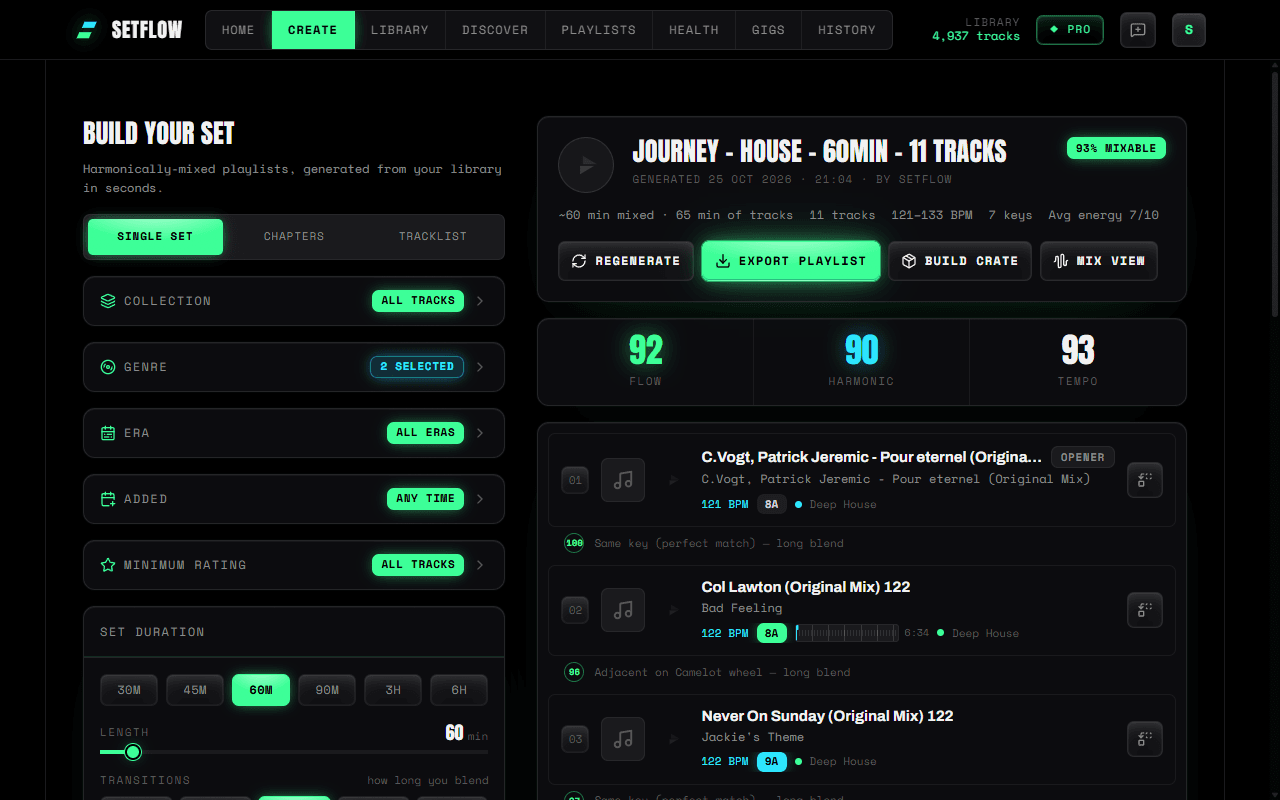
Open Create. The filters down the left decide which tracks SetFlow can use:
| Filter | Default | What it does |
|---|---|---|
| Collection | All tracks | Limit the set to a crate, or to playlists you imported |
| Genre | All | One genre, or several to blend |
| Era | All eras | Release decades, like the 1990s |
| Added | Any time | Only tracks added recently |
| Minimum rating | All tracks | Only your 4 or 5 star tracks, say |
Start with just a genre or two. Every filter you add leaves fewer tracks to choose from.
Set the length and the blend
Pick a length under Set duration, or drag the slider. Then pick how long you blend under Transitions: Cuts, 8, 16, 32 or 64 bars. Longer blends overlap more of each track, so SetFlow plans more tracks to fill the same time.
The longest set is 1 hour on the free trial, 2 hours on Hobby and 8 hours on Pro.
Choose the shape of the night
Under Set archetype, pick the energy curve: Warm-Up builds slowly, Peak Time stays high, Closing winds down, Journey rises to a peak and comes back, Chill stays low. On Pro you can draw your own with a custom plan, or chain several shapes into one long set with Chapters Pro.
Generate and read the set
- Press Generate set. The set appears on the right in a few seconds.
- Read the header: how mixable the set is, its Flow, Harmonic and Tempo scores, the BPM range and number of keys.
- Read the note between each pair of tracks. It tells you why they mix, like “Same key (perfect match)”.
- Don't like a track? Swap it: the list only offers tracks that mix with the tracks either side. Or press Regenerate for a new set.
Every set is saved in History. The free trial includes 3 sets, Hobby 10 a month and Pro as many as you like.
“Not enough tracks to generate a set”
A set needs at least 3 tracks that pass every filter you have on. The message names the filter that removed the most, such as the era, the Added window or the minimum rating. Widen that filter, pick more genres, or choose All. If a genre looks short, step 4 explains why.
Questions
Why does SetFlow say "Not enough tracks to generate a set"?
A set needs at least 3 tracks that pass every filter you have on. The message names the filter that removed the most, such as the era or the minimum rating. Widen it, pick more genres, or choose All.
Can I change a set after it is built?
Yes. Swap any track for another that mixes with the tracks either side of it, regenerate the whole set, or reorder tracks in History.