How to Keep Track of Your DJ Sets, and Find the Best One Fast
A month of planning leaves a lot of sets behind: warm-ups you tried, a peak-time set for one club, three versions of a closing set. The useful ones get lost among the experiments. SetFlow's Set History now lists every set you've made beside the one you're looking at, scores each one out of 100, and puts the next gig at the top.
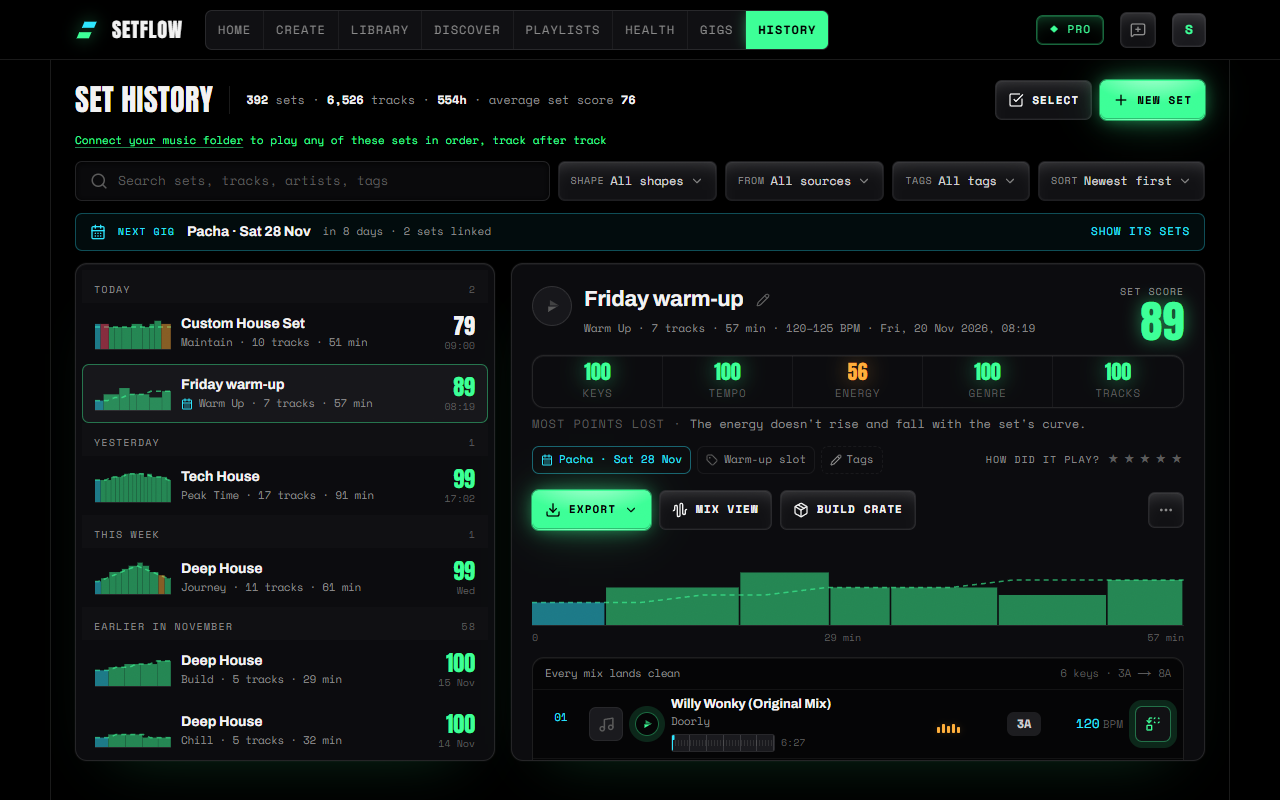
Find a set by when you made it
Most DJs remember a set by when they planned it: last weekend, before the Pacha booking, sometime in October. So Set History files your sets that way, newest first, under Today, Yesterday, This week, the rest of this month, then a heading for each month before. It's how Serato and djay file the history of what you played, applied to what you planned.
Each row shows the set in miniature: its energy across the night, coloured by how each track mixes in, with the shape it was built to drawn as a dashed line. A set that wanders off its shape, or has a red bar where two keys clash, stands out before you open it.
If you remember a track rather than a date, search for it. Search looks at set names, tags, and every track and artist inside your sets. The Shape, From and Tags filters narrow the list further, and each says what it's set to.
Compare your sets by score
Every set gets the same score Create gives a new one: out of 100, on keys, tempo, energy, genre and tracks. Sort by Highest set score and your history becomes a ranking. Open a set and the score is broken into its five parts, with the thing that cost it the most points underneath, such as “2 key clashes between tracks”. We explain what each part listens for in what makes a good DJ set.
On a computer, the list stays put while the set you picked opens beside it. Press ↑ and ↓ to move through your sets and compare them one after another, without losing your place.
See which mixes need you
The open set shows its tracks in short rows: number, title, energy, key, tempo. Most mixes in a good set land cleanly, and the key colours already say so, so there's no note under every track. A note appears between two tracks only when that mix needs you: the keys clash, the tempo jumps, or the peak arrives. Those are the transitions to practise first.
Don't like a track? Press its swap button for the tracks in your library that fit that slot. Drag a track number to move it. The set score updates as you go, and the change saves itself.
Get it ready for the gig
Link a set to a gig from the set itself. When a gig in the next fortnight has sets linked to it, Set History puts it at the top, with how many days are left and a button to show just its sets. From there:
- Export the set to Rekordbox, Serato, Traktor, a Rekordbox XML, a printable PDF or TribeXR. See how to get a set onto a USB for CDJs.
- Build crate wraps the set in the tracks from your library that mix best with it, so you can change direction if the room asks for it (how crates work).
- Mix view plays every transition from your own files, then its Back takes you straight to the same set. It's part of Pro.
After the gig, answer How did it play? with a star rating, so next time you know which sets worked in front of a crowd.
Tidy up in one go
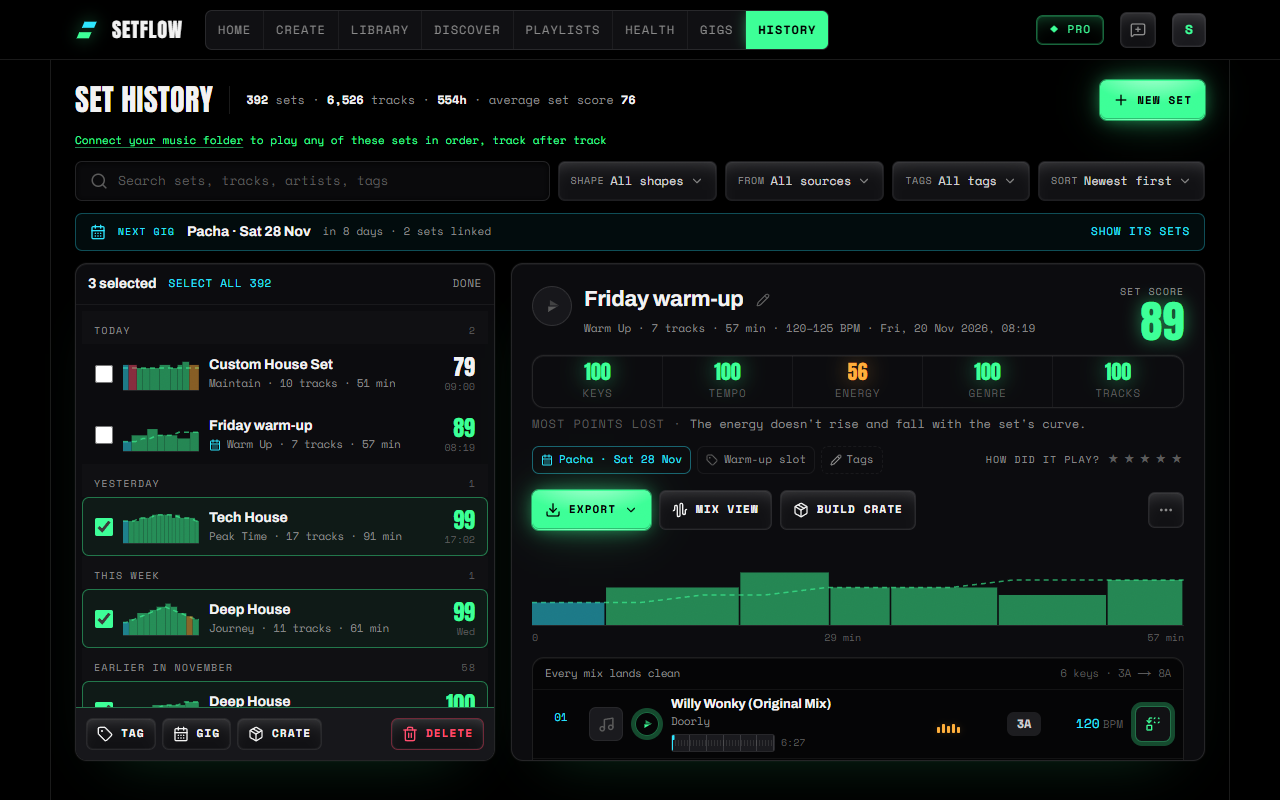
Press Select and tick the sets you want: tag them all at once (“Sunset”, “Tested live”), link them to a gig, build one crate from all of them, or delete the experiments. Deleting can be undone for a few seconds, so a slip costs nothing.
On your phone
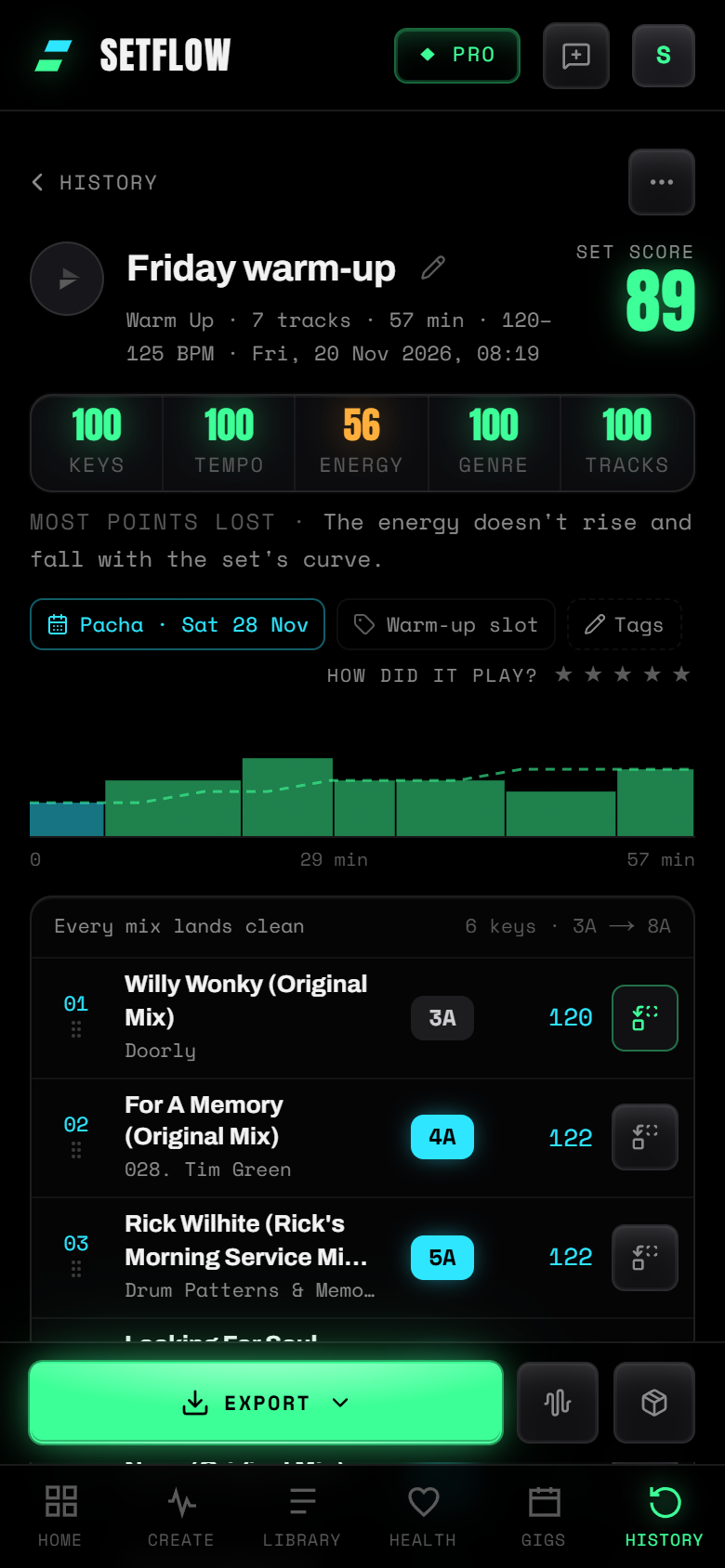
On a phone the list fills the screen. Tap a set and it opens as a screen of its own, with Export, the Mix view and Build crate in a bar at the bottom. Back returns you to the list, scrolled to where you were.
Try SetFlow free for 7 days. Import your Rekordbox, Traktor or Serato library, generate a set on Create, and it's waiting in Set History. See the changelog for everything else that's new.
Frequently Asked Questions
How do I find a DJ set I made weeks ago?
SetFlow keeps every set you make in Set History, newest first under Today, This week and each month before. Search finds a set by its name, a tag, or any track or artist in it, and the Shape, From and Tags filters narrow the list further.
How do I know which of my DJ sets is the best?
Every set has a set score out of 100, on the five things a DJ hears: keys, tempo, energy, genre and tracks. Sort Set History by Highest set score to rank them, then open one to see which part cost it the most points.
What should I check in a set before a gig?
The mixes that need you. SetFlow puts a note between two tracks only when their keys clash, the tempo jumps or the peak arrives, so you can practise those transitions first. Then export the set to Rekordbox, Serato or Traktor, or build a crate around it with room to change direction.
Can I undo deleting a set?
Yes. After you delete one set or several, an Undo button shows for a few seconds. Press it and they come back as they were.
Does Set History work on a phone?
Yes. On a phone the list fills the screen and a set opens as a screen of its own, with Export, the Mix view and Build crate in a bar at the bottom. Back returns you to the list where you left it.
Ready to build better sets?
Import your Rekordbox, Traktor, or Serato library and generate perfectly mixed DJ sets in seconds.
Try SetFlow Free